
1. Introducció
This manual provides detailed instructions for the setup, operation, and maintenance of the SINGCALL APE9500 Wireless Paging System Receiver. The APE9500 is designed to work as part of a larger wireless calling system, displaying call numbers from compatible SINGCALL transmitter bells. Please note: This receiver unit cannot be used alone and requires compatible SINGCALL transmitter bells for full functionality.
The APE9500 is ideal for various service environments such as restaurants, cafes, factories, hospitals, and offices, where efficient communication between staff and customers or colleagues is essential.
2. Informació de seguretat
Please read all safety warnings carefully before operating the device. Keep this manual for future reference.
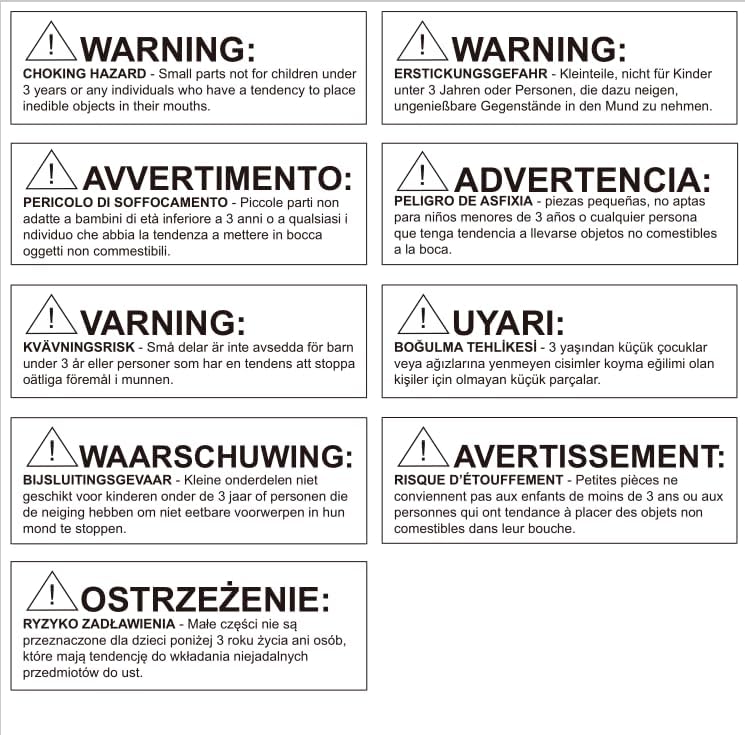
⚠ ADVERTÈNCIA: PERILL D'ENFUGAMENT
Small parts not for children under 3 years or any individuals who have a tendency to place inedible objects in their mouths. Ensure all components are securely installed and kept out of reach of young children.
3. Producte acabatview
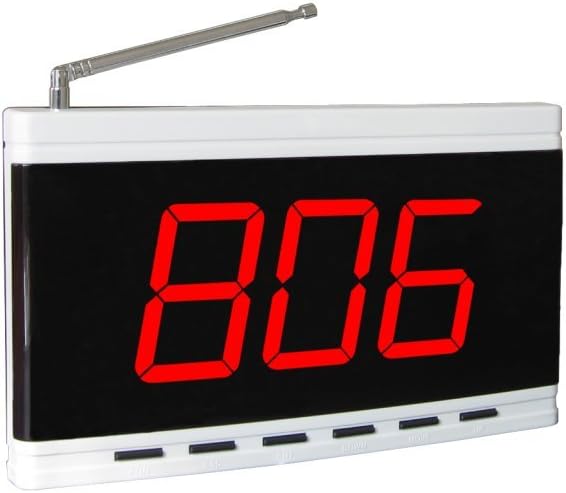
The SINGCALL APE9500 receiver features a clear three-digit display and offers various customizable settings to enhance its functionality within your paging system.
- Visualització: Shows a group of three-digit numbers, indicating the calling unit.
- Customizable Music: Each pager can be set with different chord music, offering twelve beautiful chord options.
- Call Extension: Supports up to 999 call extensions, with simultaneous display of English letters and figures.
- Display Time Length: The duration for which the call number is displayed can be adjusted.
- Call Sound Length: The length of the call sound can be selected to suit your preference.


4. Configuració
4.1 Desembalatge i inspecció
Carefully remove the APE9500 receiver from its packaging. Inspect the unit for any signs of damage. If any damage is found, do not proceed with setup and contact customer support.
4.2 Connexió d'alimentació
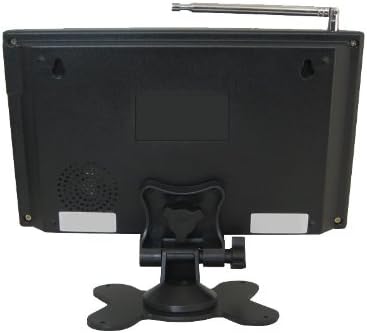
- Locate the power input port on the back of the APE9500 receiver.
- Connect the provided AC adapter to the receiver.
- Plug the AC adapter into a standard electrical outlet (AC220V/50HZ).
- The receiver will power on automatically, and the display will illuminate.
4.3 Configuració de l'antena
The APE9500 receiver comes with an extendable antenna to optimize signal reception.
- Gently extend the antenna to its full length.
- Adjust the antenna's angle for optimal signal reception. Positioning it vertically is generally recommended.
4.4 Pairing with Transmitters (Pagers)
The APE9500 receiver must be paired with SINGCALL transmitter bells (pagers) to function. Refer to the specific instructions provided with your SINGCALL transmitter bells for detailed pairing procedures. Generally, this involves putting the receiver into a pairing mode and then activating the transmitter bell.
The receiver supports up to 999 pagers. Ensure each pager is assigned a unique number for clear identification on the display.
5. Funcionament
5.1 Rebre trucades
When a paired transmitter bell is pressed, the APE9500 receiver will display the corresponding three-digit number and emit an audible alert (music or vibration, depending on settings).
- The display can show numbers from 001 to 999.
- English letters (A.B.C.D.E.F.H.P) can also be displayed alongside numbers for additional identification.
5.2 Ajustar la configuració
The APE9500 receiver allows for customization of several operational parameters using the buttons located on the front panel (e.g., FUN, ESC, ENT, UP, DOWN, MOVE).
- Chord Music Selection: You can assign different chord music tones to individual pagers or groups. Refer to the detailed programming guide (often provided with the full system or available online) for specific steps on how to change the alert sound for each pager.
- Display Time Length: Adjust how long a call number remains on the display after being received. This can be useful in busy environments to ensure calls are noticed.
- Call Sound Length: Modify the duration of the audible alert.
- Clearing Calls: Typically, a button (e.g., "ESC" or "Clear") is used to clear the currently displayed call number.
For detailed programming instructions on advanced settings and pager assignments, please consult the comprehensive system manual or the SINGCALL official weblloc.
6. Manteniment
6.1 Neteja
To maintain the appearance and functionality of your APE9500 receiver:
- Netegeu la superfície amb un drap suau i sec.
- Per a marques difícils, lleugerament dampen the cloth with water. Do not use harsh chemicals, abrasive cleaners, or solvents, as these can damage the unit's finish.
- Ensure no liquid enters the device through openings or buttons.
6.2 Emmagatzematge
If storing the receiver for an extended period:
- Desconnecteu-lo de la font d'alimentació.
- Emmagatzemar en un lloc fresc i sec, allunyat de la llum solar directa i de temperatures extremes.
7. Solució De Problemes
This section addresses common issues you might encounter with your APE9500 receiver. If the problem persists, please contact SINGCALL customer support.
| Problema | Causa possible | Solució |
|---|---|---|
| Receiver does not power on. | No power supply; faulty adapter or outlet. | Check power connection. Ensure adapter is securely plugged in and outlet is functional. Try a different outlet. |
| No call displayed when pager is pressed. | Pager not paired; pager out of range; low pager battery; signal interference. | Ensure pager is paired with the receiver. Move pager closer to the receiver. Check pager battery. Reduce potential signal interference from other electronic devices. |
| Display shows incorrect number. | Incorrect pager ID programmed. | Re-program the pager with the correct ID number. Consult the system's programming guide. |
| Call sound is too quiet/loud or not playing. | Volume settings; sound length settings. | Adjust the volume and call sound length settings using the receiver's buttons. |
8. Especificacions
Key technical specifications for the SINGCALL APE9500 Wireless Paging System Receiver:
- Nom del model: APE9500
- Dimensions del producte: 9.45 x 5.51 x 1.57 polzades (240 x 140 x 40 mm)
- Pes de l'article: 1.54 lliures (0.7 kg)
- Material: Acrilonitril butadiè estirè (ABS)
- Font d'alimentació: AC220V/50HZ-12V/1A
- US Frequency Range: 433 MHz
- Sensibilitat del receptor: -108dbm
- Maximum Pager Quantity: 999 PCS
- Simultaneous Display of Number: 1 PC
- Letters Show: A.B.C.D.E.F.H.P (8 English letters)
- Data de primera disponibilitat: 22 d'agost de 2013
- Fabricant: Dongwei technology
9. Garantia i Suport
For warranty information, technical support, or to purchase additional components for your SINGCALL paging system, please visit the official SINGCALL storefront or contact their customer service directly.


