1. Introducció
This manual provides detailed instructions for the setup, operation, and maintenance of your SINGCALL Wireless Pager Calling System Wrist Receiver, model APE6600. This device is designed to work in conjunction with SINGCALL transmitter bells/pagers to facilitate efficient communication in various service environments.
Nota important: The APE6600 is a wrist receiver only and cannot be used alone. It requires compatible SINGCALL transmitter buttons (pagers/bells) to form a complete calling system.
2. Característiques clau
- Directly receives signals from pagers for convenient use. Displays time in standby mode.
- Features a sleep mode to conserve power and prevent disturbances when not in active use.
- Offers two prompt modes: vibration or beep. The duration of vibration can be adjusted from 1 to 5 seconds.
- Includes a 'Lock the watch' function to prevent accidental operations.
- Capable of storing up to 999 call numbers.
- Displays a group of three-digit numbers and stores 10 numbers with a scrolling display.
3. Producte acabatview
The SINGCALL APE6600 is a compact wrist-worn receiver designed for ease of use and portability. It features a clear digital display and two control buttons: "FUN" (Function) and "ENT" (Enter).
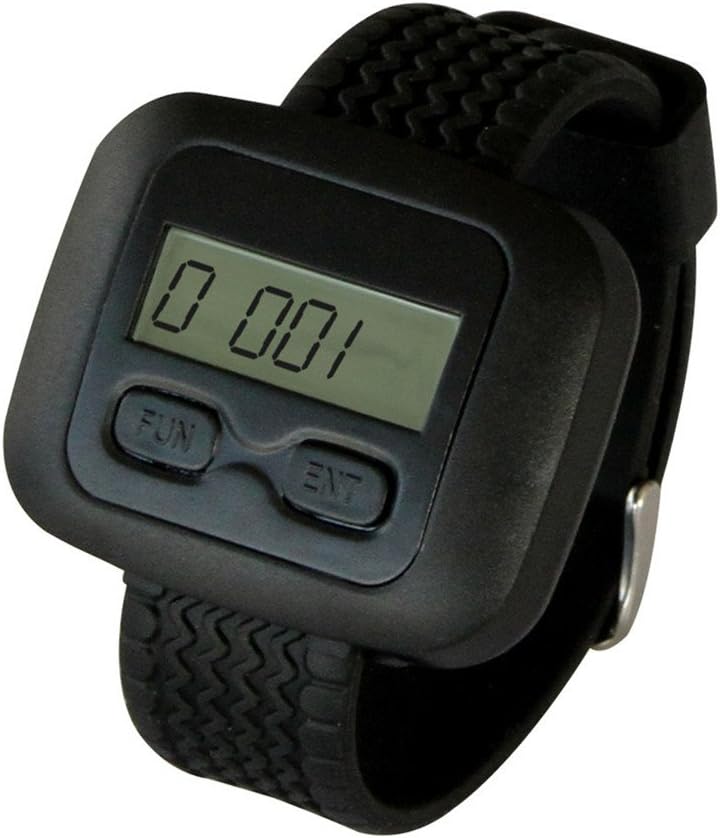
Figura 3.1: Davant view of the SINGCALL APE6600 Wrist Pager Receiver, showing the digital display and "FUN" and "ENT" buttons.

Figura 3.2: The APE6600 Wrist Pager Receiver displaying a call number, indicating its function in a paging system.

Figura 3.3: View of the battery compartment on the side of the APE6600, showing where the AAA battery is inserted.
4. Configuració
4.1. Instal·lació de la bateria
- Locate the battery compartment on the side of the APE6600 receiver.
- Gently open the battery cover.
- Inseriu una pila AAA, assegurant-vos de la polaritat correcta (+/-).
- Tanqueu la tapa de la bateria amb seguretat.
4.2. Pairing with Transmitters
The APE6600 wrist receiver must be paired with compatible SINGCALL transmitter buttons (pagers/bells) to function. Refer to the specific pairing instructions provided with your SINGCALL transmitter buttons. Generally, the process involves putting the receiver into a pairing mode and then activating the transmitter button.
For detailed pairing instructions, please consult the manual for your specific SINGCALL transmitter model or visit the SINGCALL Brand Store.
Vídeo 4.1: Demonstration of the APE6600 wrist receiver working with single call buttons. This video illustrates how the receiver displays call numbers when a paired button is pressed.
Vídeo 4.2: This video shows the APE6600 receiver matching with various SINGCALL transmitter models including 160, 560-HS, 520-HS, and 520C-HS, demonstrating compatibility.
Vídeo 4.3: A demonstration of the APE6600 receiver's compatibility with SINGCALL transmitter models 320, 330, 520C, and 830, showcasing la seva versatilitat.
Vídeo 4.4: This video illustrates the APE6600 receiver's functionality when paired with the E57 transmitter, highlighting its use in a complete system.
5. Instruccions de funcionament
5.1. Recepció de trucades
When a paired transmitter button is pressed, the APE6600 wrist receiver will display the call number and provide an alert (vibration or beep) according to its current settings.
- The display shows a three-digit number representing the calling unit.
- The receiver can store up to 10 call numbers, which will scroll on the display if multiple calls are received.
5.2. Setting Prompt Modes (Vibration/Beep)
The APE6600 offers both vibration and beep alert modes. The duration of the vibration can be customized.
- Premeu el botó DIVERTIT button to enter the function menu.
- Navegueu per les opcions utilitzant el botó DIVERTIT button until you find the alert mode setting.
- Utilitza el ENT button to select between vibration or beep.
- If vibration is selected, use the DIVERTIT button to adjust the vibration duration (1-5 seconds) and ENT per confirmar.
5.3. Mode de repòs
To conserve battery life and avoid unnecessary alerts, the receiver can be put into sleep mode.
- Consult the full manual for specific steps to activate and deactivate sleep mode. This feature helps extend battery life during periods of inactivity.
5.4. 'Lock the Watch' Function
This function prevents accidental button presses or setting changes during use.
- Refer to the detailed instructions in the complete user manual for how to activate and deactivate the 'Lock the watch' function.
6. Manteniment
6.1. Neteja
- Wipe the receiver with a soft, dry cloth.
- No utilitzeu productes químics ni productes de neteja abrasius.
- Avoid exposing the device to excessive moisture.
6.2. Substitució de la bateria
Replace the AAA battery when the display becomes dim or the device stops responding. Follow the battery installation steps in Section 4.1.
Eliminar les bateries usades d'acord amb la normativa local.
7. Solució De Problemes
Many common issues can be resolved by referring to the Frequently Asked Questions (FAQ) section, which is typically found in the full product manual or on the manufacturer's weblloc.
Problemes comuns i solucions:
- El receptor no respon: Check battery level and ensure it is correctly installed. Verify that the transmitter is powered on and within range.
- No signal received: Ensure the receiver is properly paired with the transmitter. Check for obstructions or excessive distance between the devices.
- Incorrect call number displayed: Re-pair the transmitter with the receiver to ensure correct assignment.
If problems persist, please contact SINGCALL customer support.
8. Especificacions
| Característica | Detall |
|---|---|
| Marca | SINGCALL |
| Número de model | SC-6600 |
| Pes de l'article | 2.08 unces |
| Dimensions del producte | 6.69 x 3.94 x 1.57 polzades |
| Bateries | Necessita 1 pila AAA |
| Tipus de material | ABS |
| Fabricant | Dongwei technology |
| Data de primera disponibilitat | 22 d'agost de 2013 |
9. Garantia i Suport
For information regarding product warranty, please refer to the documentation included with your purchase or visit the official SINGCALL weblloc.
For further assistance, technical support, or to explore other SINGCALL products, please visit the SINGCALL Brand Store on Amazon.


