1. Introducció
This manual provides essential information for the safe and efficient operation of your Supersonic SC-1393 Portable Audio System. Please read this manual thoroughly before using the device and retain it for future reference.
1.1 Informació de seguretat
- No exposeu la unitat a la pluja ni a la humitat per evitar incendis o descàrregues elèctriques.
- No obriu la c.asing. Demaneu totes les tasques de manteniment a personal qualificat.
- Assegureu-vos una ventilació adequada. No bloquegeu les obertures de ventilació.
- Use only the power adapter specified for this device.
- Avoid extreme temperatures. Do not place near heat sources or in direct sunlight.
- Mantenir fora de l'abast dels nens.
2. Producte acabatview
2.1 Contingut del paquet
Verifiqueu que tots els elements siguin presents al paquet:
- Supersonic SC-1393 Portable Audio System
- Control remot
- Cable d'alimentació de CA.
- Manual d'usuari
2.2 Controls i connexions
Familiaritzeu-vos amb els diversos controls i ports de connexió del vostre dispositiu.
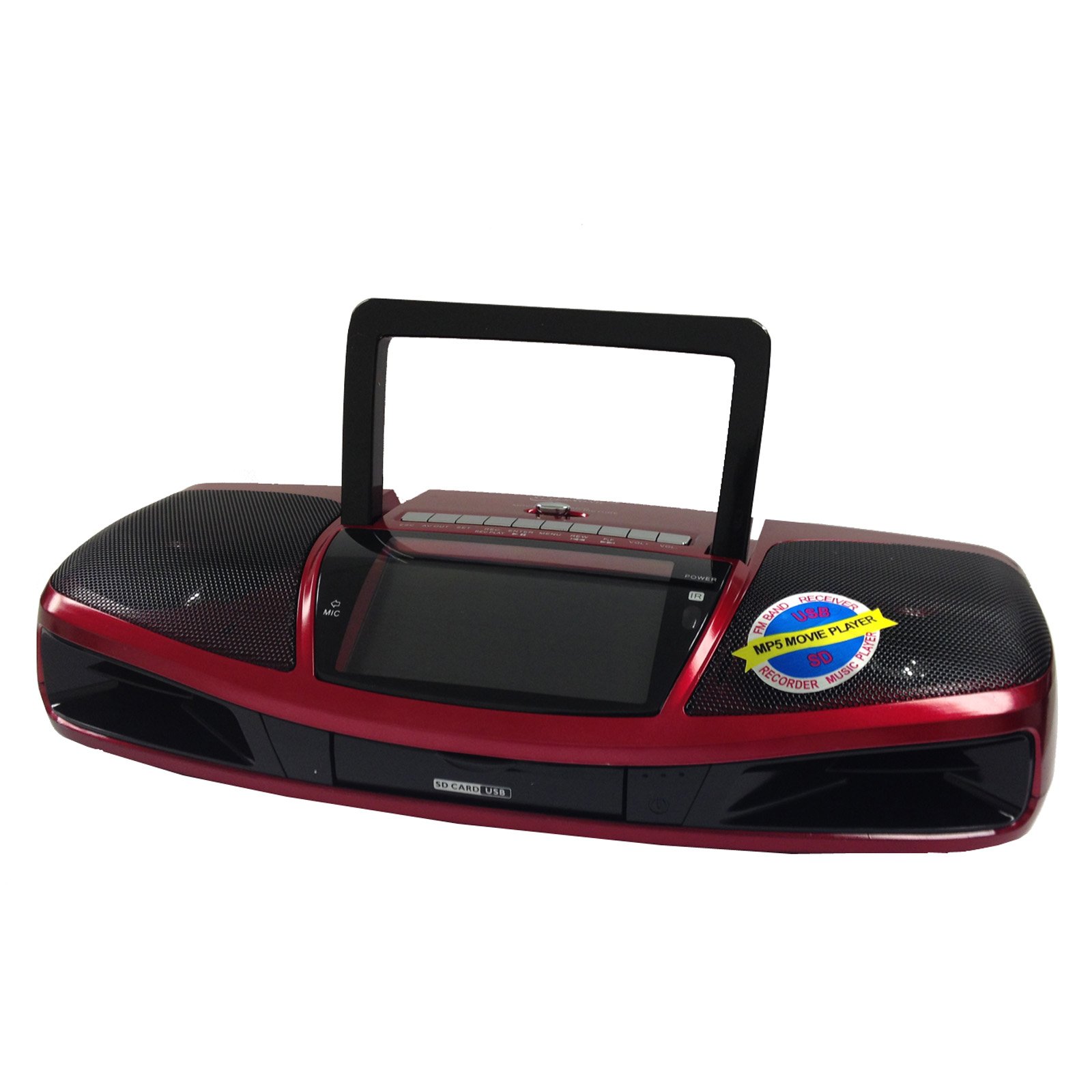
Figura 1: Frontal view of the Supersonic SC-1393 Portable Audio System, showing the 4.3-inch LCD screen, speaker grilles, and main control buttons.
Controls del panell frontal:
- Pantalla LCD: Displays video, song titles, and system information.
- Botó d'encesa: Encén/apaga la unitat.
- Botó de mode: Switches between functions (Radio, USB, SD, AUX, Video).
- Botó Reproduir/Pausa: Inicia o posa en pausa la reproducció.
- Botons anterior/següent: Navigates tracks, stations, or menu options.
- Control de volum: Ajusta el nivell de sortida d'àudio.
Connexions del panell posterior:
- Port USB: Per connectar unitats flaix USB.
- Ranura per a targeta SD: Per inserir targetes de memòria SD.
- Entrada AUX (3.5 mm): Per connectar dispositius d'àudio externs.
- Sortida AV: For connecting to an external display or audio system.
- Entrada d'alimentació de CA: Per connectar el cable d'alimentació de CA.
- Antena: Extendable rod antenna for radio reception.
Comandament a distància:
El comandament a distància inclòs proporciona un accés còmode a totes les funcions des de la distància.
- Potència: On/Off.
- Mode: Seleccioneu la font d'entrada.
- Teclat numèric: Direct track selection or radio frequency input.
- Pujar/baixar el volum: Ajustar el volum.
- Silenciar: Silence audio output.
- EQ: Equalizer settings (if available).
- Repetiu: Mode de reproducció repetida.
3. Configuració
3.1 Engegar la unitat
The SC-1393 can be powered by AC power, D-cell batteries (not included), or its built-in rechargeable battery.
- Alimentació CA: Connect the supplied AC power cable to the AC power input on the rear panel and plug the other end into a standard 110V - 60Hz wall outlet.
- Funcionament amb bateria: For portable use, insert four (4) D-cell batteries into the battery compartment on the bottom of the unit, observing correct polarity. Alternatively, the built-in rechargeable battery will provide power when disconnected from AC.
3.2 Càrrega inicial de la bateria
Before first use, it is recommended to fully charge the built-in rechargeable battery. Connect the unit to AC power and allow it to charge for approximately 6-8 hours. The charging indicator (if present) will illuminate during charging and may change color or turn off when fully charged. There is no explicit indicator for the status of the rechargeable battery.
4. Instruccions de funcionament
4.1 Funcionament general
- Premeu el botó Poder botó per encendre la unitat.
- Premeu el botó Mode button repeatedly to cycle through available input sources: Radio (AM/FM/SW), USB, SD, AUX, Video.
- Ajusteu el Control de volum to your desired listening level.
4.2 Funcionament de la ràdio (AM/FM/SW)
- Seleccioneu Ràdio mode utilitzant el Mode botó.
- Extend the telescopic antenna for optimal FM and SW reception.
- Utilitza el Anterior/Següent buttons to manually tune to a station or press and hold to auto-scan for available stations.
- Some units may have pre-set stations. Refer to the on-screen display for details. Note that pre-set stations may not be editable in all regions.
4.3 Reproducció des de targeta USB/SD
- Inseriu una unitat flaix USB al Port USB o una targeta SD a la Ranura per a targeta SD. Ensure the USB drive fits properly into the recessed port.
- Seleccioneu USB or SD mode utilitzant el Mode button. The unit will automatically detect and begin playing compatible audio/video files.
- Utilitza el Reproduir/Pausa, Anterior/Següent botons per controlar la reproducció.
- The 4.3-inch LCD will display file informació.
4.4 Entrada AUX
- Connecteu un dispositiu d'àudio extern (per exemple, un telèfon intel·ligent o un reproductor MP3) al Entrada AUX utilitzant un cable d'àudio de 3.5 mm (no inclòs).
- Seleccioneu AUX mode utilitzant el Mode botó.
- Controla la reproducció des del dispositiu extern connectat.
4.5 MP5 Video Playback
The SC-1393 supports MP5 video playback from USB or SD cards.
- Ensure compatible video files are stored on your USB drive or SD card.
- Insert the USB drive or SD card and select the corresponding mode.
- Navega fins al teu vídeo files utilitza el fitxer Anterior/Següent botons i premeu Jugar per iniciar la reproducció.
- The video will display on the 4.3-inch LCD screen.
- Ús Avança ràpida i Rebobinar functions for navigation within videos.
4.6 Funció d'enregistrament
The unit features a built-in microphone and recording function. Recordings are typically saved to the inserted USB drive or SD card.
- Ensure a USB drive or SD card with sufficient free space is inserted.
- Select the desired input source (e.g., Radio, AUX) if you wish to record from it, or simply use the built-in microphone.
- Premeu el botó Registre button (usually found on the unit or remote) to start recording.
- Premeu el botó Registre button again or Atureu-vos botó per finalitzar l'enregistrament.
- Gravat files can be accessed and played back from the USB/SD card mode.
5. Manteniment
5.1 Neteja
- Desconnecteu la unitat de l'alimentació abans de netejar-la.
- Netegeu l'exterior amb un drap suau i sec.
- No utilitzeu netejadors abrasius, ceres ni dissolvents.
- For the LCD screen, use a soft, lint-free cloth specifically designed for electronics screens.
5.2 Cura de la bateria
- If using D-cell batteries, remove them if the unit will not be used for an extended period to prevent leakage.
- For the built-in rechargeable battery, avoid fully discharging it frequently to prolong its lifespan. Recharge it regularly.
- No exposeu les bateries a una calor excessiva.
6. Solució De Problemes
| Problema | Causa possible | Solució |
|---|---|---|
| Sense poder | AC cable not connected; Batteries depleted or incorrectly inserted; Built-in battery depleted. | Check AC connection; Replace D-cell batteries or ensure correct polarity; Charge built-in battery. |
| Sense so | Volume too low; Mute activated; Incorrect input mode selected; Headphones connected. | Increase volume; Deactivate mute; Select correct mode; Disconnect headphones. |
| Mala recepció de ràdio | Antena no estesa; Senyal feble; Interferències. | Extend and adjust antenna; Relocate unit for better reception; Avoid placing near electronic devices. |
| L'USB/SD no es reprodueix | Mode incorrecte; Incompatible file format; USB/SD card not inserted correctly or damaged; USB drive too large or incompatible design. | Select USB/SD mode; Ensure files are compatible (e.g., MP3, MP4); Reinsert or try another USB/SD card; Use a standard-sized USB drive that fits the port. |
| El comandament a distància no funciona | Piles esgotades; Obstrucció entre el comandament a distància i la unitat; Comandament a distància no apuntat al sensor. | Replace remote batteries; Remove obstructions; Point remote directly at the unit's IR sensor. |
7. Especificacions
| Característica | Detall |
|---|---|
| Número de model | SC1393 |
| Mostra | LCD de 4.3 polzades |
| Entrades | USB, targeta SD, AUX (3.5 mm) |
| Sortides | Sortida AV |
| Freqüències de ràdio | AM, FM, SO |
| Font d'alimentació | AC 110V - 60Hz, 4x D-cell batteries (not included), Built-in rechargeable battery |
| Funció de gravació | Micròfon incorporat |
| Dimensions (paquet) | 15.1 x 7.9 x 4.2 polzades |
| Pes (article) | 3.55 lliures |
8. Garantia i Suport
8.1 Informació de la garantia
Supersonic products are designed and manufactured to the highest quality standards. For specific warranty details, including duration and coverage, please refer to the warranty card included with your product or visit the official Supersonic weblloc web. Conserveu el rebut de compra com a comprovant de compra per a reclamacions de garantia.
8.2 Atenció al client
If you encounter any issues not covered in this manual or require further assistance, please contact Supersonic customer support. Contact information can typically be found on the product packaging, warranty card, or the official Supersonic weblloc.
For online resources and support, visit: www.supersonicinc.com


