Introducció
Welcome to the user manual for your Alcatel Sigma 260 DECT Cordless Phone. This guide provides detailed instructions on how to set up, operate, maintain, and troubleshoot your new phone. Please read this manual carefully to ensure optimal performance and longevity of your device.
The Alcatel Sigma 260 is a reliable DECT cordless phone featuring a 50-entry phonebook, hands-free function, and caller ID, designed for clear communication and ease of use.
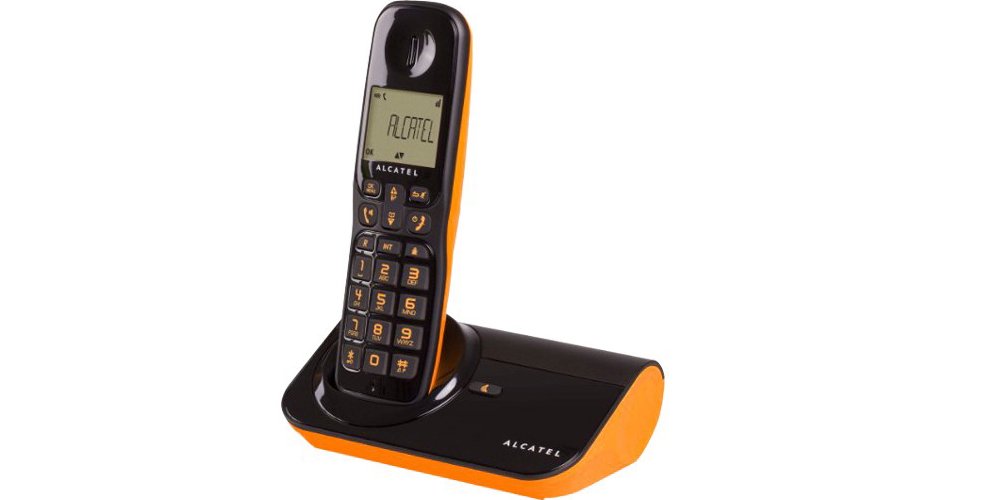
Figura 1: Alcatel Sigma 260 DECT Cordless Phone Handset and Base Station.
1. Configuració
Follow these steps to set up your Alcatel Sigma 260 phone.
1.1 Desembalatge i contingut del paquet
Desembaleu amb cura tots els articles i assegureu-vos que teniu els components següents:
- Alcatel Sigma 260 Handset
- Alcatel Sigma 260 Base Station
- Adaptador d'alimentació per a l'estació base
- Cordó de línia telefònica
- Rechargeable AAA Batteries (typically 2x)
- Manual d'usuari (aquest document)
1.2 Instal·lació de la bateria
- Localitzeu la tapa del compartiment de la bateria a la part posterior del telèfon.
- Feu lliscar o aixequeu la tapa per obrir el compartiment.
- Insert the rechargeable AAA batteries, observing the correct polarity (+ and -) as indicated inside the compartment.
- Torneu a col·locar la tapa del compartiment de la bateria, assegurant-vos que encaixi correctament al seu lloc amb un clic.
Important: Only use the supplied rechargeable batteries or equivalent approved replacements. Non-rechargeable batteries may damage the device.
1.3 Connexió de l'estació base
- Connect one end of the telephone line cord to the TEL socket on the base station.
- Connecteu l'altre extrem del cable de la línia telefònica a la presa de corrent de la paret.
- Plug the power adapter into the DC IN socket on the base station.
- Connecteu l'adaptador d'alimentació a una presa de corrent adequada.
- Place the handset on the base station to charge the batteries. Allow at least 12-15 hours for the initial charge.
Nota: Position the base station away from other electrical appliances to avoid interference.
1.4 Handset Registration (for additional handsets or re-registration)
Your primary handset is usually pre-registered. If you have additional handsets (up to 4 connectable handsets are supported) or need to re-register a handset, follow these general steps:
- On the base station, press and hold the registration button (often marked with a signal icon or "PAGE") for approximately 5 seconds until an indicator light on the base starts flashing.
- On the handset, access the menu, navigate to "Registration" or "Register Handset" (refer to the handset display for exact menu options).
- Enter the system PIN (default is usually 0000 or 1234).
- The handset will search for the base station and register. A confirmation message will appear on the handset display once successful.
Consell: If registration fails, ensure the handset is close to the base station and try again.
2. Com utilitzar el telèfon
This section covers the basic functions of your Alcatel Sigma 260.
2.1 Fer trucades
- Dialing Directly: Agafeu el telèfon o premeu PARLAR button. Enter the phone number using the keypad. The call will connect automatically.
- De la guia telefònica: Premeu el botó GUIA TELEFÒNICA button (or navigate via menu). Use the arrow keys to scroll through entries. Press PARLAR per marcar el número seleccionat.
- Torna a marcar: Premeu el botó RECOMANTA botó per view a list of recently dialed numbers. Use arrow keys to select, then press PARLAR.
2.2 Rebre trucades
- Quan soni el telèfon, premeu la tecla PARLAR botó per respondre la trucada.
- Per finalitzar una trucada, premeu el botó FINALITZACIÓ o torneu a col·locar l'auricular a l'estació base.
2.3 Agenda telefònica (50 entrades)
El telèfon pot emmagatzemar fins a 50 noms i números.
- Afegir un contacte: Access the menu, select "Phonebook", then "Add New Entry". Enter the name and number using the keypad. Save the entry.
- Editar un contacte: Access the phonebook, select the contact, then "Edit". Make changes and save.
- Deleting a Contact: Access the phonebook, select the contact, then "Delete". Confirm deletion.
2.4 Funció de mans lliures
Per activar l'altaveu de mans lliures durant una trucada, premeu la tecla PONENT button (often marked with a speaker icon). Press it again to switch back to handset mode.
2.5 Identificador de trucada
If you subscribe to Caller ID service from your telephone provider, the caller's number (and name, if available in your phonebook or provided by the service) will be displayed on the handset screen before you answer the call.
3. Manteniment
Proper care ensures the longevity of your Alcatel Sigma 260.
3.1 Neteja
Netegeu el telèfon i l'estació base amb un drap suau.amp cloth. Do not use abrasive cleaners, solvents, or strong chemicals, as these can damage the surfaces. Ensure no liquid enters the device openings.
3.2 Cura de la bateria
- Always return the handset to the base station when not in use to ensure it remains charged.
- Si no heu d'utilitzar el telèfon durant un període prolongat, traieu-ne les piles per evitar fuites.
- Replace batteries when their performance significantly degrades. Use only approved rechargeable AAA batteries.
4. Solució De Problemes
If you encounter issues with your phone, try the following solutions before seeking professional assistance.
| Problema | Possible causa/solució |
|---|---|
| Sense to de marcatge |
|
| No puc fer ni rebre trucades |
|
| Mala qualitat de so / Estàtica |
|
| El telèfon no es carrega |
|
| La pantalla està en blanc o il·legible |
|
5. Especificacions tècniques
Below are the key technical specifications for the Alcatel Sigma 260 DECT Cordless Phone:
| Marca | Alcatel |
| Número de model | sigma 260 |
| Tipus de telèfon | Telèfon sense fil DECT |
| Font d'alimentació | Battery Powered (Rechargeable AAA) |
| Tipus de teclat | Teclat únic |
| Identificador de trucada | Sí |
| Capacitat de l'agenda | 50 entrades |
| Funció mans lliures | Sí |
| Connectable Handsets | Fins a 4 |
| Tipus de visualització | Alfanumèric |
| Contestador automàtic | No |
6. Garantia i Suport
For information regarding warranty terms and conditions, please refer to the warranty card included with your product or contact your retailer. Specific warranty details are not provided in this manual.
For technical support or inquiries, you may contact the seller directly via email:
Correu electrònic: tecnotorba.amazon@gmail.com
Please provide your product model (Alcatel Sigma 260) and a detailed description of your issue when contacting support.


