Introducció
This manual provides essential instructions for the safe and efficient use of your ONKYO RC-1000M Audio Remote Control. Please read this manual thoroughly before using the product and retain it for future reference.
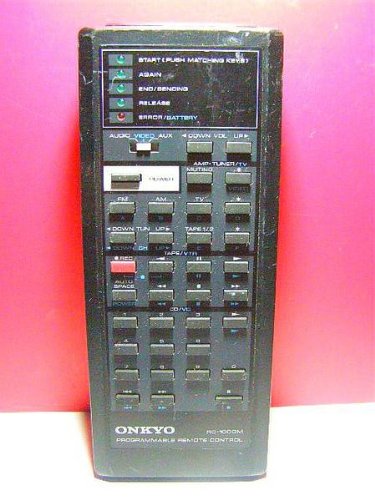
Image: The ONKYO RC-1000M Audio Remote Control, a black rectangular device with various control buttons.
Configuració
1. Instal·lació de la bateria
- Localitzeu la tapa del compartiment de la bateria a la part posterior del comandament a distància.
- Feu lliscar la coberta cap avall o premeu el pestell per obrir-la.
- Insert two AAA batteries (not included), ensuring the positive (+) and negative (-) terminals align with the indicators inside the compartment.
- Torneu a col·locar la tapa del compartiment de la bateria, assegurant-vos que encaixi correctament al seu lloc amb un clic.
Nota: Feu servir sempre piles noves i substituïu-les totes dues alhora. No barregeu piles velles i noves ni piles de tipus diferents.
2. Emparellament inicial (si escau)
The ONKYO RC-1000M is typically pre-programmed for compatible ONKYO audio devices. No manual pairing is usually required. If the remote does not respond, ensure your audio device is powered on and within range. Refer to your ONKYO audio component's manual for specific remote control compatibility and setup instructions if issues persist.
Instruccions de funcionament
The RC-1000M remote control provides comprehensive control over your ONKYO audio system. Point the remote control directly at the main unit's remote sensor.
- POTÈNCIA: Press to turn the audio component on or off.
- SELECCIONADOR D'ENTRADES: Use dedicated buttons (e.g., CD, TUNER, DVD) to switch between audio input sources.
- VOLUM +/-: Ajusta el nivell de volum principal.
- MUT: Silencia temporalment la sortida d'àudio. Premeu de nou per restaurar el so.
- PLAY/PAUSE/STOP/SKIP: Control playback functions for compatible media players (e.g., CD player, network player).
- MENU/ENTER/NAVIGATION: Access and navigate on-screen menus of your ONKYO audio component.
For detailed functions of specific buttons, refer to the instruction manual of the ONKYO audio component you are controlling.
Manteniment
Neteja
Wipe the remote control with a soft, dry cloth. Do not use abrasive cleaners, waxes, or solvents. Avoid spraying liquids directly onto the remote control.
Canvi de bateria
If the remote control's range decreases or it becomes unresponsive, replace the batteries as described in the "Battery Installation" section. Dispose of used batteries according to local regulations.
Emmagatzematge
When storing the remote control for extended periods, remove the batteries to prevent leakage and potential damage to the unit.
Resolució de problemes
| Problema | Causa possible | Solució |
|---|---|---|
| Remote control does not operate. |
|
|
| Remote control operates intermittently. |
|
|
Especificacions
- Model: RC-1000M
- Marca: ONKYO
- Font d'alimentació: DC 3V (AAA batteries x 2)
- Interval de funcionament: Approximately 7 meters (23 feet) under normal conditions.
- Dimensions (aprox.): Not specified in product data.
- Pes (aprox.): Not specified in product data.
Les especificacions estan subjectes a canvis sense previ avís per millorar-les.
Garantia i Suport
For warranty information, technical support, or service inquiries, please refer to the documentation included with your ONKYO audio component or visit the official ONKYO weblloc web. Conserveu el rebut de compra com a comprovant de compra per a reclamacions de garantia.
Official ONKYO Weblloc: www.onkyo.com


