1. Introducció
The NOYAFA NF-806R is a versatile cable testing device designed for professionals and enthusiasts to efficiently manage and troubleshoot network and telephone cables. This device allows for quick identification, tracing, and verification of cable integrity, ensuring reliable network and communication setups.
Les funcions clau inclouen:
- Examine and locate specific cables among multiple cables.
- Test continuity for LAN network cables, identifying breaks, opens, shorts, and cross-connections.
- Provide a visual end-to-end cable map for individual wires.
- Equipped with an RJ11 connector and alligator clips for diverse applications.
- Suitable for testing individual connectors, twisted pairs, phone cables, and powered electrical wires.
2. Informació de seguretat
Si us plau, llegiu i comprengui totes les instruccions de seguretat abans de fer servir el dispositiu. Si no segueix aquestes instruccions, es poden produir descàrregues elèctriques, incendis o danys al dispositiu.
- No utilitzeu el dispositiu a prop de l'aigua o en damp ambients.
- Assegureu-vos que les piles estiguin inserides correctament d'acord amb les marques de polaritat.
- Do not attempt to test live circuits with voltages exceeding the device's specified limits.
- Mantingueu el dispositiu lluny dels nens.
- If the device is damaged, do not use it. Contact support for assistance.
3. Contingut del paquet
Verifiqueu que tots els elements siguin presents al vostre paquet:
- NOYAFA NF-806R Transmitter Unit
- NOYAFA NF-806R Receiver Unit (Probe)
- Cable RJ11
- Alligator Clip Cable Pair
- Headset (for noisy environments)
- Bossa de transport
- Manual d'usuari
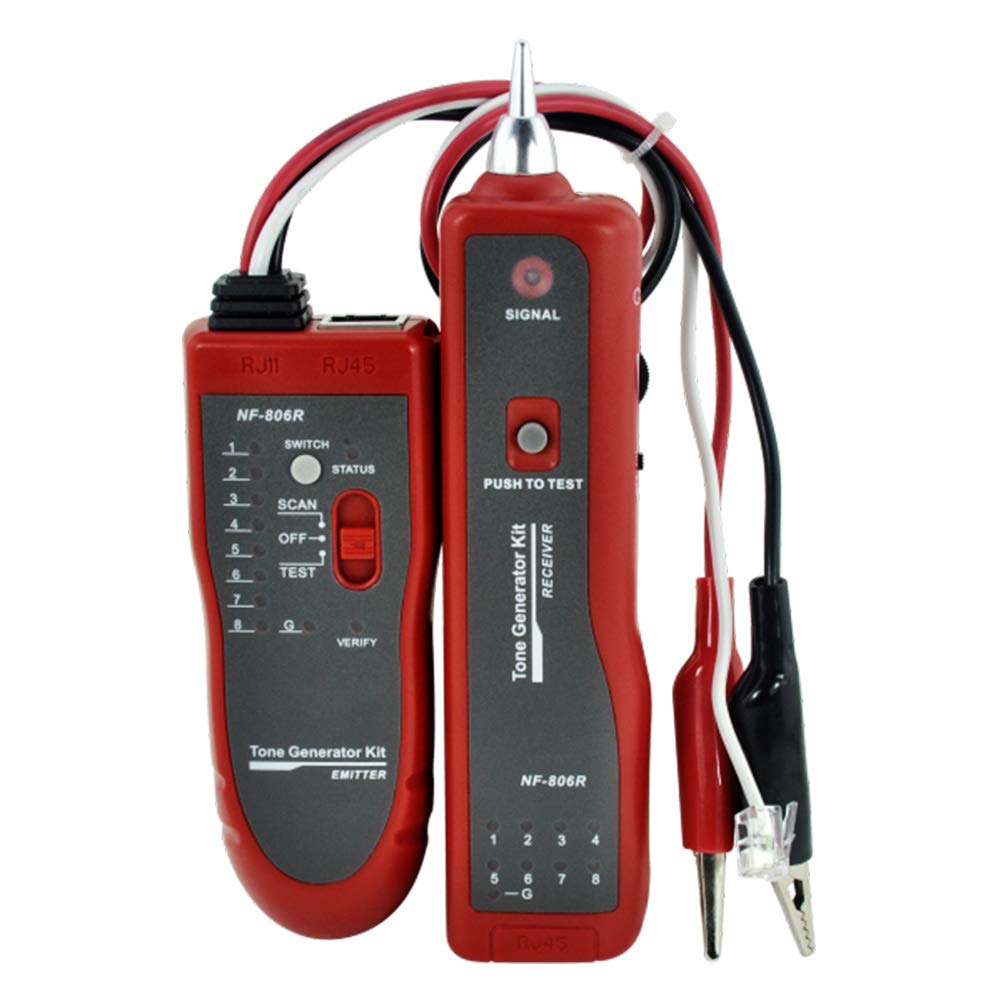
Image: Main components of the NOYAFA NF-806R cable tester, showing the red transmitter and receiver units along with the included RJ11 and alligator clip cables.
4. Producte acabatview
The NF-806R consists of two main parts: the Transmitter and the Receiver.
Unitat transmissora
- Port RJ45: For connecting LAN network cables for continuity testing.
- Port RJ11: For connecting phone cables or using the RJ11 cable with alligator clips.
- Indicadors LED: Display cable status (open, short, cross, normal).
- Interruptor de funció: To select between SCAN (tracing) and TEST (continuity).
- Interruptor d'alimentació: On/Off.
Receiver Unit (Probe)
- Consell de la sonda: Used to detect the signal from the transmitter.
- Control de volum: Adjusts the sound level of the detected signal.
- Conector d'auriculars: For connecting the included headset.
- Indicador LED: Visual confirmation of signal detection.
- Interruptor d'alimentació: On/Off.
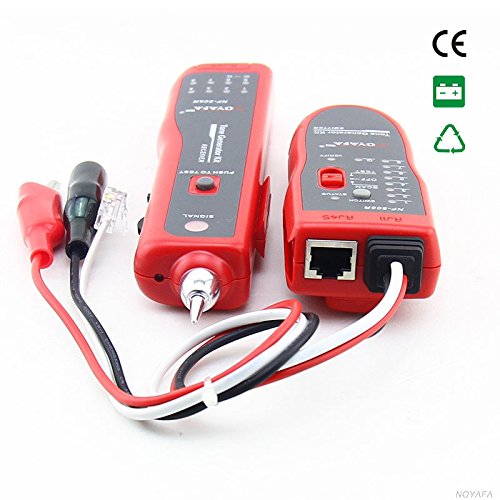
Imatge: Un costat view of the NOYAFA NF-806R receiver unit, highlighting the probe tip and various ports for connectivity.
5. Configuració
5.1 Instal·lació de la bateria
Both the transmitter and receiver units require batteries (not included). Locate the battery compartments on the back of each unit. Open the cover, insert the required batteries (typically 9V batteries for each unit) observing the correct polarity, and close the cover securely.
5.2 Cables de connexió
Depending on the test, connect the cable to be tested to the appropriate port on the transmitter unit (RJ45 for network cables, RJ11 for phone cables or alligator clips). For cable tracing, only the transmitter needs to be connected to one end of the cable.
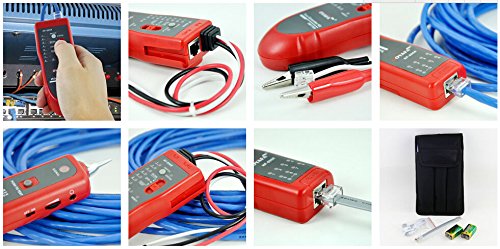
Image: A collage showing the NOYAFA NF-806R in various operational scenarios, including connecting an RJ45 cable, using the alligator clips, and the device being held for tracing.
6. Instruccions de funcionament
6.1 Cable Tracing/Locating
- Connect one end of the target cable to the RJ45 or RJ11 port on the transmitter unit.
- Turn on the transmitter unit and set the function switch to ESCANEAR mode.
- Turn on the receiver unit.
- Use the receiver's probe to scan along the cable path. The receiver will emit an audible tone when it detects the signal from the transmitter. The tone will be loudest when the probe is directly over the correct cable.
- Adjust the volume control on the receiver for optimal listening. For noisy environments, connect the headset.
6.2 LAN Cable Continuity Testing (RJ45)
- Connect one end of the RJ45 network cable to the RJ45 port on the transmitter unit.
- Connect the other end of the RJ45 network cable to the RJ45 port on the receiver unit.
- Turn on both the transmitter and receiver units. Set the transmitter's function switch to PROVA mode.
- Observe the LED indicators on both units. The LEDs will light up sequentially, indicating the status of each wire pair.
- Normal Connection: LEDs on both units light up in the same sequence (1-8).
- Open Circuit/Break: An LED fails to light up on either unit.
- Curtcircuit: Two or more LEDs light up simultaneously or in an incorrect sequence.
- Cross-Connection: LEDs light up in a different but consistent sequence on the receiver compared to the transmitter.
6.3 Phone Cable Continuity Testing (RJ11)
- Connect one end of the RJ11 phone cable to the RJ11 port on the transmitter unit.
- Connect the other end of the RJ11 phone cable to the RJ11 port on the receiver unit.
- Follow steps 3-5 from the LAN Cable Continuity Testing section, observing the RJ11 specific LED indicators.
7. Manteniment
- Neteja: Feu servir un drap suau i sec per netejar el dispositiu. No utilitzeu productes de neteja abrasius ni dissolvents.
- Emmagatzematge: Guardeu el dispositiu en un lloc fresc i sec, allunyat de la llum solar directa i de temperatures extremes. Si l'emmagatzemeu durant períodes prolongats, traieu les piles per evitar fuites.
- Substitució de la bateria: Replace batteries when the low battery indicator lights up or when the device's performance degrades.
8. Solució De Problemes
| Problema | Causa possible | Solució |
|---|---|---|
| Sense poder | Piles gastades; instal·lació incorrecta de la bateria | Canvieu les piles; comproveu la polaritat de la pila |
| No signal during tracing | Transmitter off or in wrong mode; Receiver off or too far; Cable fault | Ensure transmitter is ON and in SCAN mode; Ensure receiver is ON; Move receiver closer; Check cable for damage |
| Incorrect continuity test results | Poor cable connection; Damaged cable; Wrong test mode | Ensure cables are fully inserted; Inspect cable for damage; Ensure transmitter is in TEST mode |
| Faint or distorted tracing tone | Low battery on receiver; High ambient noise; Receiver volume too low | Replace receiver batteries; Use headset; Increase receiver volume |
9. Especificacions
| Característica | Detall |
|---|---|
| Marca | NOYAFA |
| Número de model | D3IN0009 (NF-806R) |
| Tipus de mesura | Wire Tracker, Continuity Tester |
| Cable Types Tested | RJ45 (LAN), RJ11 (Phone), Individual Wires, Twisted Pairs, Powered Electrical Wires |
| Font d'alimentació | Battery Powered (typically 9V for each unit) |
| Estil | Lleuger |
| Color | Vermell |
| Dimensions d'enviament | 27.9 x 15 x 4.6 cm |
| Pes | 272 grams (aprox.) |
| ASIN | B00F5W9VIK |
| GTIN | 06920548147750 |
10. Informació de la garantia
NOYAFA products are manufactured to high-quality standards. This product comes with a standard manufacturer's warranty against defects in materials and workmanship. Please refer to the warranty card included in your package or visit the official NOYAFA weblloc web per obtenir informació detallada sobre els termes i condicions de la garantia. Conserveu el rebut de compra com a comprovant de compra.
11. Suport
For technical support, troubleshooting assistance, or service inquiries, please contact NOYAFA customer service. Contact information can typically be found on the product packaging, the official NOYAFA weblloc web o a través del vostre distribuïdor.
When contacting support, please have your product model (NF-806R) and purchase details ready.


