1. Producte acabatview
The PVI MICROMOD VeCoax is a high-definition (HD) RF modulator designed to distribute HD or standard-definition (SD) video content to any digital cable television via existing coaxial antenna cables. This device allows you to convert various video inputs into a digital RF signal, making it accessible on multiple televisions throughout a building without the need for additional set-top boxes per TV.
It supports selectable inputs including Component, Composite, and HDMI Digital, accommodating resolutions up to 1080p to ensure high-quality image distribution. The output can be set to any channel number and injected directly into your coaxial splitter, allowing it to coexist with your current normal channels. Multiple MICROMOD units can be installed to distribute as many channels as required.

Image 1.1: PVI VeCoax MicroMod-3 HD Modulator with its packaging, illustrating the product's design and branding.
2. Instruccions de configuració
Follow these steps to set up your PVI MICROMOD VeCoax modulator:
- Connectar la font de vídeo: Connect your video source (e.g., set-top box, DVD player, computer) to the MICROMOD using an HDMI, Component, or Composite cable. For DVI video from computers, connect separate RCA audio cables to the left/right audio inputs. For HDMI connections, audio is taken digitally from the HDMI cable.
- Connecteu la sortida RF: Connect the RF output of the MICROMOD to your existing coaxial cable network or directly to a single television. This output can be injected into your coaxial splitter to distribute the signal to all connected TVs.
- Connect Antenna Input (Optional): If you wish to combine local antenna channels with the modulated signal, connect your antenna cable to the RF IN port on the MICROMOD. This eliminates the need for an external adapter or combiner.
- Encès: Connect the AC power adapter to the MICROMOD and plug it into an electrical outlet. The device is fanless and silent, allowing for flexible placement.
- Tune Television: On your television(s), perform a channel scan to detect the new digital channel broadcast by the MICROMOD. The modulated channel will appear alongside your existing channels.
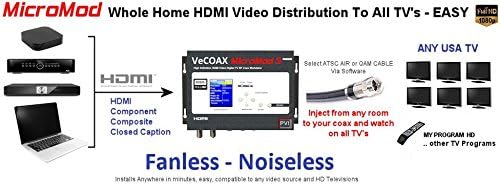
Image 2.1: Diagram illustrating the connection of various HDMI, Component, and Composite sources to the VeCoax MicroMod, which then distributes the signal via coaxial cable to multiple televisions.
3. Instruccions de funcionament
The MICROMOD VeCoax features a control keypad and status display for configuration. Use the navigation buttons to access and adjust settings.
- Accés a la configuració: Use the 'NAVIGATOR' buttons (up, down, left, right) to move through the menu options displayed on the 'STATUS DISPLAY'. Press 'ENTER' to select an option or confirm a setting.
- Selecció d'entrada: Navigate to the 'Source' setting to select your desired video input (HDMI, Component, or Composite).
- Output Channel Configuration: Adjust the 'Minor Ch' and 'Major Ch' settings to assign a specific channel number for the modulated output. This is the channel your TVs will tune to.
- RF Standard Selection: Select the appropriate RF standard (e.g., ATSC Air, QAM Cable) based on your region and cable system.
- Resolution and Quality: The device automatically adjusts to input resolutions up to 1080p. Ensure your source device is outputting a compatible resolution for optimal quality.
- Sortida dels menús: Press the 'ESCAPE' button to go back to the previous menu or exit the settings interface.

Imatge 3.1: Primer pla view of the PVI VeCOAX MicroMod-3 front panel, showing the status display, control keypad, and input/output indicators.
4. Manteniment
The PVI MICROMOD VeCoax is designed for minimal maintenance due to its fanless and noiseless operation. To ensure optimal performance and longevity:
- Neteja: Periodically wipe the exterior of the unit with a soft, dry cloth to remove dust. Do not use liquid cleaners or abrasive materials.
- Ventilació: Although fanless, ensure the unit is placed in an area with adequate airflow to prevent heat buildup. Avoid covering ventilation slots.
- Condicions ambientals: Operate the device within recommended temperature and humidity ranges. Avoid extreme temperatures or damp ambients.
- Connexions de cable: Comproveu periòdicament totes les connexions dels cables per assegurar-vos que estiguin ben fixades i que no estiguin danyats.
5. Solució De Problemes
If you encounter issues with your PVI MICROMOD VeCoax, refer to the following troubleshooting guide:
- Sense senyal a la televisió:
- Verify all video input and RF output cables are securely connected.
- Ensure the MICROMOD is powered on.
- Check that your TV is tuned to the correct channel number configured on the MICROMOD.
- Perform a channel scan on your TV to detect the modulated signal.
- Confirm the video source connected to the MICROMOD is active and outputting a signal.
- Mala qualitat d'imatge:
- Ensure the input video source is high quality.
- Check cable integrity; replace damaged cables if necessary.
- Verify the RF output standard (ATSC/QAM) matches your TV and cable system.
- Minimize the use of excessive splitters or long coaxial cable runs, which can degrade signal quality.
- Sense àudio:
- For HDMI input, ensure the HDMI cable is fully functional and carrying audio.
- For Component/Composite input, verify the separate RCA audio cables are correctly connected to the MICROMOD and the source.
- Check the audio settings on your video source device.
- El dispositiu no respon:
- Unplug the power adapter, wait 10 seconds, and plug it back in to reset the device.
- Assegureu-vos que la presa de corrent funcioni.
6. Especificacions
Detailed technical specifications for the PVI MICROMOD VeCoax (Model: MMD-MS-A-1):
| Característica | Especificació |
|---|---|
| Marca | PVI |
| Model | MMD-MS-A-1 |
| Fabricant | PVI |
| Font d'alimentació | AC |
| Piles incloses | No |
| Bateria recarregable inclosa | No |
| Dimensions del producte | 25.4 x 16.51 x 7.62 cm |
| Pes de l'article | 1.59 kg |
| ASIN | B00F7SE5MO |
| Primera data disponible | 21 d'octubre de 2013 |
| Descatalogat pel fabricant | No |

Imatge 6.1: Lateral view of the PVI VeCOAX MicroMod-3, showing its compact design and ventilation slots.
7. Garantia i Suport
The PVI MICROMOD VeCoax is typically backed by a manufacturer's warranty. While specific warranty details may vary, some product images indicate a 5-year warranty. Please refer to the documentation included with your purchase or contact the manufacturer directly for precise warranty terms and conditions.
For technical support, product inquiries, or warranty claims, please contact PVI customer service through their official website or the contact information provided in your product packaging. Ensure you have your model number (MMD-MS-A-1) and purchase details ready when contacting support.


