1. Introducció
This manual provides essential information for the safe and correct installation, operation, and maintenance of the Omron K3GN-NDC Digital Panel Meter. The K3GN-NDC is a versatile digital panel meter designed for industrial automation applications, capable of measuring DC current and DC voltage. Please read this manual thoroughly before using the product to ensure optimal performance and prevent potential hazards.
2. Precaucions de seguretat
Observeu les següents precaucions de seguretat per evitar descàrregues elèctriques, incendis o danys al producte.
- Ensure that the power supply is disconnected before performing any wiring or installation work.
- Wiring must be performed by qualified personnel in accordance with local electrical codes and regulations.
- Do not use the product in environments with flammable or explosive gases.
- Do not disassemble, modify, or repair the product. Contact Omron support for service.
- Comproveu que el volum de subministramenttage (24VDC) matches the product specifications before connecting power.
3. Característiques del producte
The Omron K3GN-NDC Digital Panel Meter offers the following key features:
- Funció de mesura: DC Current and DC Voltage.
- Intervals de mesura:
- DC Current: 0mA to 20mA, 4mA to 20mA
- DC Voltage: 0V to 5V, 1V to 5V, -5V to +5V, -10V to +10V
- Visualització: 5-digit display with 7mm digit height.
- Font d'alimentació: 24VDC.
- Retall del panell: 22.2mm (Height) x 45mm (Width).
- Compleix RoHS.
4. Configuració i instal·lació
Follow these steps for proper installation of the K3GN-NDC Digital Panel Meter.
4.1 Muntatge en panell
- Prepare a panel cutout with dimensions of 22.2mm (Height) x 45mm (Width).
- Insert the K3GN-NDC meter into the cutout from the front of the panel.
- Secure the meter using the provided mounting brackets from the rear of the panel. Ensure a snug fit to prevent movement.
4.2 Cablejat
Refer to the wiring diagram provided with your product packaging for detailed connection instructions. General wiring guidelines are as follows:
- Font d'alimentació: Connect the 24VDC power supply to the designated terminals. Observe correct polarity.
- Senyal d'entrada: Connect the DC current or DC voltage input signal to the appropriate input terminals. Ensure the input signal type and range match the meter's configuration.
- Output Terminals (OUT1, OUT2, SV): If using output functions, connect external devices to these terminals as per your system requirements and the product's wiring diagram.
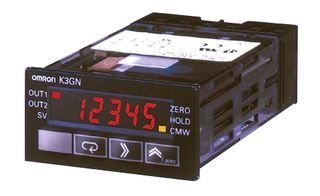
Figura 1: Frontal view of the Omron K3GN-NDC Digital Panel Meter. The display shows '12345' in red, with indicators for OUT1, OUT2, SV, ZERO, HOLD, and CMW. Control buttons are visible below the display.
5. Instruccions de funcionament
Once installed and powered, the K3GN-NDC will display the measured value. The meter features several buttons for operation and configuration.
5.1 Pantalla bàsica
The 5-digit LED display shows the current measured value (DC current or DC voltage) based on the configured input range.
5.2 Funcions dels botons
- Botó ZERO: Used for zero-point adjustment or resetting certain values. Refer to the detailed programming manual for specific functions.
- Botó HOLD: Freezes the current displayed value. Press again to release.
- CMW Button: Typically used for mode selection or parameter confirmation during configuration.
- Botons de fletxa (amunt/avall): Used for navigating menus and adjusting parameter values during configuration.
5.3 Configuració
The K3GN-NDC offers various configurable parameters, including input range, scaling, alarm outputs, and display settings. Detailed configuration procedures are beyond the scope of this basic instruction manual. Please refer to the comprehensive programming manual for advanced setup and parameter adjustments.
6. Manteniment
The Omron K3GN-NDC Digital Panel Meter is designed for reliable operation with minimal maintenance.
- Neteja: Feu servir un drap suau i sec per netejar la pantalla iasing. Do not use abrasive cleaners, solvents, or water, as these can damage the unit.
- Condicions ambientals: Ensure the operating environment remains within the specified temperature range (-10°C to 55°C) and humidity levels to prevent malfunction.
- Inspecció: Periodically inspect wiring connections for looseness or damage.
7. Solució De Problemes
If you encounter issues with your K3GN-NDC meter, consider the following common troubleshooting steps:
| Problema | Causa possible | Solució |
|---|---|---|
| Sense pantalla/Apagat | No hi ha alimentació o cablejat incorrecte. | Check 24VDC power supply connection and polarity. Verify wiring according to the diagram. |
| Lectura incorrecta | Incorrect input signal wiring; wrong measurement range configured; sensor/input device malfunction. | Verify input signal wiring. Check meter configuration for correct input range and scaling. Test the input source. |
| Display is frozen | HOLD function is active. | Press the HOLD button to release the display. |
If the problem persists after attempting these solutions, contact Omron technical support or your local distributor for assistance.
8. Especificacions
| Model | K3GN-NDC |
| Funció de comptador | DC Current / DC Voltage |
| Nombre de dígits | 5 |
| Alçada dels dígits | 7 mm |
| Interval del metre | 0mA to 20mA / 4mA to 20mA / 0V to 5V / 1V to 5V / -5V to +5V / -10V to +10V |
| Subministrament Voltage | 24VDC |
| Consum d'energia | 2.5W |
| Temperatura de funcionament | -10 °C a 55 °C |
| Panel Cutout Height | 22.2 mm |
| Panel Cutout Width | 45 mm |
| Conforme a RoHS | Sí |
9. Garantia i Suport
For warranty information, please refer to the documentation provided with your purchase or contact your Omron distributor. Technical support can be obtained through the official Omron website or by contacting their customer service department. Ensure you have your product model number (K3GN-NDC) and any relevant purchase details available when seeking support.


