Introducció
The Hunter X-Core XC800i is an indoor sprinkler controller designed for residential properties, supporting up to 8 stations for efficient lawn, garden, and drip zone watering. This controller operates independently, requiring no Wi-Fi or smart home apps. It offers precise water management with features like Cycle & Soak to reduce runoff and Seasonal Adjust for quick modifications based on weather, eliminating the need for full reprogramming. With 3 independent programs and 4 start times per program, it provides flexible scheduling. The intuitive dial interface ensures ease of use, and non-volatile memory retains settings during power outages. Built with Hunter's renowned durability, it includes surge protection and is Smart Port compatible for remote operation. This controller offers powerful performance, trusted reliability, and water-saving control in a compact, indoor-friendly design.
Configuració
Desembalatge i inspecció inicial
Carefully remove the Hunter X-Core XC800i controller from its packaging. Inspect the unit for any signs of damage during transit. Ensure all components, including the controller unit, power transformer, and mounting hardware, are present.

Figura 1: Frontal view of the Hunter X-Core XC800i Sprinkler Timer, showing the display, control dial, and buttons.
Muntatge del controlador
Select a suitable indoor location for mounting the controller, away from direct sunlight and extreme temperatures. Use the provided mounting screws and anchors to securely attach the controller to the wall. Ensure the unit is level for proper operation.
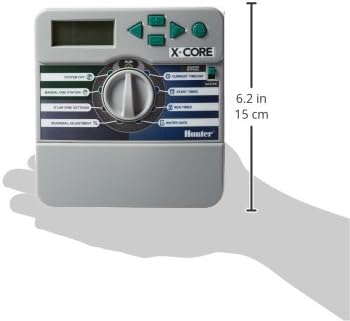
Figure 2: Dimensions of the Hunter X-Core XC800i controller, illustrating its compact size for indoor installation.
Cablejat del controlador
Before wiring, ensure the power transformer is unplugged. Remove the front panel of the controller to access the wiring terminals. Connect the common wire (typically white) to the "C" terminal. Connect each zone wire to its corresponding numbered terminal (1-8). If a master valve or pump start relay is used, connect its wire to the "P/MV" terminal. For detailed wiring instructions, refer to the official product guide video below.

Figura 3: Primer pla view of the Hunter X-Core XC800i wiring terminals, showing connections for common, zones, and master valve/pump.
Connexió d'alimentació
Once all wiring is complete, plug the provided power transformer into a standard 120V AC outlet. Then, connect the transformer's output cable to the 24VAC terminals on the controller. The display should illuminate, indicating power is supplied to the unit.
Instruccions de funcionament
Understanding the Dial Interface
The Hunter X-Core XC800i features an intuitive dial interface for easy navigation and programming. Rotate the dial to select different functions such as System Off, Manual, Date/Time, Start Times, Run Times, Water Days, Solar Sync Settings, and Seasonal Adjustment.

Figura 4: Detallada view of the Hunter X-Core XC800i control dial, highlighting each function position for user reference.
Programació bàsica
The controller supports 3 independent programs (A, B, C) with up to 4 start times each. To program:
- Rotate the dial to the "Date/Time" position to set the current time and day. Use the arrow buttons to adjust values.
- Turn the dial to "Start Times" to set the desired start times for each program.
- Move the dial to "Run Times" to specify the watering duration for each station within each program.
- Select "Water Days" to choose specific days of the week for irrigation or use the Cycle & Soak feature.
Ajust estacional
The Seasonal Adjust feature allows you to quickly increase or decrease all station run times by a percentage, adapting to changing weather conditions without reprogramming each zone individually. Rotate the dial to "Seasonal Adjust" and use the arrow buttons to set the desired percentage.
Water-Saving Features
- Cicle i remull: This feature breaks down longer watering times into shorter, more frequent cycles, allowing water to penetrate the soil more effectively and reducing runoff, especially on sloped areas or dense soils.
- Solar Sync Compatibility: The X-Core is compatible with Hunter's Solar Sync ET sensor (sold separately), which automatically adjusts watering schedules based on local weather conditions, optimizing water usage and promoting conservation.
Funcionament manual
To manually operate a single station or all stations:
- Manual One Station: Turn the dial to "Manual" and use the arrow buttons to select the desired station and set its run time.
- Manual All Stations: Turn the dial to "Manual" and press the right arrow button to initiate a manual run of all stations in sequence.
Official Product Guide Video
Video 1: "X-Core Irrigation Controller Product Guide" by Hunter Industries Inc. This video provides a comprehensive overview of the X-Core controller's features and programming.
Manteniment
Memòria no volàtil
The X-Core controller is equipped with non-volatile memory, which permanently stores all programmed settings, including date and time, even during power outages. This eliminates the need for reprogramming after a power interruption.
Quick Check Diagnostics
The Quick Check feature allows for easy troubleshooting of field wiring issues. It scans the station wiring and displays an "err" message on the screen if a short circuit is detected on a particular station number, helping to quickly identify and resolve electrical problems.
Resolució de problemes
If the controller display is blank, first check the power outlet by plugging in another device. If the outlet has power, verify the transformer connection to the controller. If the display shows an "err" message, use the Quick Check feature to identify the problematic station wiring. For persistent issues, consult a qualified irrigation professional.
Especificacions
| Característica | Detall |
|---|---|
| Marca | Caçador |
| Número de model | XC800I |
| Pes de l'article | 1.2 lliures |
| Dimensions del producte | 5.75 cm de llargada x 2 cm d'amplada x 6.5 cm d'alçada |
| Voltage | 120 volts (CA) |
| Tipus de visualització | LCD o LED |
| Temperatura de funcionament | 50 graus Fahrenheit |
| Material | Metall |
| Color | Gris |
| UPC | 611698146484 |
Garantia i Suport
Informació de la garantia
The Hunter X-Core XC800i is backed by a 2-year factory warranty, ensuring reliable performance and peace of mind.
Suport addicional
For enhanced control, the X-Core is Smart Port compatible, allowing for remote operation using Hunter ROAM remotes (sold separately). For further assistance or detailed troubleshooting, please refer to the official Hunter Industries weblloc o poseu-vos en contacte amb el seu servei d'atenció al client.


