1. Introducció
Thank you for choosing the SCHWAIGER DCR600HD Full HD Cable TV Receiver. This manual provides essential information for the safe and efficient use of your device. Please read these instructions carefully before installation and operation, and keep them for future reference.
2. Instruccions de seguretat
- Font d'alimentació: Feu servir només l'adaptador de corrent subministrat amb el dispositiu. Assegureu-vos que el volumtage coincideix amb la vostra font d'alimentació local.
- Ventilació: Do not block ventilation openings. Ensure adequate space around the receiver for proper airflow to prevent overheating.
- Humitat: Keep the device away from water, moisture, and high humidity. Do not expose it to rain or splashes.
- Neteja: Desconnecteu l'alimentació abans de netejar. Feu servir un drap suau i sec. No utilitzeu netejadors líquids ni en aerosol.
- Ubicació: Place the receiver on a stable, flat surface. Avoid direct sunlight, heat sources, and strong magnetic fields.
- Manteniment: No intenteu obrir ni reparar el dispositiu vosaltres mateixos. Encarregueu totes les tasques de manteniment a personal qualificat.
3. Contingut del paquet
Si us plau, comproveu el paquet per veure si hi ha els elements següents:
- SCHWAIGER DCR600HD Cable TV Receiver
- Control remot
- Power Cable (integrated or separate adapter)
- Manual d'usuari (aquest document)
4. Producte acabatview
4.1 Tauler frontal
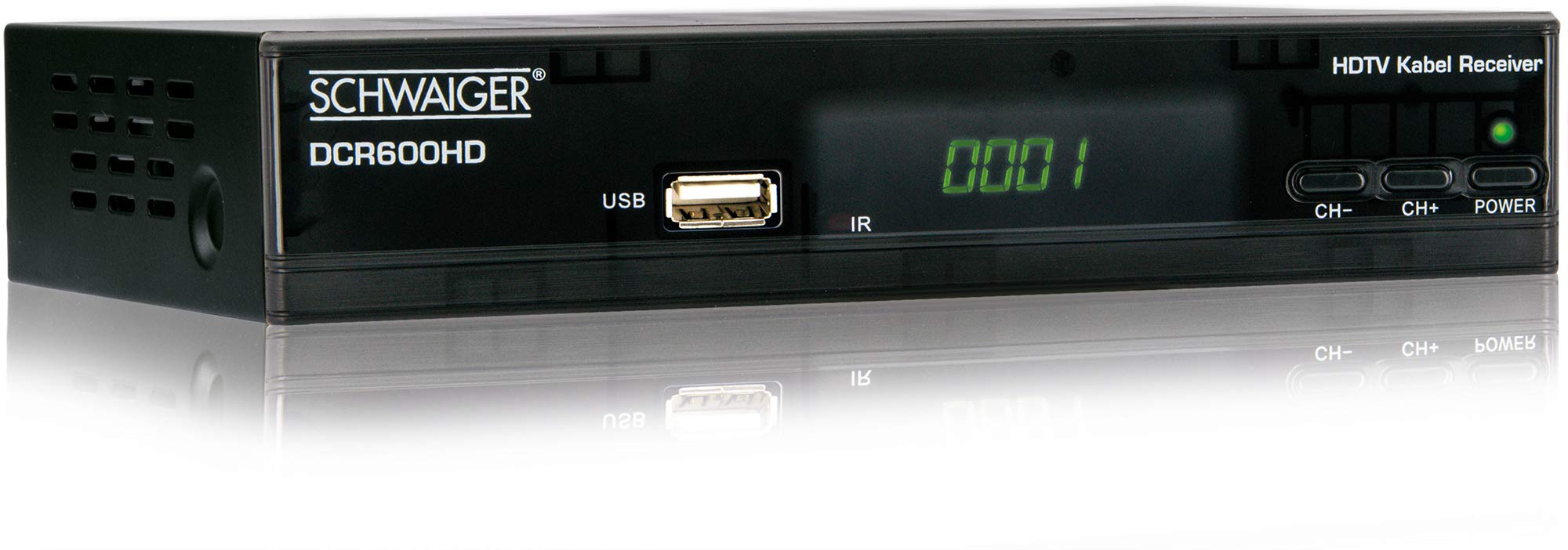
Imatge: Davant view of the SCHWAIGER DCR600HD receiver, showing the display, USB port, IR receiver, and control buttons.
- Visualització: Mostra el número de canal o l'hora.
- Port USB: For connecting USB storage devices for media playback.
- IR: Receptor d'infrarojos per al comandament a distància.
- CH- / CH+: Buttons for changing channels.
- POTÈNCIA: Button to turn the receiver on or off (standby).
4.2 Panell posterior

Imatge: posterior view of the SCHWAIGER DCR600HD receiver, displaying various input and output ports.
- RF IN: Input for connecting to your cable TV network.
- ETHERNET / LAN: For network connection (if supported for updates or specific services).
- HDMI: High-Definition Multimedia Interface output for connecting to an HD TV.
- TV SCART (CVBS): SCART output for connecting to older TVs or other devices.
- ~220-240V 50/60Hz: Power input for the receiver.
4.3 Control remot

Imatge: Layout of the SCHWAIGER DCR600HD remote control, showing various function buttons.
The remote control allows you to operate all functions of your receiver. Familiarize yourself with the button layout for easy navigation.
5. Configuració
5.1 Connexió del receptor
- Connexió a la xarxa de cable: Connect your cable TV antenna cable to the RF IN port on the rear panel of the receiver.
- Connectar-se al televisor:
- For High Definition (HD) picture quality, connect an HDMI cable from the HDMI port on the receiver to an HDMI input on your TV.
- For standard definition (SD) or older TVs, connect a SCART cable from the TV SCART (CVBS) port on the receiver to the SCART input on your TV.
- Connectar l'alimentació: Plug the power cable into the receiver's power input and then into a wall outlet.
- Engegar la televisió: Switch on your television and select the correct input source (HDMI or SCART) corresponding to your connection.
5.2 Primera instal·lació
Upon first power-on, the receiver will typically guide you through an initial setup process:
- Selecció d'idioma: Use the remote control to select your preferred language for the on-screen menus.
- Country Selection: Select your country. This helps configure regional settings and channel frequencies.
- Escaneig de canals: The receiver will prompt you to perform an automatic channel scan. Confirm to start scanning for available cable TV channels. This process may take several minutes.
- Desa la configuració: Once the scan is complete, save the found channels. Your receiver is now ready for use.
6. Instruccions de funcionament
6.1 Funcionament bàsic
- Encès/apagat: Premeu el botó PODER button on the remote control or front panel to switch the receiver on or to standby mode.
- Selecció de canals: Utilitza el CH+ / CH- buttons on the remote or front panel to change channels sequentially. Alternatively, use the number buttons to directly enter a channel number.
- Ajust de volum: Utilitza el VOL+ / VOL- buttons on the remote control to adjust the audio volume.
- Silenciar: Premeu el botó MUT botó per desactivar temporalment el so. Premeu-lo de nou per restaurar-lo.
6.2 Guia electrònica de programes (EPG)
The EPG provides a schedule of current and upcoming TV programs.
- Premeu el botó EPG button on the remote control to access the Electronic Program Guide.
- Navigate through channels and program times using the arrow buttons.
- Premeu OK a view informació detallada sobre un programa seleccionat.
6.3 Reproducció multimèdia via USB
Pots reproduir contingut multimèdia files (AVI, MKV, MP3) from a USB storage device.
- Inseriu una unitat flash USB o un disc dur extern a la USB port al panell frontal.
- The receiver should detect the USB device and prompt you to open the media player, or you can access it via the main menu.
- Navega pel teu files and folders using the arrow buttons and press OK to select and play a file.
- Use the media control buttons (Play, Pause, Stop, Fast Forward, Rewind) on the remote control for playback.
6.4 Teletext
Access teletext services provided by broadcasters.
- Premeu el botó TTX button on the remote control to activate teletext.
- Use the number buttons to enter page numbers or the arrow buttons to navigate.
- Premeu TTX again to exit teletext.
7. Manteniment
- Neteja: Regularly wipe the receiver with a soft, dry, lint-free cloth. Do not use abrasive cleaners, waxes, or solvents.
- Ventilació: Ensure that the ventilation slots are not obstructed by dust or other objects.
- Actualitzacions de programari: Reviseu periòdicament el fabricant website for any available software updates for your model. Follow the instructions provided with the update carefully.
8. Solució De Problemes
If you encounter problems with your receiver, refer to the following common issues and solutions:
| Problema | Possible causa/solució |
|---|---|
| Sense imatge ni so |
|
| El comandament a distància no funciona |
|
| No channels found during scan |
|
| El suport USB no es reprodueix |
|
9. Especificacions
| Característica | Descripció |
|---|---|
| Nom del model | DCR600HD |
| Tipus de producte | Digital DVB TV Tuner / Digital Player |
| Color | Negre |
| Dimensions (L x P x A) | 17 cm x 4.5 cm x 10 cm |
| Pes | 380 g |
| Tecnologia de connectivitat | HDMI, USB, SCART, RF |
| Dispositius compatibles | Televisió |
| Codificació de vídeo | H.264 |
| Resolucions suportades | 576i, 576p, 720p, 1080i, 1080p |
| Relacions d'aspecte | 4:3, 16:9 |
| Mode de sortida d'àudio | estèreo |
| Formats d'àudio compatibles | MP3 |
| Tipus de suports compatibles | AVI, MKV, MP3 |
| Ports USB totals | 1 (USB 4-pin Type A) |
| Ports HDMI totals | 1 |
| Consum d'energia | 3.8 W |
| Voltage | 240 Volts |
| Característiques especials | Electronic Program Guide (EPG), Teletext, Built-in Bluetooth (Note: Bluetooth functionality may vary by region/firmware) |
| Control remot | Inclòs |
10. Garantia i Suport
For warranty information and technical support, please refer to the documentation included with your product packaging or visit the official SCHWAIGER weblloc web. Conserveu el rebut de compra com a comprovant de compra per a reclamacions de garantia.


