1. Introducció
This manual provides comprehensive instructions for the setup, operation, and maintenance of your A4tech Natural A Ergonomic Keyboard, model KRS-85. Designed with patented A-Shape keys and round-edged keycaps, this keyboard aims to promote a natural typing position, thereby helping to prevent Repetitive Strain Injury (RSI).
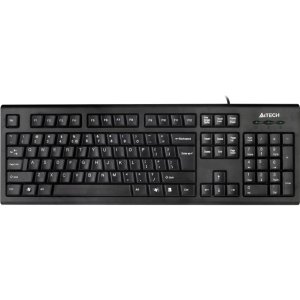
Figure 1: A4tech Natural A Ergonomic Keyboard (KRS-85). This image displays the full layout of the black wired keyboard, highlighting its ergonomic design with A-Shape keys and round keycaps.
2. Configuració
2.1 Requisits del sistema
- IBM or Compatible Systems
- Windows 2000 / XP (X64) / 2003 (X64) / Vista
2.2 Connexió del teclat
- Localitzeu un port USB disponible al vostre ordinador.
- Insert the USB connector of the A4tech KRS-85 keyboard firmly into the USB port.
- El vostre sistema operatiu hauria de detectar i instal·lar automàticament els controladors necessaris. Aquest procés pot trigar uns instants.
- Once installation is complete, the keyboard is ready for use.
3. Instruccions de funcionament
The A4tech Natural A Keyboard is designed for comfortable and efficient typing. Its unique features are intended to enhance your typing experience and reduce strain.
3.1 Característiques clau
- Patented A-Shape Keys: The layout of the keys is designed to align with the natural position of your hands and wrists, promoting a more relaxed posture.
- Round Edged Keycaps: These keycaps provide a smooth and comfortable typing surface.
- Disseny estàndard: The keyboard features a full-size layout including a numeric keypad, function keys (F1-F12), and navigation keys.
3.2 Ús bàsic
Use the keyboard as you would any standard computer keyboard for typing, navigating, and executing commands. The ergonomic design is intended to provide comfort during extended use.
4. Manteniment
Un manteniment adequat garanteix la longevitat i el rendiment òptim del teclat.
4.1 Neteja
- Desconnecteu el teclat de l'ordinador abans de netejar-lo.
- Utilitzeu un drap suau i sense pelusa lleugerament dampEsbandiu amb aigua o una solució netejadora suau per netejar la superfície del teclat.
- Eviteu l'ús de productes químics agressius, netejadors abrasius o humitat excessiva.
- Per netejar entre les tecles, feu servir aire comprimit per eliminar la pols i les restes.
5. Solució De Problemes
If you encounter issues with your A4tech Natural A Keyboard, please refer to the following common solutions.
5.1 El teclat no respon
- Ensure the USB cable is securely connected to a working USB port on your computer. Try a different USB port.
- Reinicieu l'ordinador.
- Check your computer's Device Manager (Windows) to see if the keyboard is recognized and if there are any driver issues.
5.2 Specific Key Combinations Not Working (e.g., Ctrl-Alt-Del)
- Some users have reported that certain key combinations, such as Ctrl-Alt-Del, may not function as expected on this keyboard with Windows operating systems. This is a known compatibility limitation for some configurations.
- If this issue persists, consider using alternative methods for these functions within your operating system, or consult A4tech support for potential workarounds or driver updates if available.
6. Especificacions
| Característica | Detall |
|---|---|
| Nom del producte | Natural_A Rounded Edge Keyboard |
| Número de model | KRS-85 |
| Tecnologia de connectivitat | Cable (USB) |
| Descripció del teclat | Ergonòmic |
| Nombre de claus | 85 |
| Dimensions del producte | 19.69 x 7.87 x 1.97 polzades |
| Pes de l'article | 2.2 lliures |
| Fabricant | ERGOGUYS (A4tech Co., Ltd) |
| Data de primera disponibilitat | 31 d'octubre de 2013 |
7. Informació de la garantia
The A4tech Natural A Ergonomic Keyboard (KRS-85) comes with a Garantia limitada de 1 anys del fabricant. Aquesta garantia cobreix els defectes de materials i de fabricació en condicions d'ús normal.
Please retain your proof of purchase for warranty claims. For detailed terms and conditions, refer to the warranty documentation provided with your product or contact the manufacturer directly.
8. Suport
For further assistance, technical support, or warranty inquiries, please contact the manufacturer or your point of purchase. Ensure you have your product model number (KRS-85) and proof of purchase ready when contacting support.


