1. Introducció
This user manual provides detailed instructions for the installation, configuration, and operation of the Digi CM 32 Console Server, Model 70001908. The Digi CM 32 is a robust, rack-mountable console server designed to provide secure, remote access to IT infrastructure devices such as servers, routers, and switches via their serial console ports. Understanding the contents of this manual will ensure optimal performance and longevity of your device.
2. Producte acabatview
The Digi CM 32 is a 1U rack-mountable console server featuring 32 RS-232 serial ports. It enables out-of-band management, allowing administrators to access and manage devices even when the primary network is unavailable. Key features include support for PPP connections and a compact design suitable for data center environments.
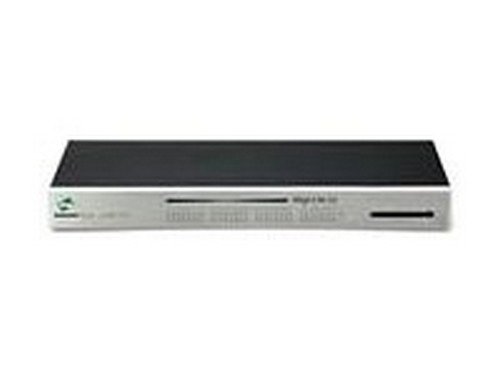
Figura 1: Davant view of the Digi CM 32 Console Server. This image shows the front panel of the device, which is silver with a black top. The Digi logo is visible on the left, and the model number "Digi CM 32" is printed in the center. There are also indicators and a slot on the right side of the panel.
3. Configuració
Follow these steps to set up your Digi CM 32 Console Server:
- Desembalatge i inspecció: Carefully remove the console server from its packaging. Inspect the device for any signs of physical damage. Report any damage to your supplier immediately.
- Muntatge en bastidor: The Digi CM 32 is designed for standard 19-inch rack mounting. Secure the device in an available 1U rack space using appropriate rack-mounting hardware (not always included). Ensure adequate ventilation around the unit.
- Connexió d'alimentació: Connect the provided power cord to the power input on the rear of the console server and then to a grounded electrical outlet.
- Connexió de xarxa: Connect an Ethernet cable from your network switch or router to the Ethernet port on the rear of the Digi CM 32. This provides network access for management.
- Console Port Connections: Connect the serial console cables from your target devices (servers, routers, switches) to the 32 RS-232 serial ports on the Digi CM 32. Ensure correct pinouts for your specific devices.
- Encesa inicial: Once all connections are secure, power on the device. Observe the front panel indicators for initial boot-up status.
4. Instruccions de funcionament
After initial setup, the Digi CM 32 can be accessed and managed through various methods:
- Web Interfície: Accedir al dispositiu webinterfície de gestió basada en introduint la seva adreça IP en un web browser. Default credentials are typically provided in supplementary documentation or on the device itself.
- SSH/Telnet: Secure Shell (SSH) or Telnet can be used to access the command-line interface (CLI) for configuration and management. SSH is recommended for secure communication.
- Serial Console Access: Once connected, individual serial ports can be accessed to manage the attached devices. Refer to the Digi CM 32 documentation for specific commands and session management.
- PPP Connections: The device supports PPP for dial-up or other serial-based network connections, enabling remote access over various mediums.
For detailed configuration of network settings, user accounts, security protocols, and serial port parameters, consult the comprehensive Digi CM 32 Administrator's Guide available on the manufacturer's weblloc.
5. Manteniment
Regular maintenance ensures the reliable operation of your Digi CM 32 Console Server:
- Neteja: Keep the device free from dust and debris. Use a soft, dry cloth for external cleaning. Do not use liquid cleaners directly on the unit.
- Ventilació: Ensure that the ventilation openings are not obstructed to prevent overheating. Maintain adequate airflow in the rack.
- Actualitzacions de firmware: Periodically check the Digi International website for firmware updates. Applying updates can provide new features, security enhancements, and bug fixes. Follow the manufacturer's instructions carefully when performing firmware upgrades.
- Gestió de cables: Ensure all network and serial cables are securely connected and properly routed to prevent accidental disconnections or damage.
6. Solució De Problemes
This section addresses common issues you might encounter with the Digi CM 32 Console Server:
- Sense energia:
- Verify the power cord is securely connected to both the device and a working electrical outlet.
- Check the power source (e.g., PDU, UPS) for functionality.
- Sense connectivitat de xarxa:
- Ensure the Ethernet cable is properly connected to the console server and the network switch.
- Check the network switch port status.
- Verify the device's IP address and network configuration.
- Ping the device's IP address from a connected computer.
- No es pot accedir al port de la consola:
- Confirm the serial cable is correctly connected between the console server and the target device.
- Verify the serial port settings (baud rate, data bits, parity, stop bits, flow control) on both the console server and the target device match.
- Ensure the target device is powered on and functioning.
- Contrasenya oblidada:
Refer to the Digi CM 32 Administrator's Guide for password recovery procedures. This typically involves a physical reset or specific console access steps.
If issues persist, consult the manufacturer's support resources or contact technical support.
7. Especificacions
| Característica | Detall |
|---|---|
| Número de model | 70001908 |
| Fabricant | Digi |
| Tipus de dispositiu | Servidor de consola |
| Ports | 32 x RS-232 |
| Protocols compatibles | PPP, RS-232 |
| Factor de forma | Muntatge en bastidor 1U |
| Pes de l'article | 8.8 lliures |
| Primer disponible | 1 de juliol de 2013 |
8. Garantia i Suport
For detailed warranty information, please refer to the warranty card included with your product or visit the official Digi International weblloc web. Els termes i condicions de la garantia poden variar segons la regió i el producte.
For technical support, product documentation, firmware downloads, and frequently asked questions, please visit the Digi International support portal:
When contacting support, please have your product model number (70001908) and serial number readily available.


