Introducció
This user manual provides comprehensive instructions for the setup, operation, and maintenance of your Reloop RP-8000 Advanced Hybrid Torque Turntable. The RP-8000 combines traditional direct-drive turntable functionality with advanced digital control features, making it a versatile tool for DJs and audio enthusiasts.
Please read this manual thoroughly before operating the device to ensure proper use and to maximize its performance and longevity.
Instruccions de seguretat
- Assegureu-vos que la font d'alimentació coincideixi amb el voltagels requisits especificats a la unitat.
- No exposeu la unitat a la pluja, la humitat o les temperatures extremes.
- Eviteu col·locar la unitat a prop de fonts de calor o sota la llum solar directa.
- No obriu la c.asing; demaneu totes les tasques de manteniment a personal qualificat.
- Desconnecteu sempre el cable d'alimentació abans de netejar o moure la unitat.
- Mantenir fora de l'abast dels nens.
Contingut del paquet
Verifiqueu que tots els elements siguin presents al paquet:
- Unitat principal de tocadiscos
- Cable d'alimentació
- Cable USB
- RCA Cable (with ground wire)
- Slipmat
- Contrapès
- Headshell (cartridge not included)
- Manual d'usuari (aquest document)
Producte acabatview
Familiarize yourself with the various components of your Reloop RP-8000 turntable.
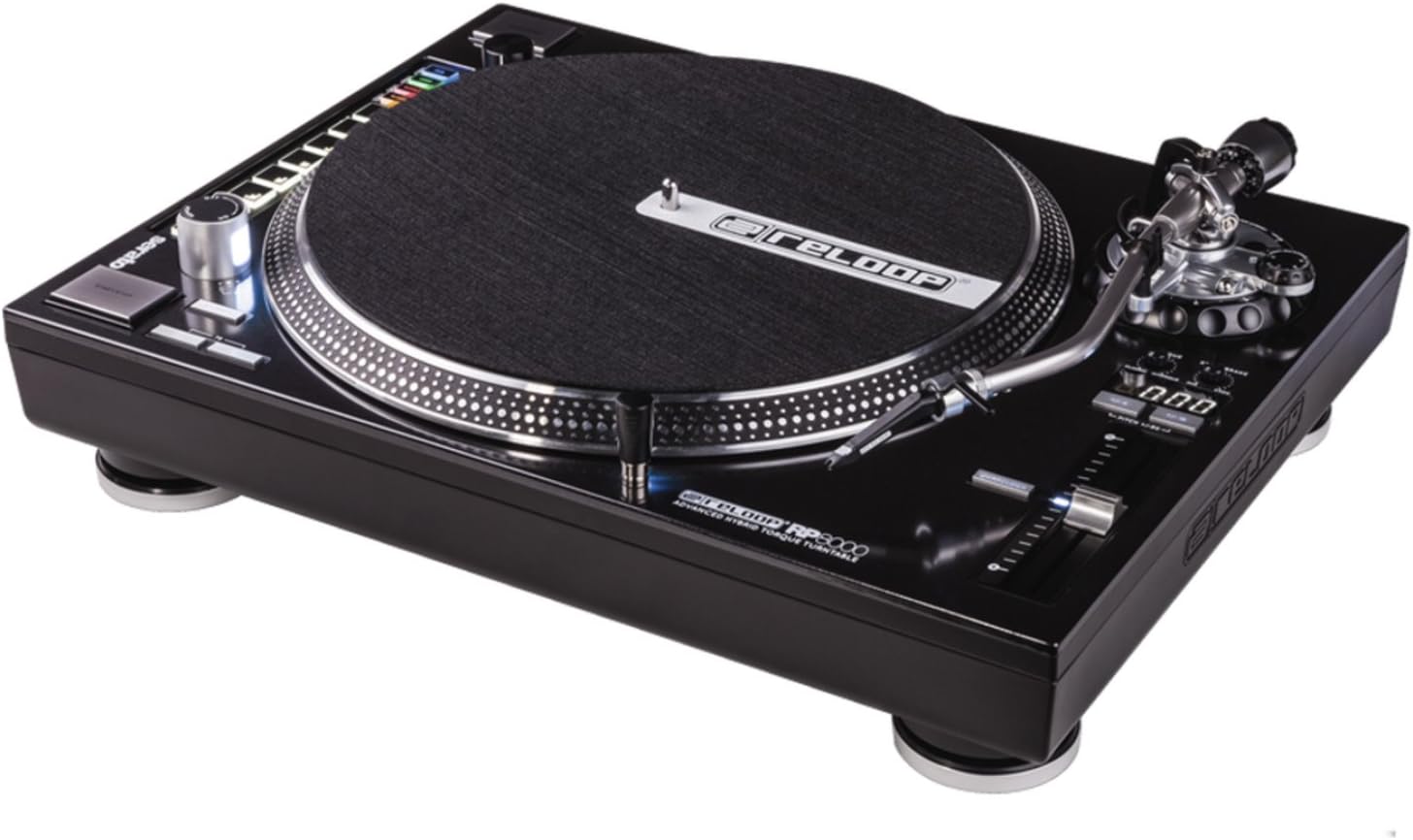
Figura 1: De dalt a baix view of the Reloop RP-8000 turntable, showcasing the platter, tone arm, pitch fader, and MIDI control section with performance pads.

Figura 2: En angle view of the Reloop RP-8000, highlighting the robust construction, the illuminated platter edge, and the integrated MIDI controls on the left side.

Figura 3: Rear panel of the Reloop RP-8000, showing the audio output (Phono/Line), USB ports (USB A and TT Link), power input, and power switch. Note the additional start/stop button for vertical setup.
Components clau:
- Plat: La superfície giratòria on es col·loquen els discos.
- Braç de to: Holds the cartridge and stylus, tracking the record's grooves.
- Fader de to: Adjusts the playback speed (BPM).
- Botons d'inici/aturada: Controls platter rotation. An additional button is provided for battle setup.
- MIDI Control Section: Features a Trax encoder, 8 backlit drum pads, and mode selection buttons for software control.
- Phono/Line Output: RCA jacks for audio output, with a switch to select between phono (turntable level) and line (mixer/amp level) output.
- Ports USB: For connecting to a computer and linking multiple turntables.
Configuració
1. Desembalatge i col·locació
- Traieu amb cura el tocadiscos del seu embalatge.
- Place the unit on a stable, level surface away from direct vibrations.
- Assegureu-vos que hi hagi una ventilació adequada al voltant de la unitat.
2. Tone Arm and Cartridge Assembly
- Attach your preferred headshell and cartridge (sold separately) to the tone arm.
- Install the counterweight onto the rear of the tone arm.
- Adjust the counterweight to balance the tone arm horizontally. Refer to your cartridge's instructions for recommended tracking force.
- Set the anti-skate dial to match the tracking force.
3. Connexions
- Connexió d'àudio: Connect the RCA cables from the turntable's PHONO/LINE output to your mixer or ampmés viu.
- If connecting to a PHONO input on your mixer/amp, set the turntable's PHONO/LINE switch to FONO.
- If connecting to a LINE input, set the turntable's PHONO/LINE switch to LÍNIA.
- Connect the ground wire to the ground terminal on your mixer/amp to reduce hum.
- Connexió USB: Connect the USB cable from the turntable's USB port to your computer for MIDI control and DVS (Digital Vinyl System) functionality.
- Turntable Link (TT Link): For linking multiple RP-8000 units, connect them in series using standard USB cables. Only one turntable needs to be connected to the computer.
- Connexió d'alimentació: Connect the power cable to the turntable and then to a suitable power outlet.
Instruccions de funcionament
1. Reproducció bàsica
- Place a record on the platter and put the slipmat on top.
- Select the desired speed (33, 45, or 78 RPM) using the speed selection buttons.
- Premeu el botó START/STOP per iniciar la rotació del plat.
- Carefully lower the tone arm onto the record using the cue lever.
- Adjust the pitch using the pitch fader as needed.
2. Control de to
- The pitch fader allows for precise adjustment of playback speed.
- Use the Pitch Range buttons (+/-8%, +/-16%, +/-50%) to select the desired pitch adjustment range.
- The LCD display shows the current pitch percentage.
- Press the Quartz Lock button to return the pitch to 0% (nominal speed).
3. MIDI Control and Performance Modes
The RP-8000 features an integrated MIDI control section for seamless integration with DJ software.
- Trax Encoder: Use this large encoder to browse through playlists and load tracks in your DJ software.
- Coixinets de rendiment: The 8 backlit drum pads offer various performance modes:
- Mode Hot Cue: Trigger up to 8 hot cue points.
- Mode de bucle: Set and trigger loops.
- SampMode: Access and play samples.
- Mode d'usuari: Freely assign MIDI functions to the pads and other control elements.
- Dual Performance Mode: Activate two modes simultaneously (e.g., Hot Cue and Loop) by pressing their respective buttons. The pads will be split to control both functions.
- Turntable Link Mode: Connect up to four RP-8000 turntables via USB. The units automatically assign themselves to available decks in your DJ software, requiring only one USB connection to your computer.
- Botó invers: Instantly reverses platter rotation.
- Adjustable Start/Stop Time: Use the dedicated dials to fine-tune the platter's start and brake times for customized performance.
Manteniment
- Neteja: Feu servir un drap suau i sec per netejar la unitat. Per a la brutícia persistent, netegeu lleugeramentamp cloth can be used, but ensure no liquid enters the unit. Avoid abrasive cleaners.
- Cura del stylus: Regularly clean your stylus with a soft brush designed for this purpose. Replace the stylus when it shows signs of wear to prevent damage to your records.
- Funda antipols: Use a dust cover (if available) when the turntable is not in use to protect it from dust and debris.
Resolució de problemes
| Problema | Causa possible | Solució |
|---|---|---|
| Sense so ni volum baix | Incorrect PHONO/LINE switch setting; loose RCA cables; faulty cartridge/stylus. | Ensure PHONO/LINE switch matches input; check cable connections; inspect/replace cartridge/stylus. |
| Soroll de brunzit | Ground wire not connected; interference from other electronics. | Connect ground wire to mixer/amp; move turntable away from other electronic devices. |
| El plat no gira | Power not connected; power switch off; START/STOP button not pressed. | Check power cable; ensure power switch is ON; press START/STOP button. |
| MIDI controls not responding | USB cable not connected; incorrect software settings; outdated firmware. | Ensure USB cable is connected; check DJ software MIDI settings; update turntable firmware if available. |
If the problem persists after attempting these solutions, please contact Reloop customer support.
Especificacions
| Característica | Detall |
|---|---|
| Nom del model | RP-8000 MK2 (AMS-RP-8000) |
| Tipus de motor | AC Motor, Quartz-driven Direct Drive |
| Pes de l'article | 22 lliures (aprox. 9.98 kg) |
| Dimensions del producte (L x A x A) | 20.66 x 16.53 x 7.48 polzades (aprox. 52.5 x 42 x 19 cm) |
| Tecnologia de connectivitat | Wired (RCA, USB 2.0) |
| Font d'alimentació | Elèctric amb cable |
| Voltage | 220 Volts (Note: Check specific unit for local voltage compatibility) |
| Interfície del maquinari | USB 2.0 |
| Dispositius compatibles | Ordinador personal |
| Format del senyal | Digital |
Garantia i Suport
For information regarding warranty coverage, please refer to the warranty card included with your product or visit the official Reloop website. Reloop offers various protection plans for extended coverage, which may be purchased separately.
For technical support, troubleshooting assistance beyond this manual, or spare parts, please contact Reloop customer service through their official weblloc web o distribuïdors autoritzats. Conserveu el rebut de compra com a comprovant de compra per a reclamacions de garantia.
Nota: The user manual (PDF) is also available for download at https://manuals.plus/m/8eb0b60ccb1c6d10ac93577b129a938bfbac889fdb461902d354afc8d19b78dd.


