1. Introducció i presentació del producteview
The Extel Emy Wireless Call Button is an IP44 rated, white, waterproof call button designed for use with compatible Extel wireless chime systems. It features a light indicator and an integrated protective visor for enhanced durability. With a radio transmission range of up to 150 meters, this call button is powered by a single CR2032 battery, which is included. It serves as an ideal replacement for a faulty call button or allows for the addition of a second entrance call point.
This call button is compatible with various Extel chime models, including LOOFIN, LOOFIB, LOOCENS, LOOPOG, LOONS, LOOBS, LOOVI, LOONI, LOOFLASH, APPLI, LOOPO, LOOMAX, and LOOKIT.
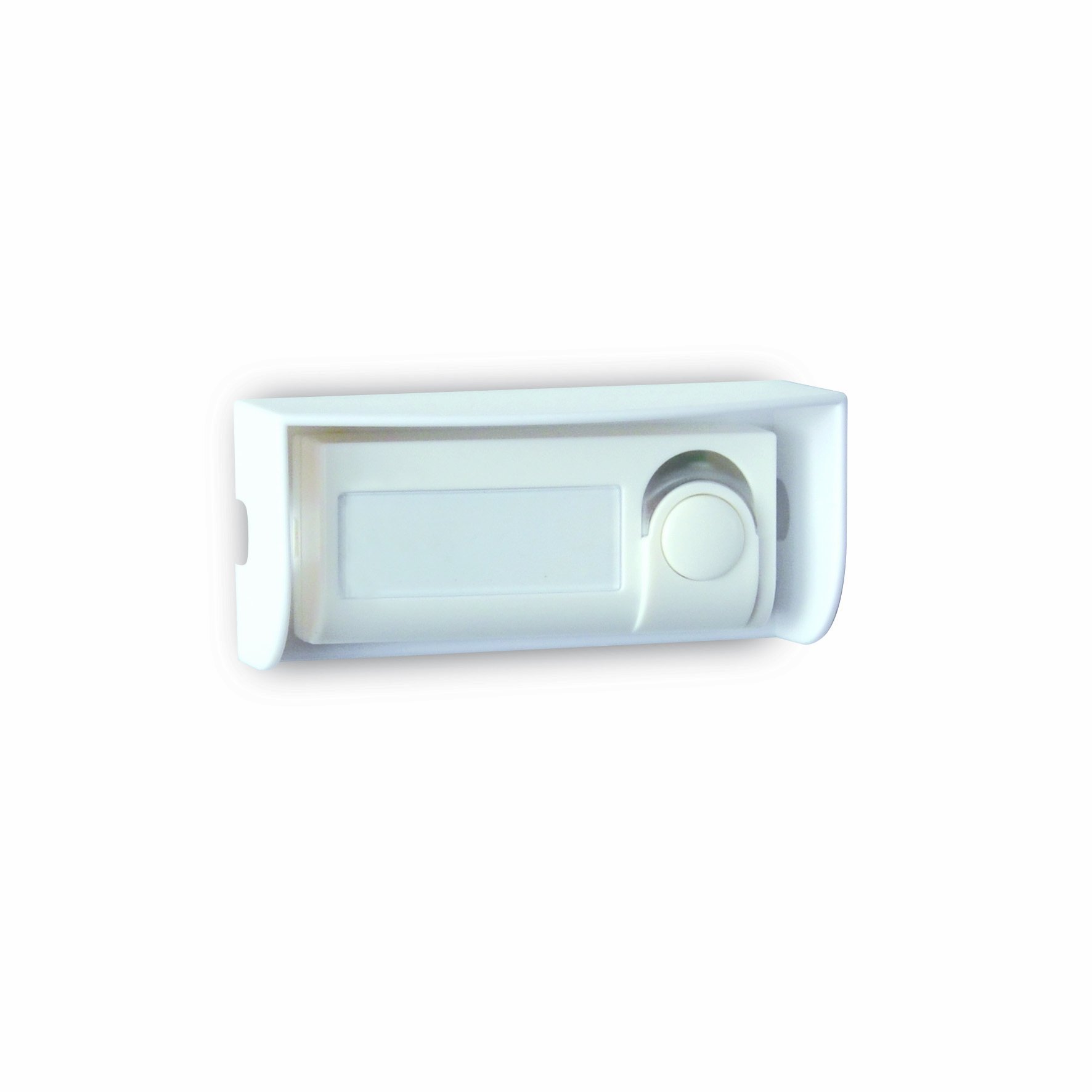
Image showing the white Extel Emy Wireless Call Button with its integrated protective visor.
2. Instruccions de seguretat
- Read all instructions carefully before installing and operating the device.
- Do not expose the call button to extreme temperatures, direct sunlight for prolonged periods, or corrosive substances.
- Ensure correct battery insertion, observing the polarity (+/-) markings. Incorrect insertion can damage the device or cause battery leakage.
- Mantingueu les piles fora de l'abast dels nens. En cas d'ingestió, busqueu atenció mèdica immediata.
- Dispose of used batteries and the device responsibly, following local regulations for electronic waste.
- No intenteu obrir ni reparar el dispositiu vosaltres mateixos. Encarregueu totes les tasques de manteniment a personal qualificat.
3. Contingut del paquet
Verifiqueu que tots els elements siguin presents al paquet:
- 1 x Extel Emy Wireless Call Button with integrated visor
- 1 x CR2032 Lithium Metal Battery (may be pre-installed)
- Mounting hardware (e.g., screws, wall plugs, or adhesive pad)
- Manual d'instruccions
4. Configuració i instal·lació
4.1 Instal·lació de la bateria
- Locate the battery compartment on the back of the call button.
- Obriu la coberta del compartiment.
- Insert the included CR2032 lithium metal battery, ensuring the positive (+) side faces upwards as indicated inside the compartment.
- Tanqueu bé la tapa del compartiment de la bateria.
4.2 Mounting the Call Button
Choose a suitable location for your call button, typically near your main entrance or any secondary entrance where you wish to add a call point. The IP44 rating ensures the button is protected against splashing water, making it suitable for outdoor installation.
- Ús de cargols: Mark the desired mounting position. Drill pilot holes if necessary, then secure the call button to the surface using the provided screws and wall plugs.
- Using Adhesive Pad (if included): Clean the mounting surface thoroughly to ensure it is dry and free of dust or grease. Peel off the protective film from the adhesive pad and firmly press the call button onto the desired location for at least 30 seconds.
Ensure the integrated protective visor is correctly positioned over the button after mounting.
4.3 Pairing with Your Extel Chime
To enable communication between the Emy call button and your Extel wireless chime, pairing is required. The exact pairing procedure may vary slightly depending on your specific Extel chime model. Please refer to your chime's instruction manual for detailed pairing steps. Generally, the process involves:
- Placing your Extel chime into pairing mode (often indicated by a flashing light or specific sound).
- Pressing the Extel Emy Wireless Call Button once to send a pairing signal.
- The chime should confirm successful pairing (e.g., by ringing or a solid light).
5. Instruccions de funcionament
Once installed and paired, operating the Extel Emy Wireless Call Button is straightforward:
- Press the call button firmly.
- A light indicator on the button will illuminate briefly, confirming that a signal has been transmitted.
- The wireless signal will be sent to your paired Extel chime, which will then sound the selected melody.
6. Manteniment
6.1 Neteja
To maintain the appearance and functionality of your call button:
- Wipe the surface of the call button with a soft, slightly damp tela.
- No utilitzeu netejadors abrasius, dissolvents ni productes químics agressius, ja que poden danyar l'acabat o els components interns.
6.2 Substitució de la bateria
The CR2032 battery typically lasts for an extended period. However, if you notice the light indicator no longer illuminates when pressed, or if the wireless range significantly decreases, it is likely time to replace the battery.
- Open the battery compartment cover on the back of the call button.
- Traieu la bateria CR2032 antiga.
- Insert a new CR2032 lithium metal battery, ensuring correct polarity (+/-).
- Tanqueu bé la tapa del compartiment de la bateria.
7. Solució De Problemes
| Problema | Causa possible | Solució |
|---|---|---|
| Call button not working / Chime not ringing | Bateria morta o instal·lada incorrectament Not paired with chime Chime power issue Fora de rang | Replace CR2032 battery, ensuring correct polarity Re-pair the call button with your Extel chime (refer to chime manual) Check if the chime is powered on and functioning Ensure the button is within 150m range of the chime |
| Reduced wireless range | Bateria baixa Obstructions between button and chime Interferència de ràdio | Substituïu la bateria CR2032 Relocate button or chime to minimize obstructions (e.g., thick walls, metal objects) Move away from other wireless devices or sources of interference |
| Light indicator not illuminating | Bateria esgotada Falla interna | Substituïu la bateria CR2032 If issue persists after battery replacement, contact customer support |
8. Especificacions
- Model: EMY
- Marca: EXTEL
- Font d'alimentació: 1 x CR2032 Lithium Metal Battery (included)
- Interval sense fil: Fins a 150 metres (en camp obert)
- Classificació de protecció d'entrada (IP): IP44 (Protect contra objectes sòlids de més d'1 mm i esquitxades d'aigua des de qualsevol direcció)
- Color: Blanc
- Dimensions (aprox.): 10 x 4.8 x 4.8 cm
- Pes (aprox.): 120 grams
- Certificació: NF
- Fabricant: CFIEX
9. Informació de la garantia
The Extel Emy Wireless Call Button is covered by a Garantia del fabricant de 1 anys des de la data de compra. Aquesta garantia cobreix els defectes de materials i fabricació en condicions d'ús normal. No cobreix els danys causats per un mal ús, accidents, modificacions no autoritzades o instal·lació incorrecta.
To make a warranty claim, please retain your original proof of purchase (receipt or invoice) and contact your retailer or Extel customer support.
10. Suport
For further assistance, technical support, or inquiries regarding your Extel Emy Wireless Call Button, please refer to the following resources:
- Official Extel Weblloc: Visit the official Extel website for FAQs, additional product information, and contact details.
- Atenció al client: Contact Extel customer service directly for personalized support.


