Introducció
Welcome to the user manual for your Logitech HD Pro Webcam C920. This guide provides detailed instructions on how to set up, operate, maintain, and troubleshoot your webcam to ensure optimal performance. The C920 Webcam delivers incredibly sharp and detailed Full HD video with a Full HD glass lens, 78° field of view, and HD auto lighting correction, plus dual microphones for crystal-clear stereo sound.
Informació de seguretat
Please read all safety instructions carefully before using your webcam. Keep this manual for future reference.
- No exposar el webcam to water or excessive moisture.
- Eviteu col·locar el webcam near heat sources or in direct sunlight.
- No intenteu obrir ni reparar el webcam yourself. Refer all servicing to qualified personnel.
- Use only the provided USB cable to connect the webcam to your computer.
- Keep the lens clean using a soft, dry cloth.
Contingut del paquet
Verifiqueu que tots els elements siguin presents al vostre paquet:
- Logitech HD Pro Weblleva C920
- Documentació d'usuari (aquest manual)
Guia de configuració
1. Instal·lació de maquinari
The Logitech C920 features a versatile clip that allows it to be securely mounted on various devices.
- For Laptops/LCD Monitors: Obriu el clip i col·loqueu-lo webcam on top of your screen, ensuring the front lip rests securely on the top edge and the adjustable clip arm rests against the back of the screen.
- For Desktops/Flat Surfaces: Fold the clip completely closed to form a flat base. Place the webcàmera sobre una superfície estable i plana.
- Muntatge del trípode: The C920 also includes a standard tripod thread on the bottom of its clip for mounting on a tripod (not included).
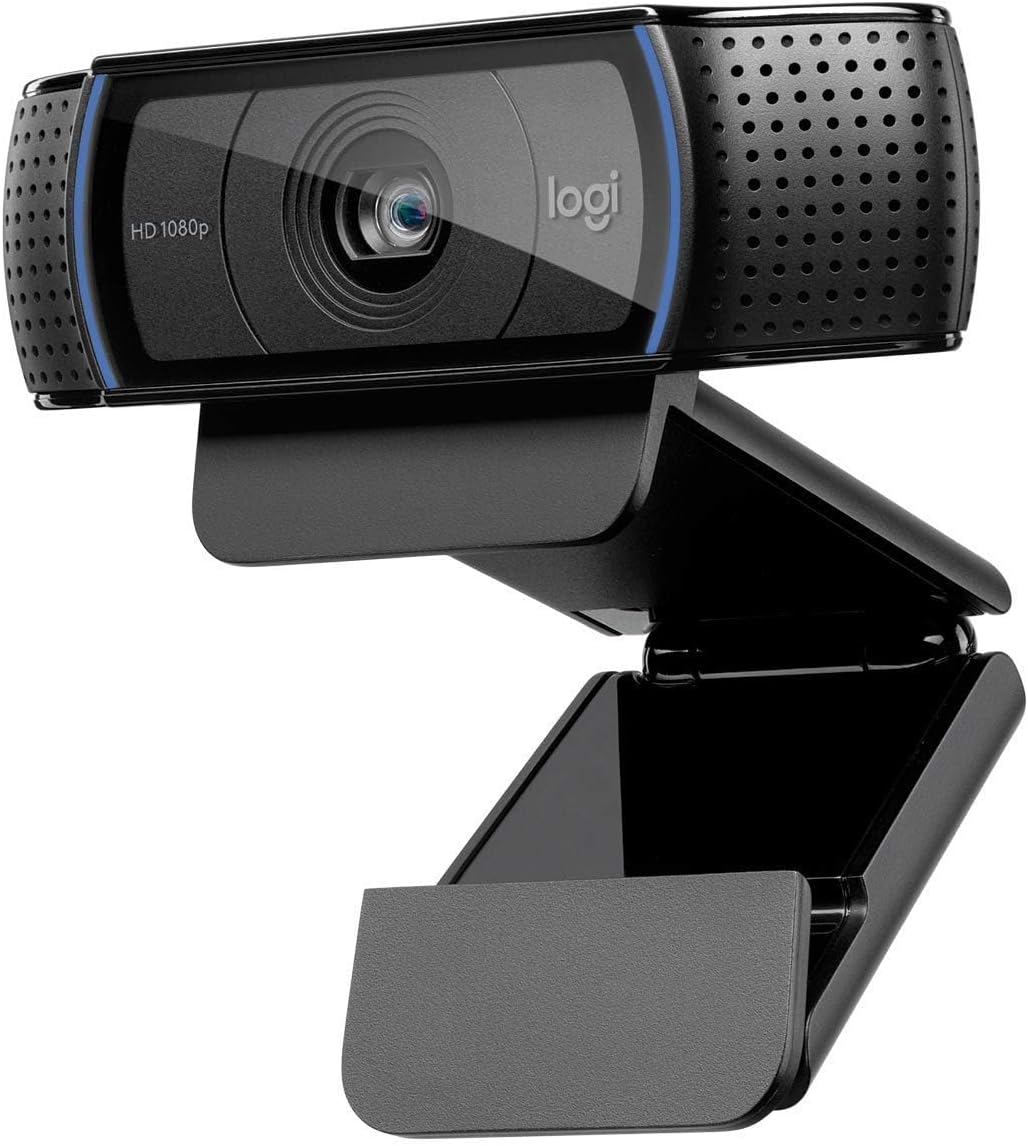
Imatge: Frontal view of the Logitech HD Pro Webcam C920, showing the lens, HD 1080p label, and Logitech logo. The webcam is mounted on its adjustable clip, ready for placement on a monitor or flat surface.

Imatge: Lateral view of the Logitech HD Pro Webcam C920, illustrating the flexible mounting clip in an extended position, suitable for gripping the top edge of a monitor or laptop screen. The attached USB cable is visible.
2. Instal·lació de programari
The Logitech C920 is a plug-and-play device for most modern operating systems. Drivers are typically installed automatically upon connection.
- Connecteu el cable USB de la webcàmera a un port USB disponible de l'ordinador.
- Your operating system (Windows or macOS) should automatically detect and install the necessary drivers. This may take a few moments.
- For advanced settings and features, you may download the Logitech G HUB software or Logitech Capture software from the official Logitech support weblloc.
Requisits del sistema:
- Windows 7, 8, 10 o posteriors
- macOS 10.10 o posterior
- Chrome OS
- Port USB 2.0
- Connexió a Internet per a la descàrrega de programari opcional
Funcionant el teu Weblleva
Connectant el Weblleva
Un cop el webcam is physically connected and drivers are installed, it will be recognized by your computer as a video and audio input device.
Using with Applications
The C920 is compatible with most popular video conferencing and streaming applications.
- Videotrucades: Open your preferred video calling application (e.g., Zoom, Skype, Microsoft Teams, Google Meet). In the application's settings, select "Logitech C920" as your camera and microphone.
- Gravació: Use your computer's built-in camera application (e.g., Camera app on Windows, Photo Booth on macOS) or third-party recording software to capture video and audio.
- Transmissió en temps real: For live streaming platforms, configure your streaming software (e.g., OBS Studio, Streamlabs OBS) to use the C920 as your video and audio source.
Ajust de la configuració
Many applications allow you to adjust webcam settings directly. For more comprehensive control, use the Logitech G HUB or Logitech Capture software.
- Resolució: Select your desired video resolution (up to 1080p Full HD).
- Camp de View: The C920 has a 78° field of view, suitable for individual or small group calls.
- Enfocament automàtic: El webcam features automatic autofocus. Ensure good lighting for optimal performance.
- Lighting Correction: HD auto lighting correction adjusts to dim lighting conditions.
- Micròfon: The C920 has dual microphones for stereo sound. Adjust microphone levels in your computer's sound settings or application settings.
Cura i Manteniment
Una cura adequada allargarà la vida del vostre weblleva.
- Neteja de la lent: Gently wipe the lens with a soft, lint-free cloth. Do not use abrasive cleaners or solvents.
- Neteja del cos: Utilitzeu una mica damp drap per netejar webcam's body. Ensure no moisture enters the device.
- Emmagatzematge: Quan no s’utilitzi, emmagatzemeu el fitxer webguardeu-ho en un lloc fresc i sec, allunyat de la llum solar directa i de temperatures extremes.
- Cura del cable: Avoid bending or kinking the USB cable excessively.
Resolució de problemes
If you encounter issues with your Logitech C920, refer to the following common problems and solutions:
| Problema | Solució |
|---|---|
| Webcàmera no detectada per l'ordinador. |
|
| No video or black screen in application. |
|
| Mala qualitat de vídeo (borrós, fosc, granulós). |
|
| No hi ha àudio o hi ha mala qualitat d'àudio. |
|
Especificacions tècniques
| Característica | Especificació |
|---|---|
| Número de model | 960-001055 |
| Resolució de captura de vídeo | Full HD 1080p (up to 1920 x 1080 pixels) at 30 frames per second |
| Resolució fotogràfica | 15 Megapixels (software enhanced) |
| Lent | Lent de vidre Full HD |
| Camp de View | Diagonal de 78° |
| Tipus d'enfocament | Enfocament automàtic |
| Micròfons integrats | Micròfons estèreo duals amb reducció automàtica de soroll |
| Lighting Correction | Automatic HD light correction (RightLight™ 2) |
| Connectivitat | USB 2.0 (preparat per a USB 3.0) |
| Longitud del cable | 1.5 m (5 peus) |
| Dimensions (A x A x P) | 2.79 x 24.64 x 16.51 cm (with clip) |
| Pes | 136.08 g |
| Sistemes operatius compatibles | Windows 7 o posterior, macOS 10.10 o posterior, Chrome OS |
Informació de la garantia
Logitech products are manufactured to the highest quality standards. This product is covered by a limited hardware warranty from the date of purchase. For specific warranty terms and conditions applicable to your region, please refer to the official Logitech weblloc web o la targeta de garantia inclosa amb el producte. Conserveu el comprovant de compra per a reclamacions de garantia.
Atenció al client
Per obtenir més ajuda, assistència tècnica o per descarregar el programari i els controladors més recents, visiteu el lloc web d'assistència oficial de Logitech. weblloc:
You can also find FAQs and community forums on the support site.


