1. Introducció
This manual provides detailed instructions for the installation, operation, and maintenance of your Axis P1355 Surveillance/Network Camera. The Axis P13 series offers high-performance fixed cameras designed for both indoor and outdoor surveillance, delivering superb image quality with H.264 compression. These models support HDTV 720p/1080p video and are equipped with features like Wide Dynamic Range and Day/Night functionality for clear imaging in various lighting conditions. Specific models within the P13 series, including HDTV 720p, incorporate Axis Lightfinder technology for enhanced low-light sensitivity, while HDTV 1080p and 5-megapixel cameras feature P-iris control for optimized depth of field and lens resolution.
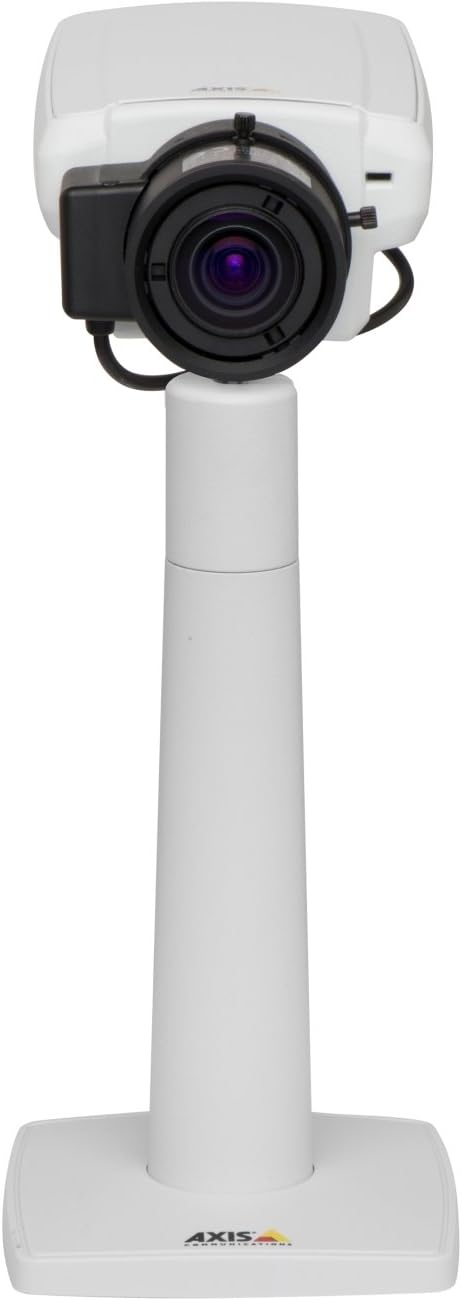
Figura 1: The Axis P1355 Surveillance Camera shown mounted on its stand. This image illustrates the camera's physical appearance and typical mounting configuration.
2. Informació de seguretat
Please read all safety instructions before installing or operating the camera.
- Ensure the power source matches the camera's requirements to prevent electrical hazards.
- La instal·lació ha de ser realitzada per personal qualificat d'acord amb les normes elèctriques locals.
- No exposeu la càmera a temperatures extremes, humitat ni ambients corrosius.
- Avoid direct exposure of the lens to strong light sources, such as the sun, as this may damage the image sensor.
- Desconnecteu l'alimentació abans de netejar o fer el manteniment de la càmera.
3. Configuració i instal·lació
The Axis P1355 camera is designed for both indoor and outdoor use and supports various mounting options.
3.1 Muntatge
The camera is typically designed for wall mount installation. Ensure the mounting surface is strong enough to support the camera's weight (approximately 2 pounds). Use appropriate screws and anchors for the chosen surface.
- Select a suitable location for optimal surveillance coverage.
- Securely attach the mounting bracket to the wall.
- Mount the camera onto the bracket, ensuring it is firmly in place.
- Adjust the camera's angle for the desired field of view.
3.2 Connexions
The Axis P1355 camera primarily uses wired connectivity for reliable data transmission and power.
- Connexió d'alimentació: Connect the provided power adapter to the camera's power input and then to a suitable electrical outlet. The camera operates on a corded electric power source.
- Connexió de xarxa: Connect an Ethernet cable from the camera's network port to your network switch or router. This provides wired connectivity for video streaming and control.
- Wireless Connectivity (Optional/Configuration): While primarily wired, the camera supports Wi-Fi for certain configurations. Refer to the Axis product documentation for specific wireless setup instructions if applicable to your model variant.
4. Instruccions de funcionament
Once installed and connected, the Axis P1355 camera can be configured and operated via a network interface.
4.1 Accés i configuració inicials
- Use the Axis IP Utility or a similar network discovery tool to find the camera's IP address on your network.
- Obre a web navegador i introduïu l'adreça IP de la càmera per accedir-hi web interfície.
- Log in using the default credentials (refer to Axis documentation for default username/password, typically 'root' and 'pass' or similar, which should be changed immediately).
- Follow the on-screen prompts to set up basic network settings, date/time, and user accounts.
4.2 Video Monitoring and Features
- Viu View: Access the live video feed through the web interface or compatible video management software.
- Resolució: The camera supports video capture resolutions up to 720p and effective video resolutions of 1080 pixels, with effective still resolution of 2 MP.
- Color and Monochrome Modes: The camera can operate in both color and monochrome (black and white) modes, automatically switching based on light conditions or configured manually.
- Visió nocturna: Utilize the integrated night vision capabilities for surveillance in low-light or complete darkness.
- Zoom òptic: Adjust the optical zoom for detailed views de zones específiques.
- P-Iris Control: For models equipped with P-iris, this feature allows precise control over the iris position to optimize depth of field and lens resolution, enhancing image sharpness. This can be configured via the web interfície.
- Format de vídeo: Video is typically captured in MP4 format.
- Comandament a distància: The camera supports remote control for various settings and adjustments.
5. Manteniment
Regular maintenance ensures optimal performance and longevity of your Axis P1355 camera.
- Neteja: Gently clean the camera lens and housing with a soft, damp drap. Eviteu productes de neteja o dissolvents abrasius.
- Actualitzacions de firmware: Reviseu periòdicament les comunicacions d'Axis weblloc web per a actualitzacions de firmware. Mantenir el firmware actualitzat garanteix l'accés a les darreres funcions, pegats de seguretat i millores de rendiment.
- Inspecció del cable: Regularly inspect all cables for signs of wear or damage, especially for outdoor installations.
- Control ambiental: Assegureu-vos que l'entorn de funcionament de la càmera es mantingui dins dels rangs de temperatura i humitat especificats.
6. Solució De Problemes
This section addresses common issues you might encounter with your Axis P1355 camera.
- Sense energia:
- Verify the power adapter is securely connected to both the camera and a working power outlet.
- Comproveu el cable d'alimentació per si hi ha danys.
- Sense connexió de xarxa:
- Ensure the Ethernet cable is properly connected to the camera and the network switch/router.
- Check network switch/router status.
- Confirm the camera has a valid IP address and is on the same network segment as your viewdispositiu d'ing.
- Mala qualitat d'imatge:
- Netegeu la lent de la càmera.
- Adjust focus and zoom settings via the web interfície.
- Check lighting conditions; enable night vision or adjust exposure settings if necessary.
- Ensure P-iris control is correctly configured for optimal sharpness (if applicable).
- No es pot accedir Web Interfície:
- Verify the camera's IP address.
- Ensure your computer is on the same network as the camera.
- Try restarting the camera and your network equipment.
7. Especificacions
| Característica | Detall |
|---|---|
| Marca | Comunicacions de l'eix |
| Número de model | EIX P1355 |
| Ús interior/exterior | Interior, Exterior |
| Tecnologia de connectivitat | Wired (Wi-Fi capable for certain configurations) |
| Característica especial | Visió nocturna |
| Font d'alimentació | Elèctric amb cable (7.1 watts) |
| Resolució de captura de vídeo | 720p |
| Resolució de vídeo efectiva | 1080 píxels |
| Resolució de fixes efectius | 2 MP |
| Tipus de zoom | Zoom òptic (2.9x òptic) |
| Tipus de controlador | Iris (P-iris control) |
| Tipus de muntatge | Muntatge de paret |
| Dimensions del producte (L x A x A) | 3.07 x 5.94 x 1.69 polzades |
| Pes de l'article | 2 lliures |
| Classificació de protecció internacional | IP54 |
| Format de captura de vídeo | MP4 |
8. Garantia i Suport
For detailed warranty information and technical support, please refer to the official Axis Communications weblloc web o contacteu directament amb el seu servei d'atenció al client.
Fabricant: AXIS COMMUNICATION INC.
Weblloc: www.axis.com (Si us plau, visiteu el lloc web oficial) website for the most current support resources, drivers, and documentation.)


