1. Introducció
This manual provides detailed instructions for the setup, operation, and maintenance of your CHACON Weather Station Model 54416 with a wireless outdoor sensor. Please read this manual thoroughly before using the device to ensure correct operation and to maximize its lifespan.
2. Contingut del paquet
- 1 x CHACON Weather Station (Main Unit)
- 1 x Sensor exterior sense fil
- 1 x Manual d'usuari
3. Producte acabatview
Familiarize yourself with the main components of your weather station.
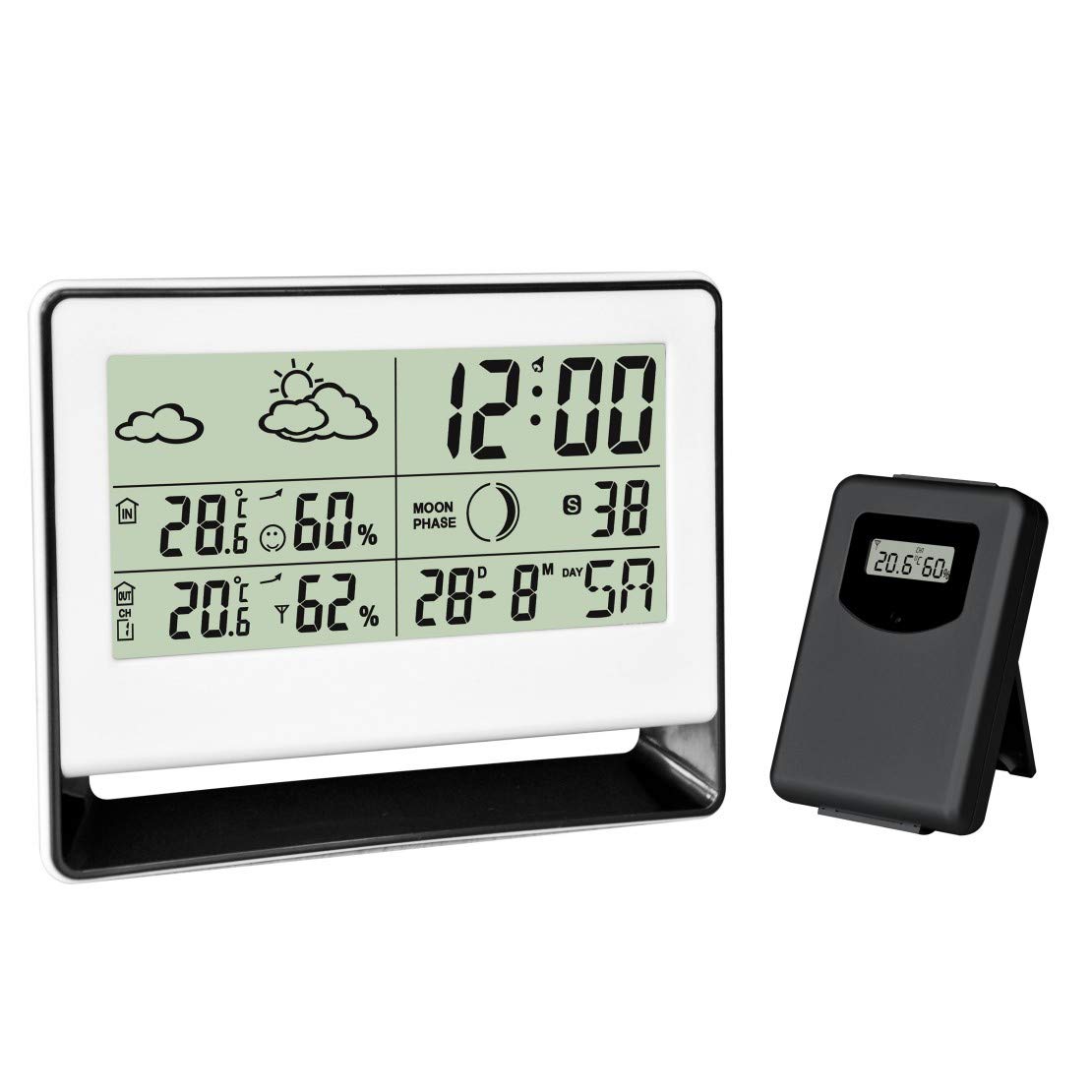
Figure 1: CHACON Weather Station main unit (left) and wireless outdoor sensor (right). The main unit displays time, indoor/outdoor temperature, humidity, weather forecast, and moon phase. The outdoor sensor transmits environmental data wirelessly to the main unit.

Figura 2: Primer pla view of the CHACON Wireless Outdoor Sensor. This compact unit features a small display showing the current outdoor temperature and humidity readings before transmission to the main station.
Main Unit Display Features:
- Current Time and Calendar
- Temperatura interior i humitat
- Outdoor Temperature and Humidity (from wireless sensor)
- Icones de previsió meteorològica
- Visualització de les fases lunars
- Funció d'alarma
4. Configuració
4.1. Instal·lació de la bateria
The CHACON Weather Station and its outdoor sensor are battery-powered. Batteries are not included.
- Unitat principal: Open the battery compartment cover on the back of the main unit. Insert the required batteries (typically AAA, refer to the compartment label for quantity and type) according to the polarity indicators (+/-). Close the cover.
- Sensor exterior: Open the battery compartment cover on the back of the outdoor sensor. Insert the required batteries (typically AAA, refer to the compartment label for quantity and type) according to the polarity indicators (+/-). Close the cover.
Nota: It is recommended to insert batteries into the outdoor sensor first, then into the main unit, to facilitate immediate pairing.
4.2. Emparellament de sensors
The outdoor sensor should automatically pair with the main unit once both are powered on. If pairing does not occur:
- Ensure both units have fresh batteries.
- Place the outdoor sensor within close proximity (e.g., 1-2 meters) of the main unit during the initial setup.
- Press the 'RESET' button (if available) on both the main unit and the outdoor sensor.
- Allow a few minutes for the units to establish a connection. The outdoor temperature and humidity should appear on the main unit's display.
4.3. Col·locació del sensor
For accurate outdoor readings, place the wireless sensor in a sheltered location outdoors, away from direct sunlight and precipitation. Ensure it is within the effective transmission range of the main unit (typically up to 30 meters, depending on obstacles).
5. Instruccions de funcionament
5.1. Configuració de l'hora i la data
Refer to the buttons on the back or side of the main unit. Typically, there will be a 'MODE' or 'SET' button to enter setting mode, and 'UP'/'DOWN' or '+'/'–' buttons to adjust values. Follow the on-screen prompts to set the time (hour, minute), date (year, month, day), and 12/24-hour format.
5.2. Configuració de l'alarma
Press the 'ALARM' or 'MODE' button repeatedly until the alarm time is displayed. Use the 'SET' or 'ADJUST' button to enter alarm setting mode, then use the adjustment buttons to set the desired alarm time. Press 'ALARM' again to activate or deactivate the alarm.
5.3. Selecció de la unitat de temperatura
Most units allow switching between Celsius (°C) and Fahrenheit (°F). Look for a dedicated '°C/°F' button or a setting option within the 'MODE' menu.
5.4. Previsió meteorològica
The weather station predicts weather conditions for the next 12-24 hours based on atmospheric pressure changes. The forecast is indicated by icons such as Sunny, Partly Cloudy, Cloudy, Rainy. These are predictions and may not always match actual local weather conditions.
5.5. Visualització de la fase lunar
The moon phase icon on the display changes automatically according to the set date, showing the current phase of the moon.
6. Manteniment
- Neteja: Netegeu la unitat principal i el sensor exterior amb un drap suau i sec.amp tela. No utilitzeu netejadors abrasius ni dissolvents.
- Substitució de la bateria: Replace batteries in both units when the low battery indicator appears on the display, or when readings become inconsistent. Always replace all batteries at the same time with new ones of the same type.
- Condicions ambientals: Avoid exposing the main unit to extreme temperatures, direct sunlight, or high humidity. The outdoor sensor is designed for outdoor use but should be protected from direct heavy rain and snow.
7. Solució De Problemes
- No outdoor readings:
- Check if batteries are correctly installed and charged in both units.
- Assegureu-vos que el sensor exterior estigui dins de l'abast de la unitat principal.
- Reduce obstacles between the sensor and main unit.
- Press the 'RESET' button (if available) on both units and allow them to re-pair.
- Lectures inexactes:
- Assegureu-vos que el sensor exterior no estigui exposat a la llum solar directa ni a prop de fonts de calor.
- Verify the main unit is not near heat-emitting appliances or in direct drafts.
- Allow time for the sensors to stabilize after initial setup or battery replacement.
- La pantalla està tènue o en blanc:
- Canvieu les piles de la unitat principal.
- Comproveu la polaritat de la bateria.
8. Especificacions
| Característica | Detall |
|---|---|
| Marca | CHACON |
| Número de model | 54416 |
| Dimensions del producte (L x A x A) | 3.2 x 20.2 x 26.2 cm (unitat principal) |
| Pes | 254 grams |
| Material | Plàstic, metall |
| Tecnologia de connectivitat | Sense fil |
| Font d'alimentació | Funciona amb bateria |
| Piles incloses | No |
| Precisió de la temperatura | ±1 °C |
| Característica especial | Alarma |
| Ús recomanat | Outdoor (for sensor) |
| Components inclosos | Estació meteorològica amb sensor exterior sense fil |
9. Informació de seguretat
- Do not expose the main unit to water or extreme moisture.
- Do not attempt to disassemble or repair the device yourself. Refer to qualified personnel.
- Mantingueu les piles fora de l'abast dels nens. Desfeu-vos de les piles usades de manera responsable d'acord amb la normativa local.
- Eviteu col·locar el dispositiu a prop de camps electromagnètics forts.
10. Garantia i Suport
Information regarding warranty coverage and customer support for the CHACON Weather Station Model 54416 is not available in this document. Please refer to the product packaging or the manufacturer's official website for details on warranty terms and contact information for support.


