1. Introducció
This manual provides essential information for the safe and effective use of your Canon EOS Rebel T5 Digital SLR Camera Kit. The Canon EOS Rebel T5 is designed for capturing high-quality still images and Full HD video, featuring an 18.0 Megapixel CMOS sensor and a DIGIC 4 image processor. Its intuitive design makes it suitable for both beginners and experienced photographers.
2. Què hi ha a la caixa
Your Canon EOS Rebel T5 kit typically includes the following components:
- Canon EOS Rebel T5 Camera Body
- Canon EF-S 18-55mm f/3.5-5.6 IS II Standard Zoom Lens
- Paquet de bateries
- Carregador de bateria
- Cable d'interfície (USB)
- Corretja ampla
- EOS Digital Solution Disk (Software)
- Manuals d'instruccions

Figure 2.1: Typical contents of the Canon EOS Rebel T5 kit.
3. Configuració
3.1 Fixació de la lent
- Traieu la tapa del cos de la càmera i la tapa posterior de l'objectiu.
- Alineeu la marca d'índex vermella de l'objectiu amb la marca d'índex vermella del cos de la càmera.
- Gireu la lent en sentit horari fins que encaixi al seu lloc.
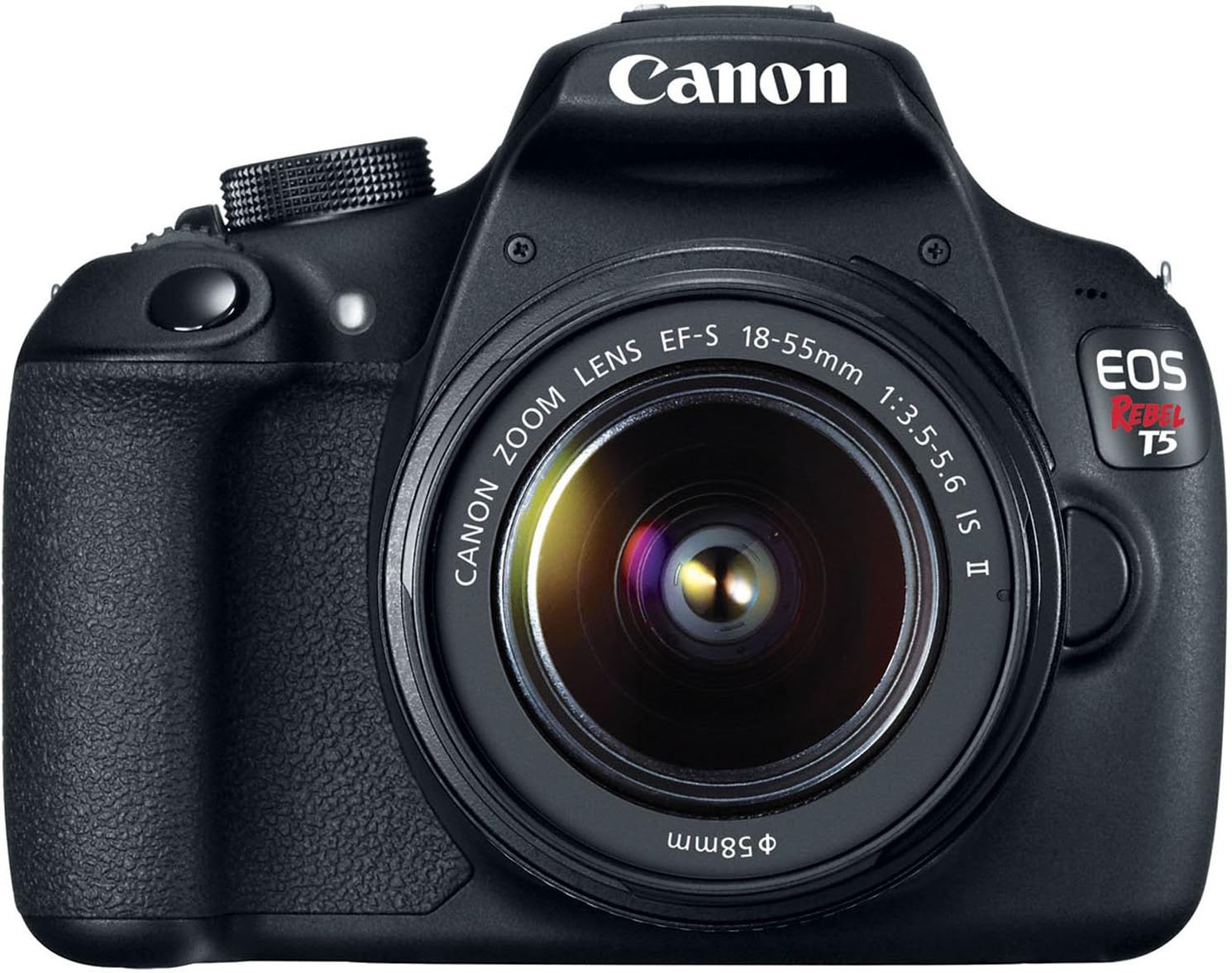
Figura 3.1: Frontal view of the Canon EOS Rebel T5 with the EF-S 18-55mm lens.
3.2 Inserció de la bateria
- Obriu la tapa del compartiment de la bateria a la part inferior de la càmera.
- Insert the charged battery pack with the electrical contacts facing inward, ensuring it clicks into place.
- Tanqueu la tapa del compartiment de la bateria.
3.3 Inserció d'una targeta SD
An SD card is required to store photos and videos. The SD card is not included with the kit and must be purchased separately. Open the SD card slot cover on the side of the camera and insert the SD card until it clicks. Ensure the card is inserted correctly to avoid damage.
Video 3.1: This video provides a visual guide on unboxing and basic setup, including attaching the lens and inserting the battery into the Canon EOS Rebel T5 Digital Camera.
4. Instruccions de funcionament
4.1 Encès/Apagat
To power on the camera, rotate the power switch to the 'ON' position. To power off, rotate it to 'OFF'.
4.2 Mode Dial
El selector de mode a la part superior de la càmera permet seleccionar diversos modes de dispar:
- Basic Zone Modes: Fully automatic modes for simple point-and-shoot operation (e.g., Scene Intelligent Auto, Flash Off, Creative Auto, Portrait, Landscape, Close-up, Sports, Night Portrait).
- Modes de la zona creativa: Provide more control over settings (e.g., Program AE (P), Shutter-priority AE (Tv), Aperture-priority AE (Av), Manual Exposure (M)).
- Movie Shooting Mode: For recording Full HD videos.

Figura 4.1: posterior view of the Canon EOS Rebel T5, highlighting the LCD and control layout.
4.3 Fer fotos
- Seleccioneu el mode de disparo desitjat amb el selector de mode.
- Mira a través del viewfinder or use the LCD screen for Live View disparant.
- Press the shutter button halfway to activate the 9-point autofocus system and achieve focus.
- Premeu completament el botó de l'obturador per fer la foto.
4.4 Gravació de vídeos
Switch the mode dial to the movie shooting mode. Press the Live View shooting/Movie shooting button to start and stop recording. The camera supports Full HD video recording.
4.5 Ús del flaix integrat
In low-light conditions or when backlighting is present, the built-in flash can be used. In Basic Zone modes, the flash may pop up automatically. In Creative Zone modes, you can manually raise the flash by pressing the flash button.
Video 4.1: This video offers an honest review of the Canon T5, demonstrating various features and operational aspects of the camera.
5. Manteniment
5.1 Cura de les lents
- Always keep the lens cap on when not in use to protect the front element.
- Use a lens brush or blower to remove dust, then gently wipe with a microfiber lens cloth. Avoid touching the lens surface with your fingers.
- For stubborn smudges, use a small amount of lens cleaning solution on a clean cloth.
5.2 Camera Body Care
- Netegeu el cos de la càmera amb un drap suau i sec.
- Avoid exposing the camera to extreme temperatures, humidity, or dust.
- No utilitzeu dissolvents orgànics ni agents de neteja forts.
5.3 Cura de la bateria
- Charge the battery fully before first use and whenever the battery indicator is low.
- Guardeu les piles en un lloc fresc i sec quan no les utilitzeu.
- Traieu la bateria de la càmera si no la fareu servir durant un període prolongat.
6. Solució De Problemes
- "No card in camera" message: Ensure an SD card is inserted correctly and is not full or damaged.
- Autofocus is slow: In very low light or with subjects lacking contrast, autofocus may be slower. Try using the built-in flash or switching to manual focus.
- La càmera no s'encén: Comproveu si la bateria està carregada i inserida correctament.
- Les imatges són borroses: Ensure the lens is clean, the camera is stable (use a tripod if necessary), and the correct focus mode is selected.
7. Especificacions
| Tipus de sensor | CMOS |
| Resolució del sensor fotogràfic | 18 MP |
| Resolució de vídeo | FHD 1080p |
| Lent | EF-S 18-55mm f/3.5-5.6 IS II standard zoom lens |
| Punts d'enfocament automàtic | 9-point AF System |
| Velocitat de tir continu | 3 FPS |
| Mida de la pantalla | 3 polzades |
| Admet File Format | JPEG, RAW |
| Tecnologia de connectivitat | Cablejat, sense fil (Wi-Fi) |
| Pes de l'article | 1 lliures |
8. Garantia i Suport
8.1 Informació de la garantia
This Canon EOS Rebel T5 camera kit comes with a 90-day limited warranty. Please retain your proof of purchase for any warranty claims.
8.2 Atenció al client
For further assistance, technical support, or service inquiries, please refer to the official Canon support website or contact their customer service department. Detailed contact information can typically be found in the included warranty card or on the manufacturer's weblloc.


