1. Introducció
Thank you for choosing the Rothenberger ROSCOPE i2000 Set Pipe 25/16 Inspection Camera. This manual provides essential information for the safe and efficient operation, maintenance, and troubleshooting of your device. Please read this manual thoroughly before using the product and keep it for future reference.
The ROSCOPE i2000 is designed for professional inspection of pipes and drains, featuring a robust design and clear imaging capabilities to assist in diagnostic tasks.
2. Informació de seguretat
Observeu sempre les següents precaucions de seguretat per evitar lesions i danys al dispositiu:
- Llegeix totes les instruccions: Familiaritzeu-vos amb les pautes de funcionament i seguretat abans d'utilitzar-lo.
- Use in appropriate environments: Aquest dispositiu és no impermeable. Avoid exposure to water or excessive moisture to prevent electrical shock or damage.
- Seguretat de la bateria: Use only specified Lithium-ion batteries. Ensure correct polarity when inserting. Do not expose batteries to extreme temperatures or dispose of them in fire.
- Avoid damage to the cable: Do not bend, pinch, or stretch the camera cable excessively.
- Manteniment: Only perform maintenance as described in this manual. Refer all other servicing to qualified personnel.
- Equips de protecció individual: Wear appropriate PPE, such as gloves and eye protection, when working in potentially hazardous environments.
3. Contingut del paquet
Verifiqueu que tots els elements siguin presents al vostre paquet:
- Rothenberger ROSCOPE i2000 Camera Unit
- ROSCOPE i2000 Module 25/16-tec100 (16m cable length)
- Lithium-ion Battery (1 required, may be pre-installed or separate)
- Manual d'usuari (aquest document)
4. Configuració
4.1. Instal·lació de la bateria
- Locate the battery compartment on the ROSCOPE i2000 camera unit.
- Obriu la coberta del compartiment.
- Insert the Lithium-ion battery, ensuring correct polarity.
- Tanqueu bé la tapa del compartiment de la bateria.
- Charge the battery fully before first use according to the charger's instructions (charger not explicitly listed, assume standard charging process).
4.2. Connecting the Camera Module
- Align the connector of the ROSCOPE i2000 Module 25/16-tec100 with the port on the main camera unit.
- Gently push the connector in until it clicks into place, ensuring a secure connection.
- To disconnect, press any release buttons or twist the connector collar as indicated on the device, then pull apart.

Figure 1: Rothenberger ROSCOPE i2000 inspection camera with the 16m cable module coiled on its stand.
5. Instruccions de funcionament
5.1. Encès / apagat
- Per encendre: Premeu i manteniu premut el botó d'engegada (normalment marcat amb ⏻ or similar icon) until the LCD screen illuminates.
- Per apagar: Premeu i manteniu premut el botó d'engegada de nou fins que el dispositiu s'apagui.
5.2. Basic Inspection
- Ensure the camera module is securely connected and the device is powered on.
- Carefully insert the camera probe into the pipe or area to be inspected. Guide the cable smoothly to avoid kinks or damage.
- Observe the live feed on the integrated LCD screen. The screen provides a 720p video resolution for clear viewing.
- Use the control buttons on the unit to adjust settings such as illumination, zoom (optical zoom available), or to capture images/videos if supported by the model.
- Slowly retract the camera after inspection.
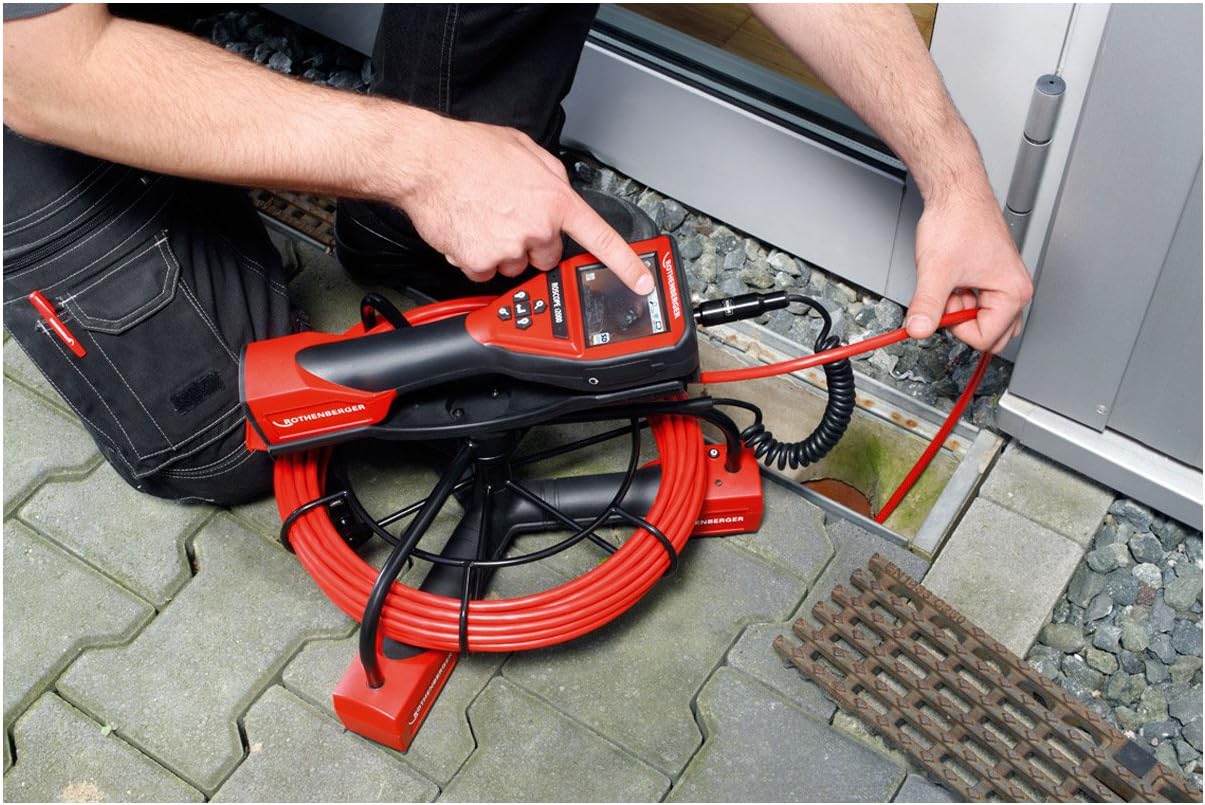
Figure 2: A user inserting the camera probe of the ROSCOPE i2000 into a drain for inspection.
5.3. Viewing i enregistrament
- The device features an LCD screen for direct viewing.
- For external display or recording, the device supports HDMI connectivity. Connect an HDMI cable from the camera unit to a compatible monitor or recording device.
- Refer to the on-screen menu for options to capture still images or record video footage. Saved media can typically be stored on an SD card (if slot available) or transferred via compatible connectivity options.

Figure 3: A user pointing at the live inspection feed displayed on the ROSCOPE i2000's LCD screen.
6. Manteniment
6.1. Neteja
- After each use, gently wipe the camera probe and cable with a soft, damp drap per eliminar qualsevol residu.
- Important: El dispositiu és no impermeable. Do not immerse the main unit or camera probe in water. Avoid using harsh chemicals or abrasive cleaners.
- Clean the LCD screen with a soft, lint-free cloth.
6.2. Emmagatzematge
- Store the ROSCOPE i2000 in a clean, dry place, away from direct sunlight and extreme temperatures.
- Ensure the cable is neatly coiled and not kinked to prevent damage.
- If storing for an extended period, remove the battery or ensure it is partially charged to prolong its lifespan.
7. Solució De Problemes
If you encounter issues with your ROSCOPE i2000, refer to the following common problems and solutions:
- El dispositiu no s'encén:
- Comproveu si la bateria està correctament instal·lada i completament carregada.
- Assegureu-vos que el compartiment de la bateria estigui ben tancat.
- Sense imatge a la pantalla:
- Verify that the camera module is securely connected to the main unit.
- Check for any damage to the camera cable or lens.
- Ensure the device is powered on and not in a standby mode.
- Poca qualitat d'imatge:
- Netegeu la lent de la càmera.
- Adjust the illumination settings if available.
- Ensure there is sufficient light in the inspection area.
If the problem persists, contact Rothenberger customer support for assistance.
8. Especificacions
| Marca | Rothenberger |
| Model | ROSCOPE i2000 |
| Mòdul | 25/16-tec100 |
| Longitud del cable | 16 metres |
| Resolució de vídeo | 720p |
| Tipus de visualització | Pantalla LCD |
| Tecnologia de connectivitat | HDMI |
| Estabilització d'imatge | Digital |
| Tipus de zoom | Zoom òptic |
| Tipus d'enfocament | Enfocament automàtic |
| Tipus de control d'exposició | Automàtic |
| Formats de suports admesos | Imatge del producte, contingut millorat |
| Font d'alimentació | 1 bateria de liti-ió (obligatòria) |
| Nivell de resistència a l'aigua | No impermeable |
| Pes de l'article | 28.11 lliures (aprox. 12.75 kg) |
| Dimensions del paquet | 78.5 x 64 x 45 cm |
9. Garantia i Suport
For warranty information, please refer to the documentation provided with your purchase or visit the official Rothenberger weblloc.
Disponibilitat de peces de recanvi: Spare parts are generally available within 3 days.
For technical support, service, or to inquire about spare parts, please contact your local Rothenberger dealer or customer service center.


