Introducció
This manual provides detailed instructions for the setup, operation, and maintenance of your PRITECH CC-630 Weather Station Clock. This device features a digital display for time, date, alarm, indoor temperature, indoor humidity, and a weather forecast.
Característiques del producte
- Time display (12/24 hour format selectable)
- Calendar display (Year, Month, Date)
- Alarma amb funció de repetició
- Indoor temperature display in Celsius (°C) or Fahrenheit (°F)
- Indoor humidity display in percentage (%)
- Weather forecast with 3-4 symbolic indicators
- Temperature histogram for trend analysis
- Blue LED backlight for improved visibility
- Desktop or wall-mountable design
Contingut del paquet
- 1 x PRITECH CC-630 Weather Station Clock
- 1 x Instruction Manual (Spanish + English)
Configuració
Instal·lació de la bateria
The PRITECH CC-630 Weather Station Clock requires 2 x AAA (LR03C) batteries (not included).
- Obriu la tapa del compartiment de la bateria situada a la part posterior de la unitat.
- Introduïu dues piles AAA, assegurant-vos de la polaritat correcta (+ i -) tal com s'indica a l'interior del compartiment.
- Tanqueu bé la tapa del compartiment de la bateria.

Image: Back of the PRITECH CC-630 Weather Station Clock with the battery compartment open, showing where to insert AAA batteries.
Engegada inicial
After battery installation, the unit will power on and display default settings. You will then need to set the time, date, and other preferences.
Instruccions de funcionament
Botó sobreview
The device features several buttons for operation, located on the front panel:

Imatge: Frontal view of the PRITECH CC-630 Weather Station Clock, highlighting the 'MODE', 'MAX/MIN', 'SNZ', 'UP', 'DOWN', and 'LIGHT' buttons.
- Mode: Switches between display modes (time, alarm) and enters setting mode when pressed and held.
- MÀXIM / MÍN: Displays maximum and minimum recorded temperature and humidity values.
- SNZ (Snooze): Activa la funció de repetició de l'alarma quan sona l'alarma.
- AMUNT: Adjusts values upwards during settings; cycles through display options.
- BAIX: Adjusts values downwards during settings; cycles through display options (e.g., °C/°F).
- LLUM: Activates the blue LED backlight.
Configuració de l'hora i la data
- From the normal time display, press and hold the MODE button for approximately 3 seconds. The hour digit will begin to flash.
- Utilitza el UP or ABAIX botons per ajustar l'hora.
- Premeu MODE again to confirm the hour and move to the minute setting. Adjust with UP/ABAIX.
- Continueu prement MODE to cycle through the year, month, and date settings. Adjust each value using the UP/ABAIX botons.
- Premeu MODE una última vegada per sortir del mode de configuració.
Configuració de l'Alarma
- Des de la pantalla de l'hora normal, premeu la tecla MODE button once to show the alarm time.
- Manteniu premut el botó MODE button for approximately 3 seconds. The alarm hour will flash.
- Utilitza el UP or ABAIX botons per configurar l'hora d'alarma desitjada.
- Premeu MODE to confirm and move to the alarm minute setting. Adjust with UP/ABAIX.
- Premeu MODE per sortir del mode de configuració de l'alarma.
- Per activar o desactivar l'alarma, premeu la tecla UP button while the alarm time is displayed. An alarm icon will appear/disappear on the screen.
Funció de posposar
Quan soni l'alarma, premeu el botó SNZ button to activate the snooze function. The alarm will temporarily stop and sound again after approximately 5 minutes.
Display de temperatura i humitat
The device automatically displays indoor temperature and humidity. To view the maximum and minimum recorded values for temperature and humidity, press the MAX/MIN button. Press it again to return to current readings.
To switch between Celsius (°C) and Fahrenheit (°F) for temperature, press the ABAIX button during normal display mode.
Previsió meteorològica
The weather station provides an indicative forecast based on atmospheric pressure changes, displayed with symbols (e.g., sunny, cloudy, rainy). This is a general prediction and not a professional meteorological forecast.
Llum de fons
Premeu el botó LLUM button to activate the blue LED backlight for a few seconds, improving visibility of the display in low light conditions.

Image: The PRITECH CC-630 Weather Station Clock with its blue LED backlight illuminated, showing the time, temperature, humidity, and weather forecast symbols.
Manteniment
- Clean the device with a soft, dry cloth. Do not use abrasive cleaners, solvents, or chemical agents.
- Avoid exposing the unit to extreme temperatures, direct sunlight, or high humidity, as this may affect its performance and lifespan.
- Remove the batteries if the device will not be used for an extended period to prevent potential battery leakage and damage.
Resolució de problemes
- Sense pantalla o pantalla tènue:
Check battery polarity. Replace batteries if they are low or depleted. - Hora/data incorrecta:
Refer to the 'Setting Time and Date' section to manually reset the time and calendar. - Lectures de temperatura/humitat inexactes:
Ensure the device is placed in a stable indoor environment, away from direct heat sources (e.g., radiators, direct sunlight), air conditioning vents, or open windows that could cause rapid temperature fluctuations. Allow some time for the sensors to stabilize after initial setup or relocation.
Especificacions
| Model | PRITECH CC-630 |
| Dimensions | 14 cm x 8 cm (aproximadament 5.51 polzades x 3.15 polzades) |
| Font d'alimentació | 2 x AAA (LR03C) batteries (not included) |
| Rang de temperatura interior | Fins a 50 °C (122 °F) |
| Interval d'humitat interior | 20% - 95% HR |
| Precisió de la temperatura | ±1 °C |
| Material | Plàstic |
| Característiques especials | Alarm, Clock, Weather Forecast, Backlight |
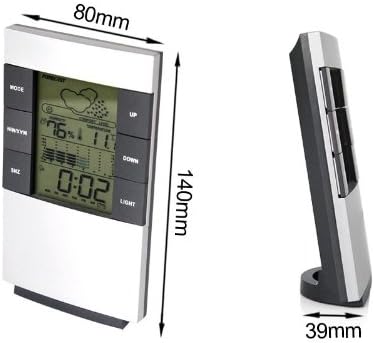
Image: The PRITECH CC-630 Weather Station Clock with its dimensions labeled: 80mm width, 140mm height, and 39mm depth at the base.
Garantia i Suport
For warranty information and technical support, please refer to the documentation provided at the point of purchase or contact your retailer directly. Keep your proof of purchase for any warranty claims.


