1. Introducció
The Attop YD-719 Quad-Copter is an 8-inch remote-controlled aerial vehicle designed for recreational flight. It features a 4-channel remote control system, 3-axis flight control for stable operation, and a built-in camera capable of recording video and capturing still images. The quad-copter utilizes 2.4 GHz wireless technology for reliable communication and is powered by a rechargeable battery.
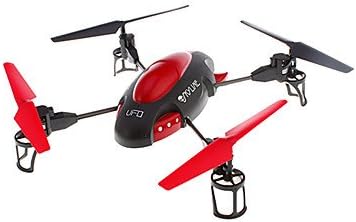
Image 1.1: The Attop YD-719 Quad-Copter, showcasing its red and black design with four propellers.
2. Precaucions de seguretat
- Always operate the quad-copter in open areas, away from people, animals, buildings, and power lines.
- No voli amb vents forts o condicions meteorològiques adverses.
- Assegureu-vos que la bateria estigui completament carregada abans de cada vol.
- Mantingueu els dits i la roba solta allunyats de les hèlixs giratòries.
- Es recomana la supervisió d'un adult per als usuaris més joves.
- Do not attempt to modify the quad-copter or its components.
- Avoid flying near airports or restricted airspace.
3. Contingut del paquet
Verifiqueu que tots els elements siguin presents al paquet:
- Attop YD-719 Quad-Copter
- Control remot
- Rechargeable Battery (for quad-copter)
- Four (4) Extra Rotor Blades
- Two (2) USB Charging Cables
- Guia de l'usuari (aquest document)
4. Components mésview
4.1 Quad-Copter
The quad-copter features four rotors, a central body housing the electronics and camera, and landing gear. The built-in camera is located on the underside of the main body.

Imatge 4.1: Lateral view of the YD-719 Quad-Copter, showing the sleek body and propeller arms.
4.2 Control remot
The remote control is a 4-channel device operating on 2.4 GHz frequency, providing precise control over the quad-copter's movements. It typically includes two joysticks for flight control and various buttons for functions like trim adjustments, photo/video capture, and power.
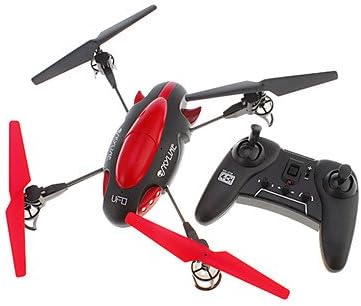
Image 4.2: The Attop YD-719 Quad-Copter alongside its remote control, illustrating their relative sizes.
5. Configuració
5.1 Quad-Copter Battery Charging
- Locate the rechargeable battery within the quad-copter's compartment.
- Connect one end of the provided USB charging cable to the battery and the other end to a USB power source (e.g., computer USB port, USB wall adapter).
- The charging indicator light will illuminate during charging and typically turn off or change color when fully charged. Refer to the specific indicator behavior in the product documentation if available.
- Charging time is approximately 60-90 minutes. Do not overcharge.

Imatge 5.1: Part inferior view of the YD-719 Quad-Copter, showing the battery compartment and wiring.
5.2 Instal·lació de la bateria del comandament a distància
- Obriu el compartiment de la bateria a la part posterior del comandament a distància.
- Introduïu tres (3) piles AAA, assegurant-vos de la polaritat correcta (+/-).
- Tanqueu el compartiment de la bateria de manera segura.
5.3 Instal·lació/substitució de l'hèlix
The quad-copter comes with four extra rotor blades. If replacement is necessary:
- Carefully remove the damaged propeller by gently pulling it upwards from the motor shaft.
- Note the direction of rotation for each propeller. Propellers are typically marked (e.g., A or B) and must be installed on the correct motor.
- Press the new propeller firmly onto the motor shaft until it is seated securely.

Image 5.2: Close-up of a propeller and motor assembly on the YD-719 Quad-Copter.
6. Instruccions de funcionament
6.1 Emparellament del control remot
- Place the quad-copter on a flat, level surface.
- Turn on the quad-copter's power switch. The LED lights will flash.
- Engegueu el comandament a distància.
- Push the left joystick (throttle) all the way up, then all the way down. The quad-copter's LED lights will stop flashing and remain solid, indicating successful pairing.
6.2 Enlairament i aterratge
- Enlairament: After pairing, slowly push the left joystick (throttle) upwards to increase motor speed and lift the quad-copter off the ground.
- Aterratge: Slowly pull the left joystick (throttle) downwards to decrease motor speed and gently land the quad-copter. Once landed, pull the throttle all the way down to stop the motors.
6.3 Controls bàsics de vol
- Pujar/Descens: Left joystick (throttle) up/down.
- Endavant/Enrere: Joystick dret amunt/avall.
- Gir a l'esquerra/dreta (guinyada): Joystick esquerre esquerra/dreta.
- Volar esquerra/dreta (rodar): Joystick dret esquerra/dreta.
6.4 Gravació de vídeo i presa de fotos
The YD-719 is equipped with a built-in camera. Refer to the remote control diagram (if provided in a physical manual) for specific buttons to activate video recording or still photo capture. Typically, a short press activates photo mode, and a long press activates video recording.
7. Manteniment
7.1 Neteja
Use a soft, dry cloth to wipe down the quad-copter after use. Avoid using water or cleaning solvents, as they may damage electronic components.
7.2 Cura de l'hèlix
Regularly inspect propellers for damage (bends, cracks, chips). Replace any damaged propellers immediately to ensure stable flight and prevent further damage to the quad-copter.
7.3 Emmagatzematge de la bateria
When not in use for extended periods, store the quad-copter battery at approximately 50% charge in a cool, dry place. Remove batteries from the remote control if it will not be used for a long time.
8. Solució De Problemes
- Quad-Copter not responding: Ensure both quad-copter and remote control are powered on and successfully paired. Check remote control batteries.
- Vol inestable: Check for damaged propellers and replace if necessary. Ensure the quad-copter is placed on a level surface before pairing. Perform trim adjustments on the remote control if the quad-copter drifts.
- Temps de vol curt: Ensure the quad-copter battery is fully charged. Battery performance may degrade over time.
- Camera not recording: Ensure the quad-copter is powered on and the camera function is correctly activated via the remote control. Check if the memory card (if applicable) is inserted and has sufficient space.
9. Especificacions
| Característica | Especificació |
|---|---|
| Número de model | YD-719 |
| Fabricant | A dalt |
| Dimensions (aprox.) | 36.83 x 34.93 x 11.43 cm (14.5 x 13.75 x 4.5 polzades) |
| Pes (aprox.) | 680.39 g (1.5 lliures) |
| Canals de control | 4-Canals |
| Control de vol | 3-Eix |
| Tecnologia sense fils | 2.4 GHz |
| Bateria Quadcopter | 600 mAh Rechargeable |
| Bateria de control remot | 3 x AAA (no inclòs) |
| Característica especial | Built-in Camera (Video/Photo) |
10. Garantia i Suport
For warranty information or technical support, please refer to the contact details provided with your purchase documentation or visit the manufacturer's official weblloc web. Conserveu el comprovant de compra per a reclamacions de garantia.


