Introducció
The M-Audio Keystation Mini 32 is a compact USB MIDI controller designed for music production and performance. This manual provides essential information to help you set up, operate, and maintain your device.

Figure 1: M-Audio Keystation Mini 32 USB MIDI Controller.
Configuració
Contingut de la caixa
- M-Audio Keystation Mini 32
- Cable USB
- Ignite Card (for software activation)
- Guia d'inici ràpid
- Manual de seguretat i garantia
Connexió al vostre ordinador
The Keystation Mini 32 is a class-compliant, USB-powered device. This means it does not require separate drivers for most operating systems and draws power directly from the USB connection.
- Connect one end of the supplied USB cable to the USB port on the Keystation Mini 32.
- Connecteu l'altre extrem del cable USB a un port USB disponible de l'ordinador (Mac o PC).
- Your computer should automatically recognize the device.
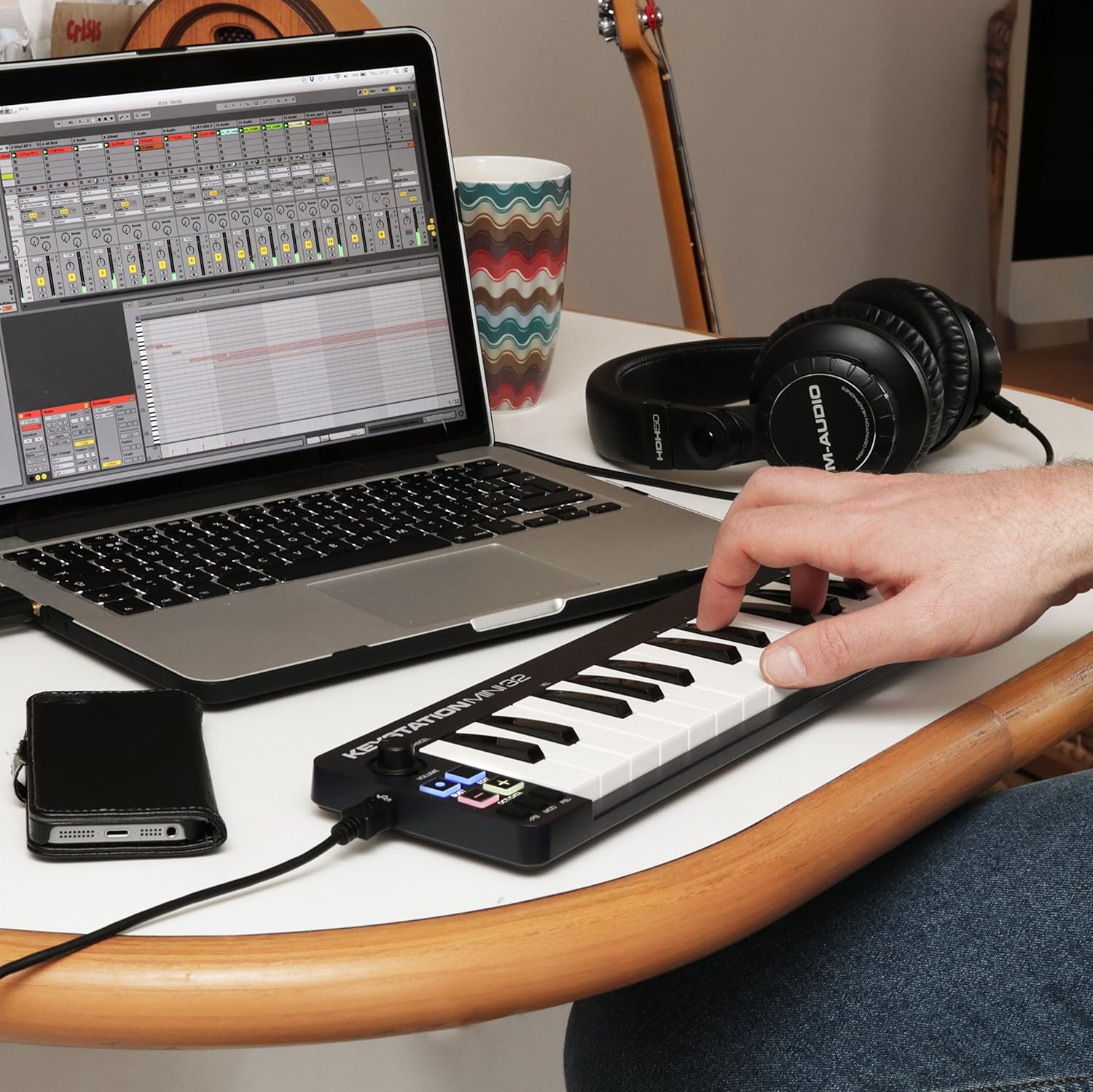
Figure 2: Keystation Mini 32 connected to a laptop, demonstrating a typical setup for music production.
iOS Connectivity
For iOS device connectivity, the Apple iPad Camera Connection Kit (sold separately) is required. This allows you to use the Keystation Mini 32 with audio applications on your iPad and other iOS devices.
Instal·lació de programari
The Keystation Mini 32 includes bundled software:
- AIR Music Technology's Ignite: Over 275 instrument sounds. Use the provided Ignite Card for activation.
- Ableton Live Lite: A popular performance and production program.
Refer to the Quickstart Guide and the Ignite Card for detailed instructions on downloading and activating the included software.
Funcionament
The Keystation Mini 32 features 32 velocity-sensitive, synth-action mini keys and several controls for expressive performance.
Característiques i controls principals

Figura 3: superior view of the Keystation Mini 32, highlighting the various controls and keys.
- 32 mini tecles sensibles a la velocitat: These keys respond to how hard you play them, allowing for dynamic musical expression.
- Octave/Data Buttons: Use these to shift the keyboard's octave range up or down, providing access to the full melodic keyboard range. These buttons can also function as data entry controls in certain modes.
- Pitch Bend Buttons: These buttons allow you to bend the pitch of notes up or down for expressive effects.
- Modulation Button: Engages modulation effects, often used for vibrato or other tonal changes.
- Botó de sosteniment: Functions like a sustain pedal, holding notes after the key is released. Some users note a mode where pressing and holding sustains, and releasing stops sustain.
- Pom de volum: Ajusta el volum de sortida.
- Botó Edita: Used to access advanced functions and settings. Refer to the full user guide for detailed information on edit mode.
Tocar l'instrument
Once connected and your software is running, select the Keystation Mini 32 as your MIDI input device within your Digital Audio Workstation (DAW) or virtual instrument software. You can then play virtual instruments, sequence music, and control various parameters using the keyboard and its dedicated controls.
Manteniment
To ensure the longevity and optimal performance of your Keystation Mini 32, follow these maintenance guidelines:
- Neteja: Use a soft, dry cloth to clean the surface of the controller. Avoid abrasive cleaners, solvents, or waxes.
- Emmagatzematge: Guardeu el dispositiu en un lloc fresc i sec, allunyat de la llum solar directa, de temperatures extremes i d'alta humitat.
- Manipulació: Handle the controller with care. Avoid dropping it or subjecting it to strong impacts.
- Port USB: The USB port is a critical component. Connect and disconnect the USB cable gently to prevent damage. Avoid excessive force or bending the cable while connected.
Resolució de problemes
If you encounter issues with your Keystation Mini 32, consider the following common solutions:
- Sense poder/No reconegut:
- Ensure the USB cable is securely connected to both the Keystation Mini 32 and your computer.
- Proveu un port USB diferent a l'ordinador.
- Si feu servir un concentrador USB, proveu de connectar-lo directament a l'ordinador.
- Verify that your computer's operating system is up to date.
- Sense sortida de so:
- Check your DAW or virtual instrument software settings to ensure the Keystation Mini 32 is selected as the MIDI input device.
- Confirm that the volume knob on the Keystation Mini 32 is turned up.
- Ensure your software instruments are loaded and active.
- Keys Not Responding or Incorrect Velocity:
- The keys are velocity-sensitive. Ensure you are pressing them with sufficient force if you expect a louder sound.
- Check your software's velocity curve settings, as these can often be adjusted to match your playing style.
- Assegureu-vos que no hi hagi deixalles enganxades sota les claus.
- Software Activation Issues:
- Refer to the instructions on the Ignite Card for software download and activation.
- Visit the M-Audio support website for assistance with software registration.
Especificacions
| Pes de l'article | 1.01 lliures |
| Dimensions del producte | 5.38 x 17.5 x 2.25 polzades |
| Número de model | 102432 |
| Data de primera disponibilitat | 14 d'abril de 2014 |
| Nom del color | Negre |
| Dispositius compatibles | Ordinador portàtil, tauleta |
| Tipus de connector | USB |
| Interfície del maquinari | USB |
| Programari compatible | Ableton Live |
| Tipus de material | Plom |
| Estil musical | Electrònica |
| Clau d'instrument | Qualsevol |
| Nombre de tecles del teclat | 32 |
| Mida | 32 mini-key |
| Plataforma de maquinari | x86_64, ARM |
| Marca | M-AUDIO |
| Tecnologia de connectivitat | USB |
| Característica especial | Portàtil |
| Nom del model | Keystation Mini II |
Garantia i suport
For detailed warranty information, please refer to the "Safety & Warranty Manual" included in your product box. This document outlines the terms and conditions of your product warranty.
For technical support, software assistance, or further inquiries, please visit the official M-Audio website. Their support section typically provides FAQs, driver downloads, and contact information.
Note: This product is an International Version and may not include a U.S. Warranty. Please check your specific purchase details for warranty coverage.


