Introducció
This manual provides detailed instructions for the proper installation, operation, and maintenance of your BLOW AVH-8603 Car Radio. Please read this manual thoroughly before using the device to ensure safe and optimal performance. Keep this manual for future reference.
Informació de seguretat
- Ensure proper wiring and connections to prevent short circuits or damage. Consult a professional for installation if unsure.
- No feu servir el dispositiu de manera que us distregui de la conducció. Prioritzeu sempre la seguretat viària.
- Eviteu exposar la unitat a temperatures extremes, llum solar directa o humitat.
- No intenteu desmuntar ni modificar la unitat. Això podria anul·lar la garantia i causar danys.
- Mantingueu el volum a un nivell que us permeti sentir els sons del trànsit exterior.
Producte acabatview
The BLOW AVH-8603 is a modern car radio designed for audio playback and communication. It features a 1 DIN universal size and includes multiple connectivity options.

Image: The BLOW AVH-8603 car radio unit, showing the front panel, included remote control, metal mounting frame, and wiring harness. A smartphone displaying music app icons is also shown, illustrating Bluetooth connectivity.
Característiques principals:
- Connectivitat Bluetooth: Per a trucades de mans lliures i transmissió d'àudio.
- Multiple Media Inputs: USB ports, micro SD card slot, and AUX input.
- Ràdio FM amb RDS: Automatic tuning, station search, and Radio Data System functionality.
- Sortida d'alta potència: 4x60W maximum power.
- Detachable Panel: For security.
- Connector ISO: Standardized wiring for easy installation.
- Comandament a distància: Inclòs per a un funcionament còmode.
- Pantalla LCD: Large and clear display for information.
- Equalitzador: Sound settings adjustment.
Configuració i instal·lació
Proper installation is crucial for the performance and safety of your car radio. It is recommended to have the unit installed by a qualified technician.
Passos d'instal·lació:
- Preparar el vehicle: Desconnecteu el terminal negatiu de la bateria del vehicle per evitar curtcircuits.
- Eliminar la unitat existent: Carefully remove the old car radio from the dashboard.
- Install Mounting Sleeve: Insert the metal mounting sleeve (included) into the dashboard opening and secure it.
- Connecteu el cablejat:
- Connect the ISO wiring harness from the vehicle to the radio's ISO connector.
- Ensure all power, ground, speaker, and antenna connections are secure.
- Connecteu el amplifier output (RCA cables) if using an external ampmés viu.

Imatge: Part posterior view of the BLOW AVH-8603 car radio, highlighting the ISO connector for power and speaker wiring, as well as the RCA outputs for external amplifiers and antenna input.

Image: The metal mounting frame and the included wiring harness (ISO connectors) for the BLOW AVH-8603 car radio, essential components for installation.
- Slide in the Unit: Carefully slide the car radio into the mounting sleeve until it locks into place.
- Torneu a connectar la bateria: Torneu a connectar el terminal negatiu de la bateria del vehicle.
- Funcionalitat de prova: Turn on the unit and test all functions (radio, USB, Bluetooth, etc.) to ensure correct installation.
Instruccions de funcionament
Controls del panell frontal:
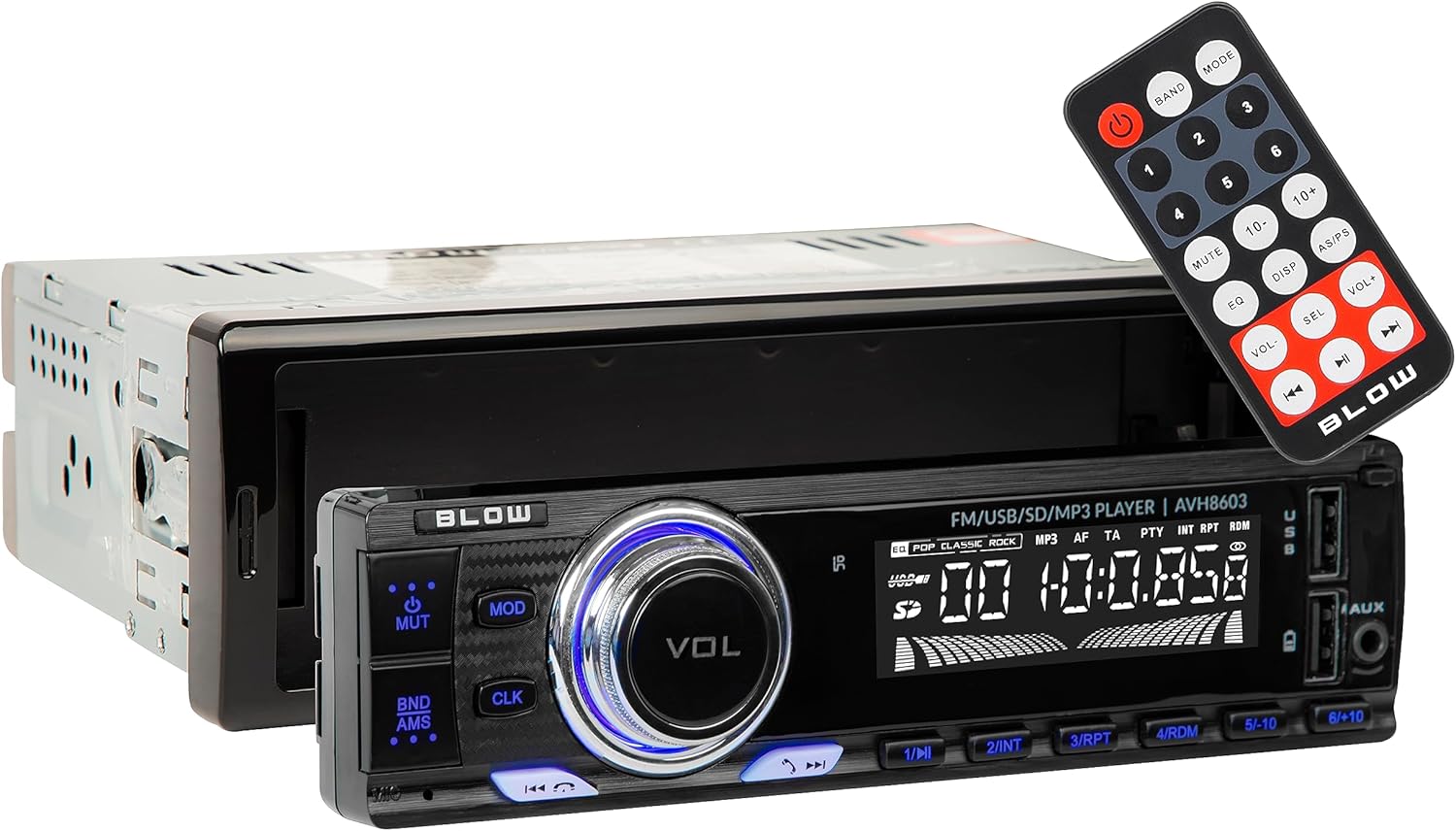
Image: The front panel of the BLOW AVH-8603 car radio, showing the main display, volume knob, control buttons, USB ports, SD card slot, and AUX input. The remote control is also visible.
- Power Button (PWR): Premeu per encendre/apagar la unitat.
- Volume Knob (VOL): Gireu per ajustar el volum. Premeu per accedir a la configuració d'àudio (greus, aguts, balanç, atenuació, equalitzador).
- Botó MODE: Press to switch between radio (FM), USB, SD, AUX, and Bluetooth modes.
- Botó CLK: Press to display the clock. Hold to set the time.
- BND/AMS Button: In radio mode, press to switch between FM bands (FM1, FM2, FM3). Hold to automatically scan and save stations.
- Botó MUTE: Silencia o activa l'àudio.
- Navigation Buttons (<< / >>): In radio mode, short press for manual tuning, long press for automatic seek. In media mode, short press for track skip, long press for fast forward/rewind.
- Botons predefinits (1-6): In radio mode, short press to select a saved station. Hold to save the current station to that preset number.
- Ports USB: Insert USB flash drives for MP3 playback.
- Ranura per a targeta SD: Insert micro SD cards for MP3 playback.
- Entrada AUX: Connecteu dispositius d'àudio externs amb un cable d'àudio de 3.5 mm.

Imatge: Un primer pla view of the two USB ports and the AUX input jack located on the front panel of the BLOW AVH-8603 car radio, used for connecting various media devices.
Detachable Panel:
For security, the front panel of the AVH-8603 can be detached. Press the release button (usually on the left side) and gently pull the panel off. To reattach, align the panel with the main unit and press until it clicks into place.

Image: The main unit of the BLOW AVH-8603 car radio with the front panel removed, revealing the connection points and a hidden USB port, which is part of the detachable panel mechanism.
Radio Operation (FM/RDS):
- Premeu el botó MODE fins que aparegui "FM" a la pantalla.
- Premeu BND / AMS to select FM1, FM2, or FM3 band.
- Premsa curta << or >> per sintonitzar manualment una freqüència.
- Premsa llarga << or >> per buscar automàticament la següent emissora amb bona freqüència.
- To save a station, tune to the desired frequency, then long press one of the Botons predefinits (1-6) until the display confirms saving.
- The RDS (Radio Data System) function will automatically display station information (e.g., station name, program type) if available.
Media Playback (USB/SD/AUX):
- USB/SD: Insert a USB flash drive into a USB port or a micro SD card into the SD slot. The unit will automatically switch to USB/SD mode and begin playback. If not, press MODE per seleccionar.
- AUX: Connect an external audio device (e.g., smartphone, MP3 player) to the AUX input using a 3.5mm audio cable. Press MODE per seleccionar el mode AUX.
- Ús << i >> botons per saltar pistes.
- Ús 1/PAU to pause/play.
Funcionament Bluetooth:
- Maridatge:
- Premeu el botó MODE button until "BT" or "BLUETOOTH" appears on the display.
- Al dispositiu mòbil, activeu el Bluetooth i cerqueu els dispositius disponibles.
- Select "BLOW AVH-8603" (or similar name) from the list.
- Si se us demana una contrasenya, introduïu "0000".
- Un cop emparellat, la pantalla mostrarà "CONNECTED".
- Trucades mans lliures:
- When a call comes in, the radio will display the caller ID (if supported).
- Premeu el botó Respon button (often the green phone icon or a specific button on the remote/front panel) to answer.
- Premeu el botó Finalitzar la trucada button (often the red phone icon or a specific button) to end the call.
- Bluetooth Audio Streaming (A2DP):
- After pairing, select music on your mobile device. The audio will stream through the car radio.
- Utilitza el << i >> buttons on the radio or remote to control track playback.
Manteniment
- Neteja: Feu servir un drap suau i sec per netejar la superfície de la unitat. No utilitzeu productes de neteja abrasius ni dissolvents.
- Detachable Panel Care: When the panel is detached, store it in a protective case to prevent scratches or damage.
- Substitució de fusibles: Si la unitat no s'encén, comproveu el fusible que es troba a la part posterior de la unitat. Substituïu-lo per un fusible de la mateixa capacitat (per exemple, 10 A).
Resolució de problemes
| Problema | Causa possible | Solució |
|---|---|---|
| Sense poder | Blown fuse, incorrect wiring, loose power connection. | Check and replace fuse. Verify power and ground connections. |
| Sense so | Volume too low, mute activated, incorrect speaker wiring, faulty speakers. | Increase volume. Deactivate mute. Check speaker connections. Test with different speakers if possible. |
| La recepció de la ràdio és deficient | Antenna not connected, weak signal area, damaged antenna. | Assegureu-vos que l'antena estigui connectada correctament. Proveu-ho en una altra ubicació. Inspeccioneu l'antena per detectar danys. |
| L'USB/SD no es reprodueix | Sense suport file format, corrupted files, incompatible device, incorrect mode. | Assegureu-vos files are MP3 format. Try a different USB/SD card. Select correct mode (USB/SD). |
| L'aparellament de Bluetooth falla | Device not in pairing mode, incorrect password, interference. | Ensure radio is in Bluetooth mode. Restart both devices. Try pairing in a different location. Enter "0000" if prompted for a password. |
Especificacions
| Característica | Detall |
|---|---|
| Marca | COP |
| Model | AVH-8603 |
| Potència màxima de sortida | 4 x 60W (240W en total) |
| Bandes de ràdio | FM (87.5 ~ 108 MHz) |
| Ràtio senyal / soroll | >=50dB |
| Separació de canals (1 kHz) | >=22dB |
| Resposta de freqüència | (100Hz~10kHz) +/- 6dB |
| Impedància | 4 ohms |
| Font d'alimentació | 12V DC |
| Connectivitat | Bluetooth, USB (2 ports), micro SD, AUX (3.5mm) |
| Característiques especials | RDS, Detachable Panel, LCD Display, Equalizer, Remote Control |
| Dimensions (producte) | 60 x 60 x 85 cm (approximate, based on provided data) |
| Pes (producte) | 600 g |
Garantia i Suport
Your BLOW AVH-8603 Car Radio is covered by a manufacturer's warranty. Please refer to the warranty card included with your product for specific terms and conditions. For technical support, service, or warranty claims, please contact your retailer or the official BLOW customer service.
For more information, visit the official BLOW weblloc web o contacteu amb els seus canals d'assistència.


