1. Introducció
This manual provides detailed instructions for the safe and effective operation of your Monoprice Par-64 Stage Light, Model 612720. This stage light features an aluminum shell and 177 RGB LEDs, designed for various stage and event lighting applications. It supports independent dimming, fading, and mixing of each color, along with built-in programs for dimming and strobe effects. The unit is compatible with standard DMX-512 control signals and supports Master/Slave mode for synchronized operation with multiple units.
2. Informació de seguretat
Please read and understand all safety instructions before installing or operating this device. Retain this manual for future reference.
- Seguretat elèctrica: Always connect the device to a grounded power outlet. Ensure the power supply voltage matches the device's requirements (AC90V-240V, 50-60Hz). Disconnect power before cleaning or servicing.
- Calor: The device generates heat during operation. Ensure adequate ventilation and do not block cooling vents. Maintain a safe distance from flammable materials.
- Muntatge: Securely mount the device using appropriate hardware. Ensure the mounting surface or structure can support the weight of the fixture.
- Seguretat ocular: Do not stare directly into the light source, as it can cause eye damage.
- Humitat: Do not expose the device to rain or moisture. Operate only in dry locations.
- Manteniment: Refer all servicing to qualified personnel. Do not attempt to repair the device yourself.
3. Contingut del paquet
Please ensure all items are present and in good condition upon unpacking.
- 1x Monoprice Par-64 Stage Light (Model 612720)
- 1x cable d'alimentació
- 1x Manual d'usuari (aquest document)
4. Producte acabatview
Familiarize yourself with the components and controls of your Par-64 Stage Llum.
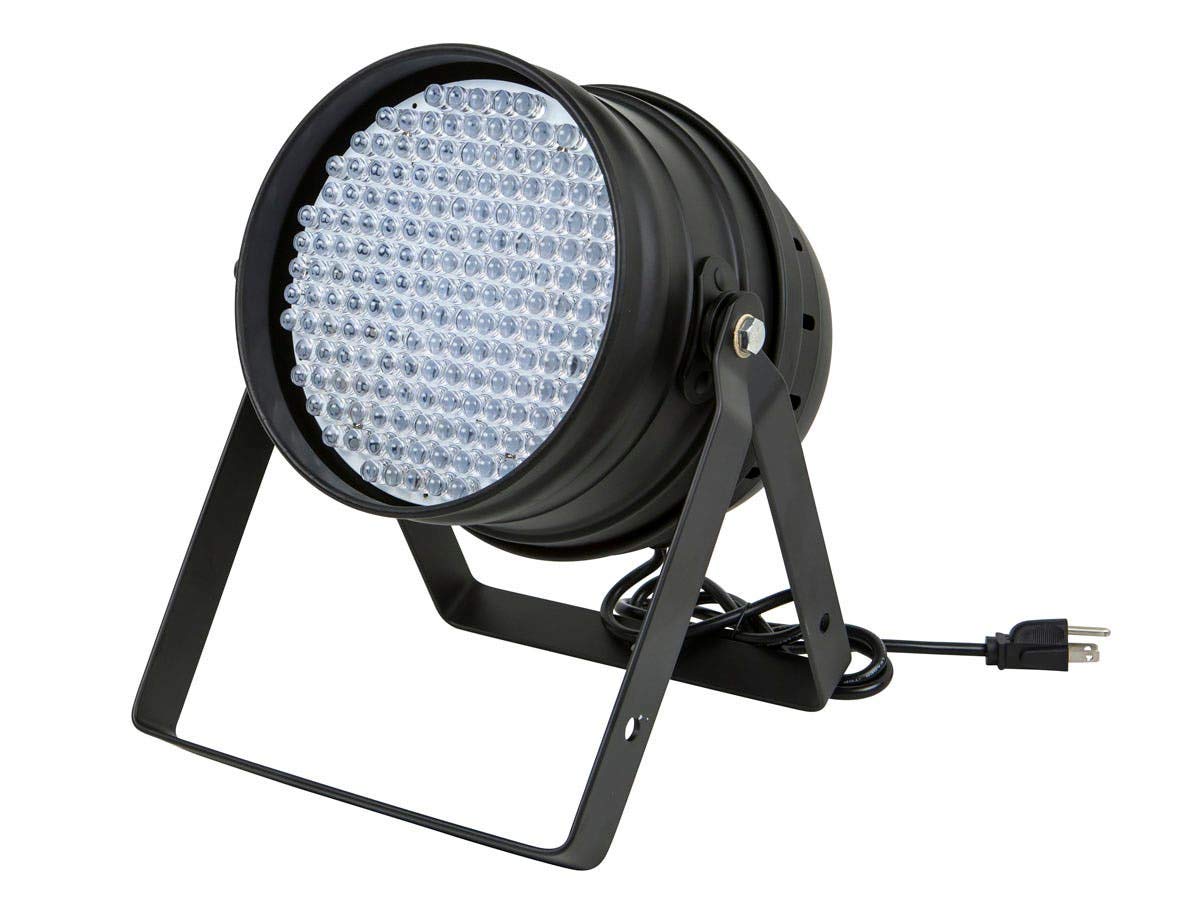
Figura 1: Frontal view of the Monoprice Par-64 Stage Light, showing the main body, mounting bracket, and power cable connection.

Figura 2: posterior view of the control panel, featuring the 4-digit LED display, MENU, UP, DOWN, ENTER buttons, DMX IN/OUT ports, and power input.
Funcions del tauler de control:
- Pantalla LED: Shows current mode, DMX address, or parameter values.
- Botó MENÚ: Passa ciclísticament per les opcions del menú principal.
- Botó amunt: Augmenta valors o navega cap amunt per les opcions del menú.
- Botó ABAIX: Disminueix valors o navega cap avall per les opcions del menú.
- Botó ENTER: Confirma les seleccions o accedeix a submenús.
- DMX IN/OUT: 3-pin XLR connectors for DMX-512 signal input and output.
- Entrada d'alimentació: Es connecta a la font d'alimentació de CA.
5. Configuració
5.1 Muntatge
The Monoprice Par-64 Stage Light is designed for floor mount applications. The adjustable bracket allows for precise positioning.
- Col·loqueu el llum sobre una superfície plana i estable.
- Adjust the angle of the light using the side knobs on the mounting bracket. Tighten the knobs securely once the desired angle is achieved.
- Ensure the light is positioned away from any obstructions that could block ventilation or pose a fire hazard.
5.2 Connexió d'alimentació
Connect the provided power cable to the power input on the rear of the unit and then to a suitable grounded AC power outlet (AC90V-240V, 50-60Hz).
Connexió DMX 5.3 (opcional)
For DMX control, connect a DMX controller to the DMX IN port using a 3-pin XLR cable. To daisy-chain multiple units, connect the DMX OUT of the first unit to the DMX IN of the next unit, and so on. Ensure the last unit in the chain has a DMX terminator connected to its DMX OUT port (not included).
6. Instruccions de funcionament
The Monoprice Par-64 Stage Light offers several operating modes:
6.1 Standalone Modes
These modes allow the light to operate without an external DMX controller.
- Color Mixing Mode: Use the MENU button to navigate to color adjustment settings. Use UP/DOWN to select Red, Green, or Blue, then ENTER to adjust the intensity (0-255) for each color. This allows for custom color creation.
- Programes integrats: The light features pre-programmed effects for dimming and strobe. Use the MENU button to cycle through these programs. Use UP/DOWN to select different programs or adjust their speed/intensity if applicable.
- Mode actiu de so: (If available, check specific model features) The light may react to sound via a built-in microphone. Select this mode via the MENU button.
6.2 Mode mestre/esclau
In Master/Slave mode, multiple identical lights can perform the same operation using a single control signal or source. One unit acts as the Master, and others as Slaves.
- Connecteu la sortida DMX de la unitat mestra a l'entrada DMX de la primera unitat esclava. Continueu connectant en cadena la sortida DMX a l'entrada DMX per a totes les unitats esclaus posteriors.
- Set the Master unit to its desired operating mode (e.g., Color Mixing, Built-in Program).
- Set all Slave units to "Slave" mode via their MENU options. Refer to the LED display for confirmation.
- The Slave units will now mirror the actions of the Master unit.
6.3 DMX-512 Control Mode
This mode allows external control via a DMX controller.
- Connect the DMX controller to the DMX IN port of the first light in the chain.
- Set a unique DMX address for each light using the MENU, UP, DOWN, and ENTER buttons. The LED display will show the current DMX address. Ensure no two lights have the same address if they are to be controlled independently.
- Consult your DMX controller's manual for specific programming instructions. The Monoprice Par-64 Stage Light typically uses a standard DMX channel assignment for RGB control, dimming, and strobe.
7. Manteniment
Proper maintenance ensures the longevity and optimal performance of your stage llum.
- Neteja: Disconnect power before cleaning. Use a soft, lint-free cloth to wipe the exterior. For stubborn dirt, a slightly damp es pot fer servir un drap. No utilitzeu productes de neteja abrasius ni dissolvents.
- Neteja de lents: Gently clean the LED lenses with a soft cloth and a mild glass cleaner if necessary.
- Ventilació: Periodically check that the cooling vents are free from dust and debris. Use compressed air to clear any blockages.
- Emmagatzematge: Quan no l'utilitzeu durant períodes prolongats, guardeu-la en un lloc sec i sense pols, preferiblement en el seu embalatge original o en una funda protectora.
8. Solució De Problemes
Si teniu problemes, consulteu els problemes i solucions habituals següents.
| Problema | Causa possible | Solució |
|---|---|---|
| El llum no s'encén. | No power supply; faulty cable; unit malfunction. | Check power cable connection. Ensure outlet has power. Try a different power cable. If problem persists, contact support. |
| Sense control DMX. | Incorrect DMX address; faulty DMX cable; DMX controller issue; incorrect mode. | Verify DMX address matches controller setting. Check DMX cable connections. Ensure light is in DMX mode. Test with a different DMX cable or controller. |
| Lights are not synchronized in Master/Slave mode. | Incorrect Master/Slave settings; faulty DMX cable. | Ensure one unit is set as Master and all others as Slave. Check DMX daisy-chain connections. |
| La llum parpelleja o es comporta de manera erràtica. | Poor power connection; DMX signal interference; overheating. | Check power connections. Ensure DMX cables are good quality and properly terminated. Ensure adequate ventilation. |
9. Especificacions
Detailed technical specifications for the Monoprice Par-64 Stage Light (Model 612720).
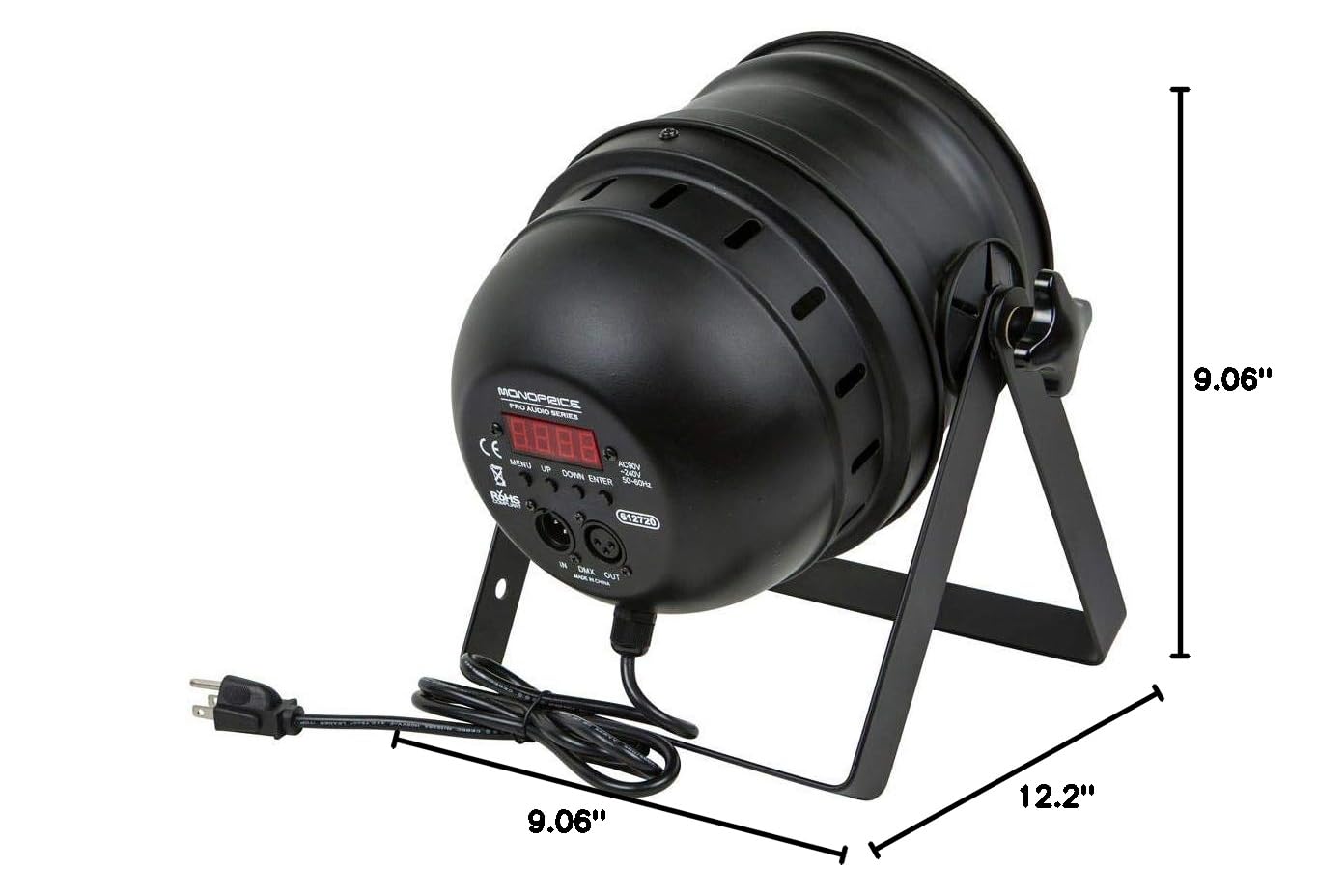
Figura 3: Dimensional drawing of the Monoprice Par-64 Stage Light, showing its length, width, and height.
| Característica | Detall |
|---|---|
| Número de model | 612720 |
| Font de llum | 177 LED RGB |
| Color | RGB (Xarxa, Green, Blue) |
| Material | Carcassa d'alumini |
| Font d'alimentació | Elèctric amb cable |
| Voltage | AC90V-240V |
| Freqüència | 50-60 Hz |
| Wattage | 18 watts |
| Tipus de muntatge | Muntatge al terra |
| Dimensions del producte (L x A x A) | 12.2" x 9.06" x 9.06" (30.99 cm x 23.01 cm x 23.01 cm) |
| Pes de l'article | 4.87 lliures (2.21 kg) |
| Modes de control | DMX-512, Master/Slave, Standalone (Color Mixing, Built-in Programs) |
10. Garantia i Suport
Monoprice stands behind its products. For warranty information, technical support, or customer service inquiries, please visit the official Monoprice weblloc web o contacteu directament amb el seu equip d'atenció al client.
Monoprice Official Weblloc: www.monoprice.com
Si us plau, tingueu a mà el número de model del producte (612720) i la informació de compra quan us poseu en contacte amb el servei d'assistència.