Introducció
This manual provides essential instructions for the safe and efficient operation of your Muse M-28 VF Portable CD/MP3 Radio with USB Player. Please read this manual thoroughly before using the device and retain it for future reference.
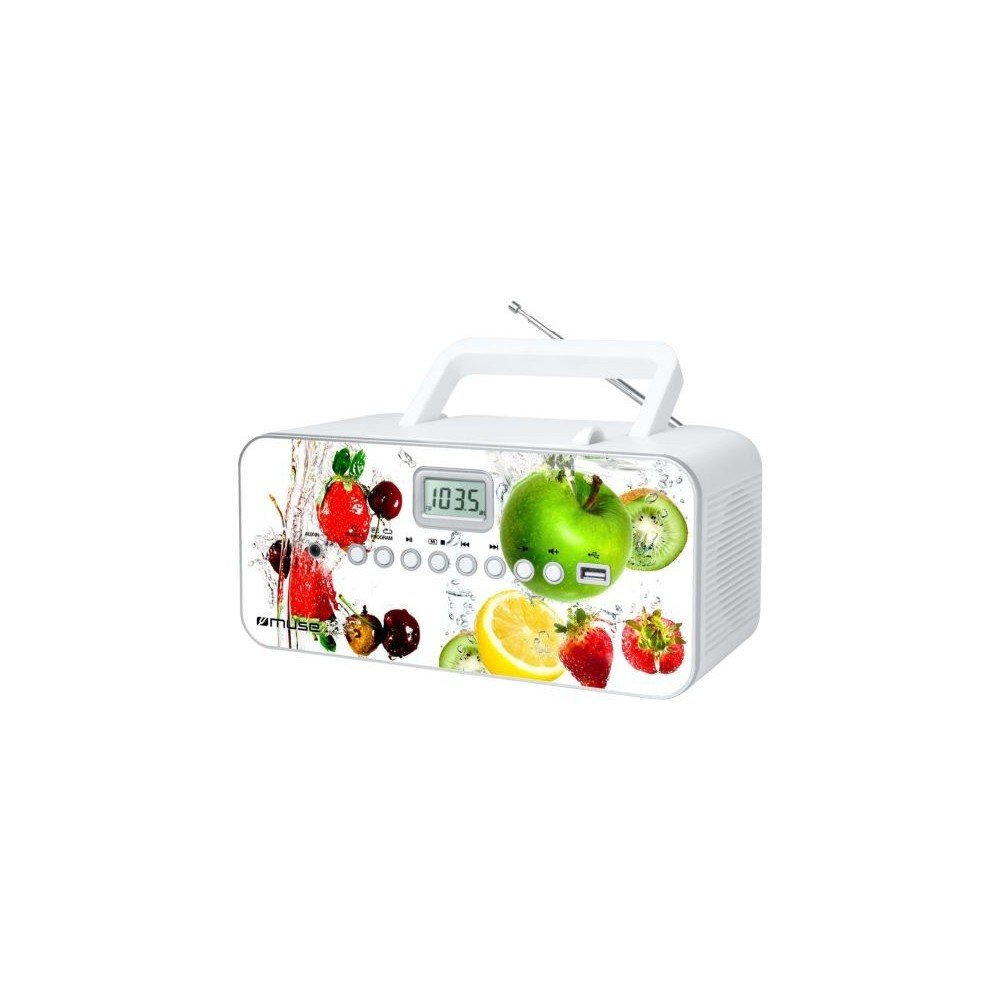
Davant view of the Muse M-28 VF portable CD/MP3 radio, showing the CD compartment, display, and control buttons.
Informació de seguretat
- No exposeu la unitat a la pluja o la humitat.
- No obstruïu cap obertura de ventilació.
- Assegureu-vos una ventilació adequada al voltant de la unitat.
- Utilitzeu només accessoris/accessoris especificats pel fabricant.
- Desendolleu la unitat durant les tempestes llamps o quan no l'utilitzeu durant llargs períodes.
- Demaneu tot el servei a personal de servei qualificat.
Configuració
1. Connexió d'alimentació
- Locate the AC power cord.
- Insert the small end of the power cord into the AC IN jack on the back of the unit.
- Connecteu l'altre extrem del cable d'alimentació a una presa de corrent estàndard.
2. Ajust de l'antena
For optimal FM radio reception, fully extend the telescopic antenna. For MW (AM) reception, the unit has a built-in antenna; rotate the unit for best reception.
Instruccions de funcionament
1. Encendre/apagar
Premeu el botó PODER botó per encendre o apagar la unitat.
2. Selecció de mode
Premeu el botó MODE button repeatedly to switch between CD, USB, FM Radio, MW Radio, and AUX modes.
3. Reproducció de CD
- Obriu la porta del compartiment del CD.
- Place a CD (CD/CD-R/CD-RW/MP3 compatible) with the label side facing up.
- Tanqueu la porta del compartiment del CD.
- Seleccioneu el mode CD amb el botó MODE botó.
- Premeu el botó REPRODUCCIÓ/PAUSA per iniciar la reproducció.
- Utilitza el SALTAR botons (<< / >>) per navegar per les pistes.
- Premeu el botó STOP botó per finalitzar la reproducció.
- The unit features a full or partial repeat function. Refer to the display for repeat mode indicators.
4. Reproducció USB
- Inseriu una unitat flaix USB al port USB.
- Seleccioneu el mode USB amb el botó MODE botó.
- Playback will start automatically or by pressing the REPRODUCCIÓ/PAUSA botó.
- Utilitza el SALTAR botons (<< / >>) per navegar per les pistes.
5. FM/MW Radio Operation
- Select FM or MW mode using the MODE botó.
- Manteniu premut el botó TUNE +/- botons per escanejar automàticament la següent emissora disponible.
- Premeu el botó TUNE +/- botons breument per ajustar la freqüència.
- To store a station: Tune to the desired station, then press and hold the PROGRAMA botó. Ús SALTAR botons per seleccionar un número preestablert i, a continuació, premeu PROGRAMA again to confirm. The unit supports 20 FM and 10 MW storable stations.
- To recall a stored station: Press the MEMÒRIA or PRESET botó i, a continuació, feu servir SALTAR botons per seleccionar la configuració predefinida desitjada.
6. Entrada auxiliar (AUX IN)
- Connect an external audio device (e.g., smartphone, MP3 player) to the AUX IN jack using a 3.5mm audio cable (not supplied).
- Seleccioneu el mode AUX amb el botó MODE botó.
- Controla la reproducció des del dispositiu extern connectat.
7. Control de volum
Gira el VOLUM botó per ajustar el nivell del so.
Manteniment
1. Neteja de la unitat
- Before cleaning, ensure the unit is powered off and unplugged from the wall outlet.
- Feu servir un drap suau i sec per netejar les superfícies exteriors.
- Per a taques persistents, una mica dampRenta el drap amb aigua. No utilitzis productes de neteja abrasius, ceres ni dissolvents.
- Clean the CD lens periodically with a specialized CD lens cleaner disc (not supplied).
2. Emmagatzematge
Quan no l'utilitzeu durant períodes prolongats, guardeu la unitat en un lloc fresc i sec, allunyat de la llum solar directa i de temperatures extremes.
Resolució de problemes
| Problema | Causa possible | Solució |
|---|---|---|
| Sense poder | El cable d'alimentació no està connectat correctament. | Comproveu si el cable d'alimentació està ben connectat a la unitat i a la presa de corrent. |
| Sense so | El volum és massa baix o silenciat. S'ha seleccionat un mode incorrecte. | Increase the volume. Ensure the correct playback mode (CD, USB, Radio, AUX) is selected. |
| El CD no es reprodueix | CD inserit incorrectament. El CD està brut o ratllat. Mode incorrecte. | Insert CD with label side up. Clean or replace the CD. Select CD mode. |
| No es reprodueix l'USB | USB drive not inserted correctly. Incompatible file format. | Ensure USB drive is fully inserted. Check if filesón en format MP3. |
| Mala recepció de ràdio | Antena no estesa/col·locada correctament. Interferències. | Fully extend and adjust the FM telescopic antenna. Rotate the unit for MW reception. Move away from other electronic devices. |
Especificacions
- Model: M-28 VF
- Marca: MUSA
- Tipus de disc compatibles: CD, CD-R, CD-RW, MP3
- Sintonitzador de ràdio: PLL FM/MW
- Estacions preseleccionades: 20 FM, 10 MW
- Connectivitat: USB Port (1), Auxiliary Input (3.5mm)
- Tipus d'altaveu: estèreo
- Font d'alimentació: Cable CA
- Potència de sortida: 14 watts
- Dimensions (L x A x A): 17 x 26 x 13 cm (aproximadament 6.7 x 10.2 x 5.1 polzades)
- Pes: 1.4 quilograms (aproximadament 3.1 lliures)
- Compatible amb Bluetooth: No
Informació de la garantia
Aquest producte ve amb una garantia del fabricant de 1 any from the date of purchase. Please retain your proof of purchase for warranty claims. The warranty covers defects in materials and workmanship under normal use. It does not cover damage caused by misuse, accident, unauthorized modification, or external causes.
Atenció al client
For further assistance, technical support, or warranty inquiries, please refer to the contact information provided with your product packaging or visit the official MUSE weblloc. No intenteu reparar la unitat vosaltres mateixos.


