1. Introducció
This manual provides instructions for the installation, configuration, and operation of the D-Link DGS-1210-28P Web Smart 24-Port Gigabit PoE Switch. This device is designed to provide a high-performance, cost-effective solution for small to medium-sized businesses, offering advanced management features and Power over Ethernet (PoE) capabilities.
2. Informació de seguretat
- Assegureu-vos d'una ventilació adequada al voltant de l'interruptor per evitar el sobreescalfament.
- Do not place the switch in areas with high humidity or extreme temperatures.
- Utilitzeu només l'adaptador d'alimentació subministrat amb el dispositiu.
- Desconnecteu l'alimentació abans de netejar o realitzar tasques de manteniment.
- This device should be installed by qualified personnel in accordance with all local and national electrical codes.
3. Contingut del paquet
Comproveu que el vostre paquet contingui els elements següents:
- DGS-1210-28P Web Smart 24-Port Gigabit PoE Switch
- Cable d'alimentació
- Kit de muntatge en rack (suports i cargols)
- Peus de goma (per a la instal·lació d'escriptori)
- Cable de consola (RJ-45 a DB-9)
- Guia d'instal·lació ràpida
- CD-ROM (containing product documentation)
If any items are missing or damaged, please contact your local D-Link reseller for assistance.
4. Physical Description and Hardware Overview
The DGS-1210-28P switch features 24 Gigabit Ethernet ports with PoE support and 4 SFP slots for fiber optic connections. Below are diagrams illustrating the front and rear panels of the device.
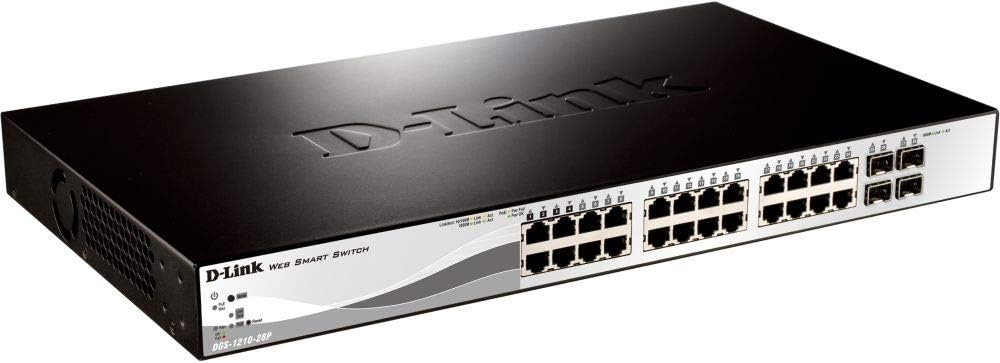
Figura 4.1: Tauler frontal View
This image displays the front panel of the DGS-1210-28P switch, showing 24 RJ-45 Gigabit Ethernet ports, each with LED indicators for link/activity and PoE status. To the right, there are 4 SFP (Small Form-Factor Pluggable) slots for fiber optic transceivers. The D-Link logo and model number are visible on the left side of the panel.

Figura 4.2: Panell posterior View
This image shows the rear panel of the DGS-1210-28P switch. The primary feature visible is the AC power input connector on the right side, labeled "AC LINE" with voltage and current specifications (100-240VAC, 50/60Hz, 0.5 A MAX). The D-Link brand name is embossed on the top surface of the switch casing.
4.1 Indicadors del panell frontal
- LED d'alimentació: Indica l'estat d'alimentació de l'interruptor.
- LED del sistema: Indica l'estat del sistema.
- LED d'enllaç/acció (per port): Green for Gigabit link/activity, Amber for 10/100 Mbps link/activity.
- PoE Status LEDs (per PoE port): Indica l'estat de subministrament d'alimentació PoE.
4.2 connectors del panell posterior
- Entrada d'alimentació de CA: Es connecta al cable d'alimentació proporcionat.
5. Configuració
5.1 Instal·lació d'escriptori
- Fixeu els peus de goma inclosos a la part inferior de l'interruptor.
- Col·loqueu l'interruptor sobre una superfície plana i estable amb una ventilació adequada.
5.2 Instal·lació del bastidor
- Attach the two rack-mounting brackets to the side grooves of the switch using the provided screws.
- Fixeu el commutador a un rack d'equips estàndard de 19 polzades amb els cargols de rack adequats (no inclosos).
5.3 Connexió del commutador
- Connect your network devices (computers, servers, access points, IP cameras) to the RJ-45 ports on the front panel using standard Ethernet cables.
- Per a connexions de fibra òptica, inseriu transceptors SFP compatibles a les ranures SFP i connecteu els cables de fibra òptica.
- Connect the power cord to the AC power input on the rear panel of the switch and then to a suitable power outlet.
- Verify that the Power LED on the front panel illuminates.
6. Funcionament de l'interruptor
6.1 Initial Access to WebGestió basada
The DGS-1210-28P is a Web Smart switch, meaning it can be configured and managed via a web navegador.
- Ensure your computer is connected to one of the switch's Ethernet ports.
- By default, the switch has a pre-configured IP address (e.g., 192.168.0.1). Refer to the Quick Installation Guide or product documentation for the exact default IP address.
- Configure your computer's IP address to be in the same subnet as the switch (e.g., if the switch is 192.168.0.1, set your computer to 192.168.0.10 with subnet mask 255.255.255.0).
- Obre a web browser (e.g., Chrome, Firefox, Edge) and enter the switch's default IP address in the address bar.
- You will be prompted for a username and password. The default credentials are typically "admin" for both username and password. Refer to the documentation for specific defaults.
- Upon successful login, you will access the switch's web management interface, where you can configure various network settings, VLANs, QoS, PoE settings, and more.
Important: For security reasons, it is highly recommended to change the default password immediately after initial login.
6.2 Funcionalitat d'alimentació a través d'Ethernet (PoE)
The DGS-1210-28P supports PoE, allowing it to deliver power to compatible devices (e.g., IP phones, wireless access points, IP cameras) over the Ethernet cable. This eliminates the need for separate power outlets for these devices.
- Connect PoE-compatible devices to any of the 24 Gigabit Ethernet ports.
- The switch will automatically detect and provide power to compliant devices.
- Monitor PoE status via the port LEDs or the web interfície de gestió.
- The total power budget for the switch is 193 Watts. Ensure the total power consumption of connected PoE devices does not exceed this limit.
7. Manteniment
- Neteja: Feu servir un drap suau i sec per netejar l'exterior de l'interruptor. No utilitzeu netejadors líquids ni en aerosol.
- Actualitzacions de firmware: Comproveu periòdicament el suport de D-Link website for firmware updates to ensure optimal performance and security. Follow the instructions provided with the firmware update package.
- Ventilació: Ensure that the ventilation openings on the switch are not blocked to prevent overheating.
- Configuració de còpia de seguretat: Regularly back up your switch configuration settings through the web management interface to facilitate quick recovery in case of a reset or failure.
8. Solució De Problemes
| Problema | Causa possible | Solució |
|---|---|---|
| Sense indicació LED d'engegada | Cable d'alimentació no connectat o problema amb la presa de corrent. | Verify power cord connection to the switch and power outlet. Test the outlet with another device. |
| No Link/Act LED on a connected port | Faulty cable, incorrect cable type, or device not powered on. | Check the Ethernet cable for damage. Ensure the connected device is powered on and functioning correctly. Try a different port or cable. |
| No es pot accedir web interfície de gestió | Incorrect IP address, subnet mismatch, or browser issue. | Verify the switch's IP address and your computer's IP settings. Ensure they are in the same subnet. Clear browser cache or try a different browser. Reset the switch to factory defaults if necessary (refer to documentation for procedure). |
| PoE device not receiving power | Device not PoE compliant, cable issue, or power budget exceeded. | Ensure the device is PoE compliant. Check the Ethernet cable. Verify the total PoE power consumption in the web interface and ensure it does not exceed 193 Watts. |
9. Especificacions
| Model | DGS-1210-28P |
| Ports | 24 x 10/100/1000BASE-T PoE Ports, 4 x Gigabit SFP Ports |
| Estàndard PoE | IEEE 802.3af / at |
| Pressupost total d'energia PoE | 193 watts |
| Capacitat de commutació | 56 Gbps |
| Taxa de reenviament | 41.67 Mpps |
| Mida de la taula d’adreces MAC | 16K entrades |
| Marc Jumbo | 10,000 bytes |
| Dimensions (L x P x A) | 440 x 210 x 44 mm (17.32 x 8.27 x 1.73 polzades) |
| Pes | 3.63 kg (8 lliures) |
| Entrada de potència | 100-240 VAC, 50/60 Hz Internal Universal Power Supply |
| Temperatura de funcionament | De 0 °C a 50 °C (32 °F a 122 °F) |
| Temperatura d'emmagatzematge | -20 °C a 70 °C (-4 °F a 158 °F) |
| Humitat de funcionament | 0% a 95% sense condensació |
10. Garantia i Suport
D-Link provides a limited warranty for this product. For detailed warranty information, please refer to the warranty card included with your product or visit the official D-Link weblloc.
For technical support, product documentation, and firmware updates, please visit the D-Link support portal:
You can also find additional resources and community forums on the D-Link weblloc.


