1. Acabatview
The SIRUI VA-5 Fluid Video Head is engineered for smooth, quiet, and vibration-free camera operation. Designed for DSLR and system cameras, as well as small camcorders, it supports a maximum load of 3kg. Its sophisticated fluid-damped system ensures precise and intuitive control for both panning and tilting movements. A Safety Lock System is integrated to prevent accidental slipping of the quick release plate. The VA series is compatible with the Arca-Swiss system, offering versatility for various photographic setups. An internal spring-assisted counter-balance mechanism further enhances smooth tilt movements and provides equipment protection.

Figure 1: The SIRUI VA-5 Fluid Video Head, showcasing el seu disseny compacte i la nansa integrada.
2. Configuració
2.1 Fixació a un trípode
- Ensure your tripod has a standard 3/8-inch mounting screw.
- Align the base of the VA-5 Fluid Video Head with the tripod's mounting screw.
- Rotate the head clockwise onto the tripod until it is securely tightened. Verify stability before proceeding.

Figure 2: The VA-5 Fluid Video Head securely attached to a tripod, ready for camera mounting.
2.2 Mounting the Quick Release Plate
- Locate the quick release plate (TY-70A) and the camera mounting screw.
- Attach the quick release plate to the bottom of your camera or spotting scope by screwing the mounting screw into the device's tripod socket. Ensure it is tight.
- To insert the plate into the head, loosen the quick release clamp knob on the side of the head.
- Press the red safety lock button located at the rear of the quick release clamp.
- Slide the quick release plate with your camera into the clamp fins que encaixi al seu lloc.
- Premeu l'alliberament ràpid clamp knob to secure the camera firmly.

Figura 3: superior view of the quick release plate (TY-70A) on the VA-5 Fluid Video Head, showing the mounting screws and alignment marks.

Figure 4: The quick release plate secured on the VA-5 Fluid Video Head, highlighting the red safety lock mechanism.
2.3 Adjusting the Pan Handle
- The pan handle can be adjusted for optimal comfort and control.
- Loosen the blue knob on the side of the head where the handle attaches.
- Rotate the handle to your desired position (forward or backward).
- Tighten the blue knob to secure the handle in place.
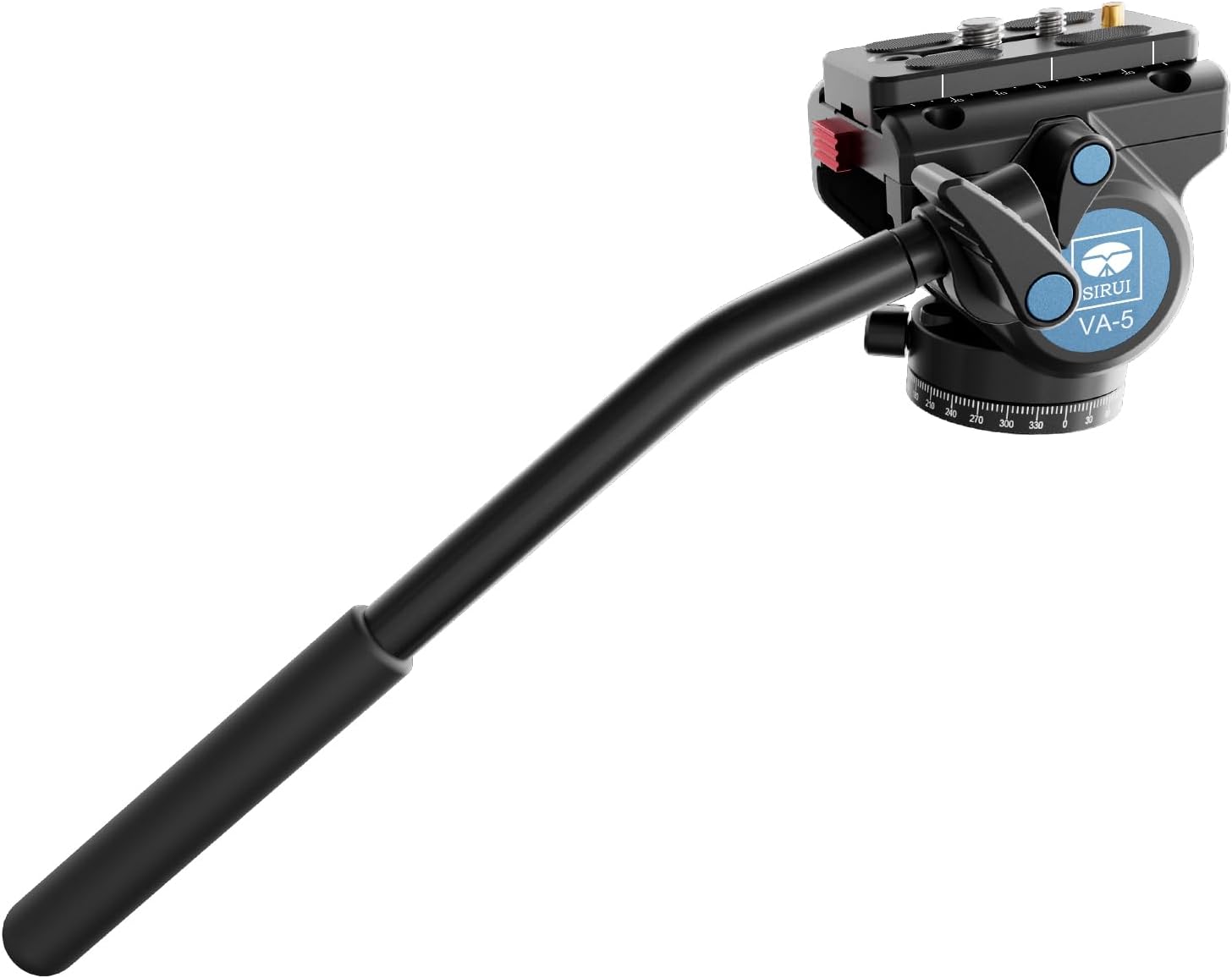
Figure 5: The VA-5 Fluid Video Head with its pan handle extended, demonstrating adjustability for user preference.
3. Funcionament
3.1 Panning Movement
- To pan horizontally (360°), loosen the pan lock knob located at the base of the fluid head.
- Use the pan handle to smoothly rotate the camera horizontally.
- Tighten the pan lock knob to secure the head in the desired horizontal position.

Figura 6: lateral view of the VA-5 Fluid Video Head, showing the pan and tilt lock knobs for precise control.
3.2 Tilting Movement
- To tilt vertically, loosen the tilt lock knob on the side of the fluid head.
- Adjust the camera's vertical angle using the pan handle. The fluid damping system ensures smooth tilting.
- Tighten the tilt lock knob to fix the camera at the desired vertical angle.
- The internal spring-assisted counter-balance mechanism helps prevent the camera from tipping when the tilt lock is disengaged, especially with heavier equipment.
3.3 Ús dels nivells de bombolla
- The VA-5 Fluid Video Head features two spirit levels to assist in achieving a perfectly level setup.
- One spirit level is located on the base for leveling the head on the tripod.
- Another spirit level is on the top plate for leveling the camera itself.
- Adjust your tripod legs and/or the head's base until the bubbles in both spirit levels are centered.
3.4 Vídeo oficial del producte
Video 1: An official product review by SIRUI USA, demonstrating the features and smooth operation of the SIRUI VA-5 Fluid Video Head, including its panning, tilting, and quick release plate mechanisms.
4. Manteniment
- Neteja: Feu servir un drap suau i sec per netejar el capçal del fluid després de cada ús. Per a la brutícia persistent, netegeu lleugerament.amp es pot fer servir un drap, i assecar-lo immediatament. Eviteu productes químics agressius o materials abrasius.
- Emmagatzematge: Store the fluid head in a clean, dry environment, preferably in its protective bag, to prevent dust accumulation and potential damage.
- Lubricació: El fluid damping system is factory-sealed and does not require user lubrication. Attempting to lubricate internal components may void the warranty and damage the head.
- Inspecció: Periodically check all knobs, levers, and screws for tightness. Ensure the quick release plate mechanism operates smoothly and securely.
5. Solució De Problemes
| Problema | Causa possible | Solució |
|---|---|---|
| Movement is not smooth (panning/tilting). | Lock knobs are too tight; debris in the mechanism. | Ensure pan and tilt lock knobs are sufficiently loosened. Clean any visible debris. If the issue persists, contact customer support. |
| Quick release plate does not lock securely. | Clamp knob not tightened; safety lock not engaged; plate not fully inserted. | Ensure the plate is fully inserted and the red safety lock button has popped out. Tighten the clamp knob firmly. Check for any obstructions. |
| Camera/scope feels unstable on the head. | Quick release plate not tightened to camera; head not tightened to tripod. | Verify the quick release plate is securely attached to your device. Ensure the fluid head is tightly mounted to the tripod. |
6. Especificacions
- Dimensions del producte: 11.81 x 3.94 x 3.27 polzades (11.81" de profunditat x 3.94" d'amplada x 3.27" d'alçada)
- Pes de l'article: 1.17 lliures (0.53 quilograms)
- Número de model: 49506 (VA-5 Fluid Head)
- Marca: Sirui
- Color: Negre
- Dispositius compatibles: Càmera
- Fabricant: Guangdong SIRUI Optical Co., Ltd
- Característiques: Sophisticated fluid damping system, Safety Lock System, Continuously adjustable friction for tilt, 360° panorama panning, 2 spirit levels.
7. Garantia i assistència
For warranty information and customer support, please refer to the documentation included with your product or visit the official Sirui Store o el seu oficial weblloc web. Conserveu el rebut de compra com a comprovant de compra per a qualsevol reclamació de garantia.


