1. Introducció
This manual provides detailed instructions for the installation, operation, and maintenance of your REXING F9US Dash Camera. Please read this manual thoroughly before using the device to ensure proper functionality and to maximize your user experience.
2. Contingut del paquet
Si us plau, verifiqueu que tots els elements que s'enumeren a continuació estiguin inclosos al vostre paquet:
- REXING F9US Dash Camera
- In-car charging cable
- Windshield Suction Cup mount
- cable USB
- Manual d'usuari
Nota: A Micro SD Card (Class 10 or higher, up to 128GB) is required for operation and is not included in the package.
3. Producte acabatview
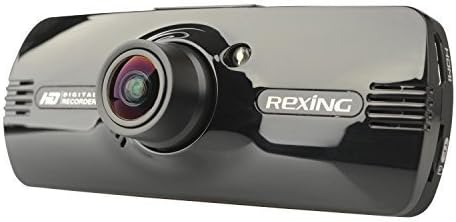
Image: REXING F9US Dash Camera
The REXING F9US Dash Camera is a compact, high-definition car dashboard camera designed to record your driving. It features a 170-degree wide-angle lens, a 2.7-inch 16:9 TFT LCD screen, and supports Full HD 1080p video recording. Key features include G-Sensor for automatic accident detection, Wide Dynamic Range (WDR) technology for optimal video quality in varying light conditions, and motion detection for recording when the vehicle is parked.
4. Configuració
4.1 Instal·lació de la targeta Micro SD
- Assegureu-vos que la càmera del salpicader estigui apagada.
- Localitza la ranura per a targetes Micro SD al lateral de la càmera.
- Insert a Class 10 or higher Micro SD card (up to 128GB) into the slot until it clicks into place.
- Per treure-la, premeu suaument la targeta fins que surti.
4.2 Muntatge de la càmera del cotxe
- Netegeu a fons la zona desitjada del parabrisa.
- Attach the suction cup mount to the camera.
- Premeu la ventosa fermament contra el parabrisa i gireu la palanca per fixar-la.
- Ajusta l'angle de la càmera per garantir una visió clara view de la carretera.
4.3 Connexió de potència
- Connect the in-car charging cable to the camera's power input port.
- Plug the other end of the cable into your vehicle's 12V power outlet (cigarette lighter socket).
- The camera will typically power on automatically when the vehicle's ignition is turned on.
4.4 Configuració inicial
Upon first use, or after a reset, you may need to set the date, time, and language. Navigate through the menu using the camera's buttons.
5. Instruccions de funcionament
5.1 Enregistrament bàsic
- Once powered on and connected to power, the camera will automatically begin loop recording. A flashing red record indicator will confirm recording is active.
- To manually start/stop recording, press the REC botó.
5.2 Navegació de menús
The camera features several buttons for navigation and control:
- Botó MENÚ (bottom left): Press once to enter video settings, press twice to enter tool settings.
- EVENT Button (top right, with a triangle): Functions as an 'Up' button in menus. When held for 3 seconds during recording, it locks the current video file.
- Botó MIC: Functions as a 'Down' button in menus.
- Botó REC: Functions as 'Select' or 'OK' in menus.
- Botó d'imatge (bottom right): When held, enters review mode a view gravat files.
5.3 Reproducció i File Gestió
- A view recordings on the camera, enter review mode using the Picture button.
- Per transferir files to a computer, connect the camera via the USB cable. The camera will appear as a removable disk.
- The camera also supports HDMI output for viewen una pantalla més gran.
6. Característiques explicades
6.1 Enregistrament en bucle
The camera continuously records video in segments (e.g., 2, 3, or 5 minutes). When the memory card is full, the oldest unlocked video file is automatically overwritten by the newest recording. This ensures continuous recording without manual intervention.
6.2 G-Sensor (Accident Auto Detection Feature)
The built-in G-Sensor detects sudden movements or impacts (e.g., in case of a collision). When triggered, the current video segment is automatically locked and saved to prevent it from being overwritten by loop recording. These files are stored in a protected folder.
6.3 Wide Dynamic Range (WDR) Technology
WDR technology enhances video quality by balancing exposure in scenes with high contrast, such as driving from a dark tunnel into bright sunlight. This ensures clearer images with more detail in both bright and dark areas.
6.4 Detecció de moviment
When enabled, the camera will automatically start recording if it detects motion in front of the lens while the vehicle is parked. This feature is useful for monitoring your vehicle when it's unattended.
6.5 Visió nocturna
The camera supports night vision capabilities to improve recording quality in low-light conditions. Note that the built-in LED light is primarily for use when the camera is outside the car in battery mode, acting as a flashlight. For in-car recording, it's generally recommended to keep it off to avoid windshield reflections.
7. Manteniment
- Neteja: Feu servir un drap suau i sec per netejar la lent i la pantalla de la càmera. Eviteu utilitzar productes de neteja abrasius o dissolvents.
- Format de la targeta SD: It is recommended to format the Micro SD card periodically (e.g., once a month) within the camera's settings to ensure optimal performance and prevent data corruption. Back up any important files abans de formatar.
- Emmagatzematge: Guardeu la càmera en un lloc fresc i sec, allunyat de la llum solar directa i de temperatures extremes quan no la feu servir.
8. Solució De Problemes
| Problema | Possible solució |
|---|---|
| La càmera no s'encén. | Ensure the power cable is securely connected to both the camera and the vehicle's 12V outlet. Check the vehicle's power outlet for functionality. |
| Camera powers off unexpectedly or stops recording. | Verify the power connection is stable. Ensure the Micro SD card is Class 10 or higher and formatted correctly. Try a different Micro SD card. |
| La qualitat del vídeo és deficient o borrosa. | Clean the camera lens. Ensure the protective film (if any) has been removed from the lens. Check if the windshield is clean. |
| Error de targeta micro SD. | Format the Micro SD card within the camera's settings. Ensure the card is Class 10 or higher. Try a different, reputable brand Micro SD card. |
| La data i l'hora són incorrectes. | Adjust the date and time settings in the camera's menu. |
9. Especificacions
| Característica | Detall |
|---|---|
| Resolució de vídeo | 1080FHD (1920x1080), 1080P (1440x1080), 720P (1280x720), WVGA (848x480), VGA (640x480), QVGA (320x240) |
| Lent | 170 degree 6-layers glass lens |
| Mida de la pantalla | 2.7 inch 16:9 TFT LCD |
| Vídeo File Format | MOV |
| Imatge File Format | JPG |
| Suport per a targetes de memòria | Up to 128GB Class10 or upper Micro SD/TF Card (not included) |
| Connectivitat | HDMI, AV-OUT, USB |
| Enregistrament d'àudio | Admet |
| Sistema lingüístic | Anglès, francès, espanyol, portuguès, alemany, italià, xinès simplificat, xinès tradicional, rus, japonès |
| Dimensions del producte | 7 x 5 x 3 polzades |
| Pes de l'article | 12.1 unces |
| Bateria | 1 Lithium Polymer battery required (internal) |
10. Garantia i Suport
For information regarding product warranty, technical support, or service inquiries, please visit the official REXING website or contact REXING customer service directly. Please have your product model number (F9US) and purchase details available when contacting support.


