1. Introducció
The Intermatic DT121K is an indoor 7-day digital plug-in timer designed for automated control of electrical devices. It offers flexible programming options, including 24-hour or 7-day schedules, and can manage up to 7 on/off events. Key features include an astronomic function for automatic sunrise/sunset adjustments, automatic daylight saving time correction, and a random mode to enhance home security by varying light activation times. This timer is equipped with a single 2-prong receptacle and is suitable for various indoor applications, such as controlling Christmas tree lights or seasonal decorations.
2. Informació de seguretat
- Read all instructions before use to ensure proper operation and to prevent damage to the timer or connected devices.
- This timer is designed for indoor use only. Do not expose to water or moisture.
- Do not exceed the electrical ratings of the timer (15A, 125VAC, 60Hz, 1/2 HP Motor Load, 1000W Tungsten, 500VA Electronic Ballast, 120VAC 8.3A Standard Ballast). Overloading can cause overheating and potential fire hazards.
- Ensure the timer is securely plugged into a properly grounded outlet.
- No intenteu desmuntar ni reparar el temporitzador. Envieu totes les tasques de manteniment a personal qualificat.
- Mantenir fora de l'abast dels nens.
3. Producte acabatview i Característiques
The DT121K timer features an intuitive interface with a digital display and control buttons for easy programming. Its compact design allows it to plug directly into a standard wall outlet.

Figura 3.1: Frontal view of the DT121K timer, showing the digital display and control buttons (PROGRAM, TIME, RESUME, MODE, +, -).
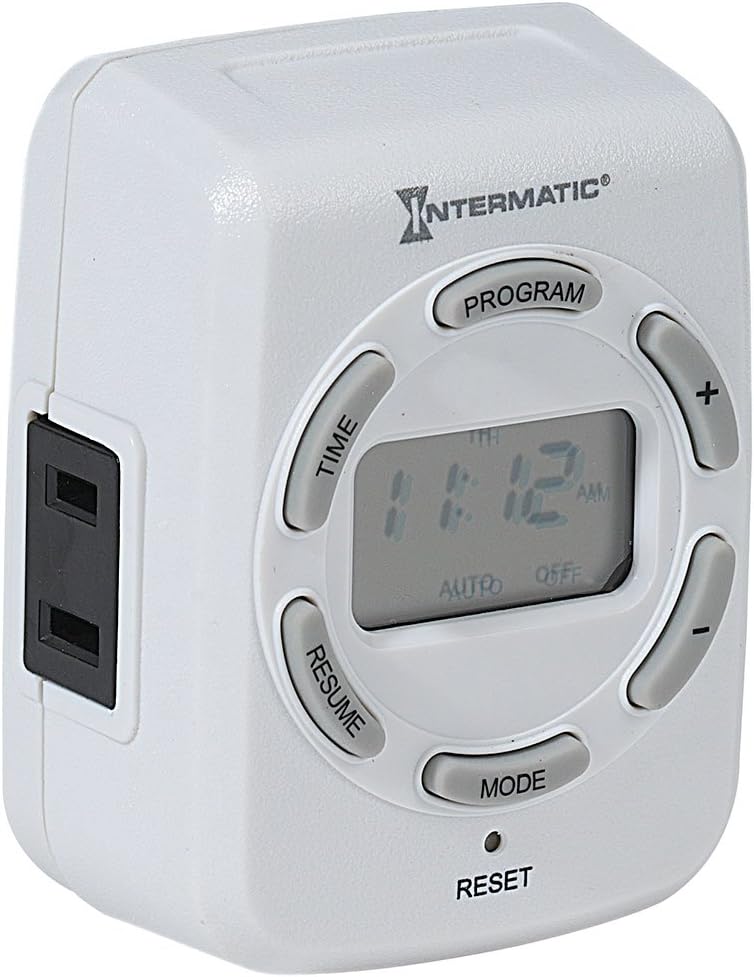
Figura 3.2: lateral view of the DT121K timer, highlighting the single 2-prong receptacle for connecting devices.
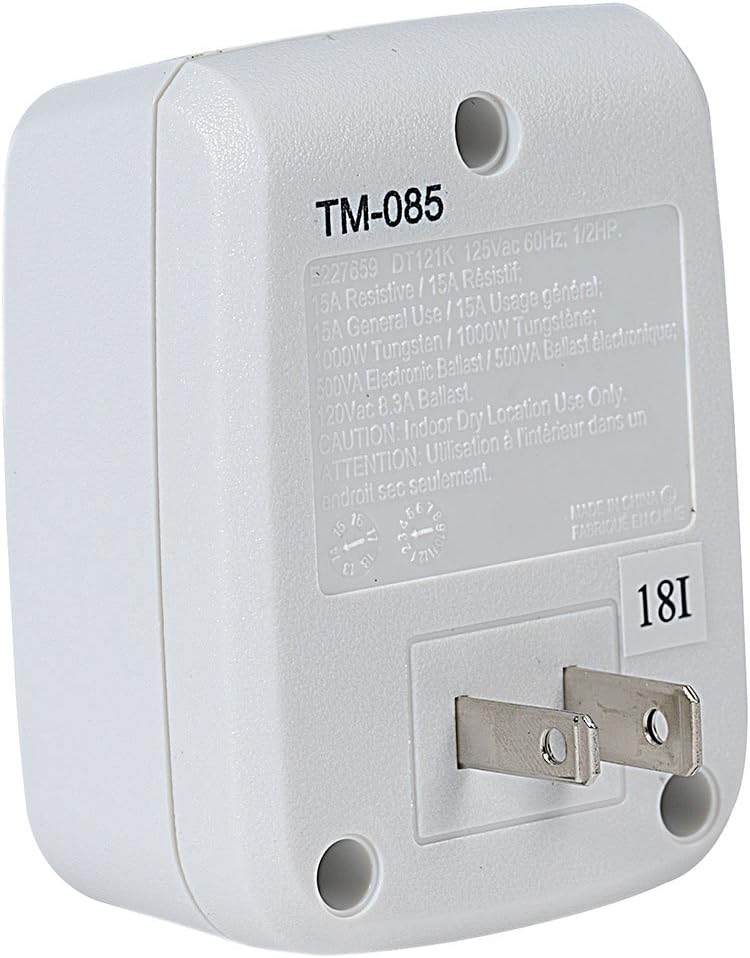
Figura 3.3: posterior view of the DT121K timer, displaying the 2-prong plug for wall outlet insertion and the product specification label.
Característiques principals:
- 7-Day/24-Hour Programming: Allows for flexible scheduling of connected devices throughout the week.
- 7 ON/OFF Events: Program up to seven distinct on and off times per day or week.
- Astronomic Feature: Automatically adjusts ON/OFF times based on daily sunrise and sunset changes, ideal for outdoor lighting simulation.
- Automatic Daylight Saving Time Adjustment: Simplifies time management by automatically adjusting for DST changes.
- Random Feature: Varies programmed ON/OFF times by a few minutes to create a "lived-in" appearance, enhancing security.
- Còpia de seguretat de la bateria recarregable: Maintains programmed settings and current time during power outages.
- Single 2-Prong Receptacle: Provides a convenient outlet for controlling a single device.
4. Configuració
4.1 Engegada i càrrega inicials
- Plug the DT121K timer into a standard 125VAC wall outlet.
- Allow the timer to charge for at least 30 minutes before initial programming. The internal rechargeable battery will charge automatically when plugged in.
- If the display is blank or dim, press the RESET button (located at the bottom of the timer, may require a pointed object like a pen tip) to clear all settings and restart the timer.
4.2 Configuració de l'hora i el dia actuals
- Manteniu premut el botó TEMPS botó fins que la pantalla parpellegi.
- Utilitza el + i - buttons to adjust the current hour. Pay attention to AM/PM indicators.
- Premeu el botó TEMPS de nou per passar als minuts i, a continuació, utilitzeu el botó + i - per ajustar-se.
- Premeu el botó TEMPS button again to select the current day of the week (MO, TU, WE, TH, FR, SA, SU). Use + i - per seleccionar.
- Premeu el botó TEMPS button one last time to save the settings and exit time setting mode.
5. Instruccions de funcionament
5.1 Programació d'esdeveniments ON/OFF
The timer allows for up to 7 ON and 7 OFF programmed events. Each event can be set for specific days or groups of days.
- Premeu el botó PROGRAMA botó. La pantalla mostrarà "1 ON" i l'hora parpellejarà.
- Utilitza el + i - botons per configurar el temps d'encesa desitjat per al Programa 1.
- Premeu el botó PROGRAMA button again. The display will show "1 OFF" and the time will flash.
- Utilitza el + i - botons per configurar l'hora d'apagada desitjada per al Programa 1.
- Premeu el botó PROGRAMA button again to select the days for Program 1. Use + i - per anar ciclant entre les opcions de dia (per exemple, DL-DS, DL-DV, DS-DS, dies individuals).
- Repetiu els passos 1-5 per a programes d'encesa/apagada addicionals (fins a 7).
- Per sortir del mode de programació, premeu CURRÍCULA button or wait approximately 30 seconds for the timer to automatically return to normal operation.
5.2 Using Astronomic (Dusk-to-Dawn) Feature
The astronomic feature allows the timer to turn ON at sunset and OFF at sunrise, or at a set time relative to them.
- When setting an ON or OFF program, cycle through the time options using the + or - buttons until "DUSK" or "DAWN" appears on the display.
- You can also set an offset (e.g., DUSK + 30 minutes, DAWN - 15 minutes) by continuing to press + or - after DUSK/DAWN appears.
- Save the program as usual by pressing PROGRAMA.
5.3 Activating Random Mode
The random mode varies the programmed ON/OFF times by a few minutes (typically +/- 30 minutes) to simulate occupancy.
- Premeu el botó MODE button repeatedly until "RDM" (Random) appears on the display.
- The timer will now operate in random mode, slightly adjusting your programmed ON/OFF times.
- To deactivate random mode, press MODE until "RDM" disappears.
5.4 Anulació manual
To temporarily override the current program without deleting it:
- Premeu el botó MODE button to cycle through ON, OFF, and AUTO modes.
- Selecting ON will keep the connected device on until the next programmed OFF event or until manually changed.
- Selecting OFF will keep the connected device off until the next programmed ON event or until manually changed.
- Selecting AUTO returns the timer to its programmed schedule.
6. Manteniment
- Netegeu el temporitzador amb un drap suau i sec. No utilitzeu productes de neteja abrasius ni dissolvents.
- Assegureu-vos que el temporitzador estigui desendollat abans de netejar-lo.
- The internal battery is rechargeable and designed for long life. No user maintenance is required for the battery.
7. Solució De Problemes
| Problema | Causa possible | Solució |
|---|---|---|
| La pantalla està en blanc o tènue. | Battery not charged or needs reset. | Plug timer into an active outlet for at least 30 minutes. Press the RESET botó. |
| El dispositiu no s'encén/apaga a les hores programades. | Incorrect programming, timer in manual override mode, or power outage. | Verify programmed ON/OFF times and days. Ensure timer is in AUTO mode. Check power to the outlet. |
| El mode aleatori no funciona. | Mode aleatori no activat. | Premeu el botó MODE button until "RDM" appears on the display. |
| L'hora és incorrecta després de l'apagadatage. | Battery backup depleted or not fully charged. | Ensure timer is regularly plugged in to keep the battery charged. Reset and reprogram time if necessary. |
8. Especificacions
- Model: DT121K
- Entrada Voltage: 125 VCA, 60 Hz
- Càrrega màxima: 15 Amps Resistive, 1000W Tungsten, 500VA Electronic Ballast, 1/2 HP Motor Load
- Nombre de programes: Up to 7 ON/OFF events
- Tipus de receptacle: 2 puntes
- Bateria: Ió de liti recarregable (inclosa)
- Dimensions: 6.75 x 5 x 2.5 polzades
- Pes: 4.6 unces
- Material: Resina, plàstic
- Color: Black (Note: Product images show white, but specification lists black. Please refer to product packaging for exact color.)
- Certificacions: Llistat UL
- UPC: 078275143388
9. Garantia i Suport
For warranty information and technical support, please refer to the official Intermatic weblloc web o contacteu directament amb el seu servei d'atenció al client. Conserveu el rebut de compra com a comprovant de compra per a qualsevol reclamació de garantia.
Intermatic Customer Support:
- Weblloc: www.intermatic.com
- Contact information can typically be found in the "Support" or "Contact Us" section of their weblloc.


