1. Acabatview
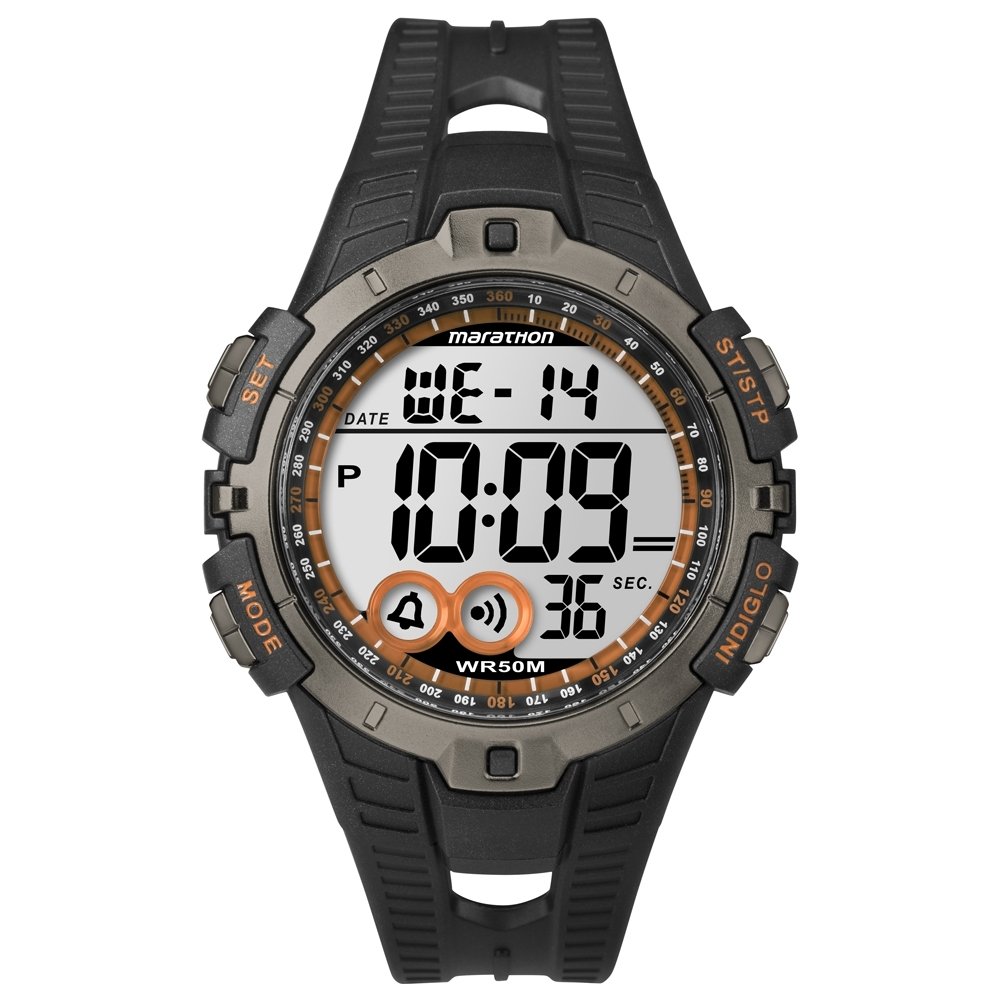
The Timex T5K801 Marathon Digital Chronograph Watch is designed for performance and durability. It features a clear digital display, a robust resin case, and a comfortable resin strap. This watch is water-resistant and includes essential functions for daily use and fitness activities.
- Protective scratch-resistant hard mineral crystal lens.
- Round high-performance and durable resin case with digital display.
- Durable and strong resin 20mm wide strap with buckle.
- Resistent a l'aigua fins a 50 metres.
2. Configuració
2.1 Initial Power On and Battery
Your Timex T5K801 watch comes with a pre-installed Lithium Ion battery. The watch should power on automatically. If the display is blank, ensure the battery is properly seated or consider a replacement if the watch is old. This model requires 1 Lithium Ion battery.
2.2 Configuració de l'hora i la data
- Locate the 'SET' button, typically on the side of the watch. Press and hold it until the time display begins to flash.
- Use the 'MODE' or 'START/STOP' buttons to adjust the flashing digit (hours, minutes, seconds).
- Press the 'SET' button again to move to the next setting (e.g., minutes, then year, month, day).
- Once all settings are correct, press the 'SET' button one last time to exit the setting mode.
3. Funcionament del rellotge
3.1 Modes de navegació
The 'MODE' button, usually located on the side of the watch, allows you to cycle through different functions such as Time, Chronograph (Stopwatch), Alarm, and Timer. Press the 'MODE' button repeatedly to switch between these functions.
3.2 Ús del cronògraf (rellotge de temps)
- Press 'MODE' until the chronograph display appears (usually showing 00:00:00).
- Press the 'START/STOP' button to begin timing.
- Press 'START/STOP' again to pause the timing.
- To resume, press 'START/STOP' once more.
- To reset the chronograph to zero, press the 'RESET' button while the chronograph is paused.
3.3 Configuració i ús de l'alarma
- Press 'MODE' until the alarm display is shown.
- Press and hold the 'SET' button until the alarm time flashes.
- Use 'MODE' or 'START/STOP' to adjust the hours and minutes.
- Press 'SET' to confirm each segment.
- After setting the time, you can usually toggle the alarm ON/OFF using a dedicated button or a combination of 'MODE' and 'SET'.
3.4 Llum nocturna INDIGLO®
To illuminate the watch face in low-light conditions, press the INDIGLO® button, typically located on the top left side of the watch case. The light will remain on for a few seconds.
4. Manteniment
4.1 Neteja del rellotge
Per netejar el rellotge, netegeu-lo amb un drap suau iamp cloth. Avoid using harsh chemicals or abrasive materials, as these can damage the resin case and strap or the mineral crystal lens. For stubborn dirt, a mild soap solution can be used, followed by rinsing with clean water and thorough drying.
4.2 Substitució de la bateria
When the watch display dims or functions become erratic, it may be time to replace the battery. While it is possible to replace the battery yourself, it is recommended to have it replaced by a qualified watch technician to ensure proper sealing and maintain water resistance. Improper battery replacement can compromise the watch's water resistance.
4.3 Resistència a l'aigua
This watch is water resistant to 50 meters (5 ATM). This means it is suitable for showering, swimming in shallow water, and general water activities. It is not suitable for diving or high-impact water sports. Do not operate buttons while the watch is submerged in water, as this can allow water to enter the case.
5. Solució De Problemes
- Pantalla en blanc: If the display is blank, the battery may be depleted. Refer to Section 4.2 for battery replacement.
- Hora/data incorrecta: If the time or date is incorrect, follow the steps in Section 2.2 to reset them. Ensure you are in the correct 12-hour or 24-hour format if applicable.
- Botons que no responen: Ensure the watch is not in a locked mode (if applicable, consult a more detailed model-specific manual). If buttons remain unresponsive, a battery issue or internal malfunction may be present. Try a soft reset by removing and reinserting the battery (if comfortable doing so, otherwise seek professional help).
- Fogging Under Crystal: If condensation appears under the crystal, it indicates a breach in the watch's water resistance. Avoid further water exposure and seek professional service immediately to prevent damage to the internal components.
6. Especificacions
| Característica | Detall |
|---|---|
| Número de model | T5K801 |
| Marca | TIMEX |
| Tipus de visualització | Digital (LCD) |
| Tipus de moviment | Quars |
| Material de la caixa | Resina |
| Diàmetre de la caixa | 46 Mil·límetres |
| Gruix de la caixa | 14 Mil·límetres |
| Material de la banda | Plàstic (resina) |
| Amplada de banda | 20 Mil·límetres |
| Material de cristall | Mineral |
| Profunditat de resistència a l'aigua | 50 Metres (5 ATM) |
| Font d'alimentació | Funciona amb bateria (1 bateria d'ions de liti inclosa) |
| Pes de l'article | 0.05 quilograms (51.5 g) |
| Característiques addicionals | INDIGLO® Night-Light, Chronograph |
7. Garantia i Suport
Timex watches are manufactured to high standards and come with a limited warranty against manufacturing defects. The specific terms and duration of your warranty may vary by region. Please refer to the warranty card included with your purchase or visit the official Timex weblloc per obtenir informació detallada sobre la garantia.
For technical support, service, or inquiries regarding your Timex T5K801 watch, please contact Timex customer service through their official website or the contact information provided in your watch packaging. When contacting support, please have your model number (T5K801) and purchase details readily available.
Timex oficial Weblloc: www.timex.com


