1. Introducció
The CyberPower BRG1500AVRLCD Intelligent LCD UPS System is designed to provide reliable battery backup and surge protection for desktop computers, workstations, networking devices, and home entertainment systems. This Uninterruptible Power Supply (UPS) system utilizes line interactive topology and simulated sine wave output to safeguard your valuable electronics from power interruptions and fluctuations.
Key features include Automatic Voltage Regulation (AVR) to correct minor power fluctuations without switching to battery power, thereby extending battery life. It also offers two USB charge ports (2.1 Amps shared) for portable devices.

Figure 1: CyberPower BRG1500AVRLCD UPS System in a typical office environment, providing power protection to connected devices.
2. Precaucions de seguretat
Please read and follow all safety instructions carefully before installing or operating the UPS. Failure to do so may result in damage to the unit, connected equipment, or personal injury.
- Do not install the UPS in direct sunlight, near heat-emitting appliances, or in areas with excessive humidity.
- Ensure the UPS is connected to a grounded outlet.
- No obriu el SAI casing. There are no user-serviceable parts inside. Refer servicing to qualified service personnel.
- No utilitzeu el SAI per a equips mèdics o de suport vital.
- Ensure proper ventilation around the UPS. Do not block any ventilation openings.
- In case of fire, use a powder fire extinguisher. Do not use water.
3. Contingut del paquet
Verifiqueu que tots els elements siguin presents al paquet:
- Unitat SAI
- Manual d'usuari
4. Producte acabatview
4.1 Tauler frontal

Figura 2: Frontal view of the CyberPower BRG1500AVRLCD UPS, highlighting the Intelligent LCD panel and USB charging ports.
The front panel features the Intelligent LCD display, control buttons (Display, Mute, Enter, Setup), and two USB charge ports (USB-A and USB-C) for convenient charging of portable devices.
4.2 Panell posterior
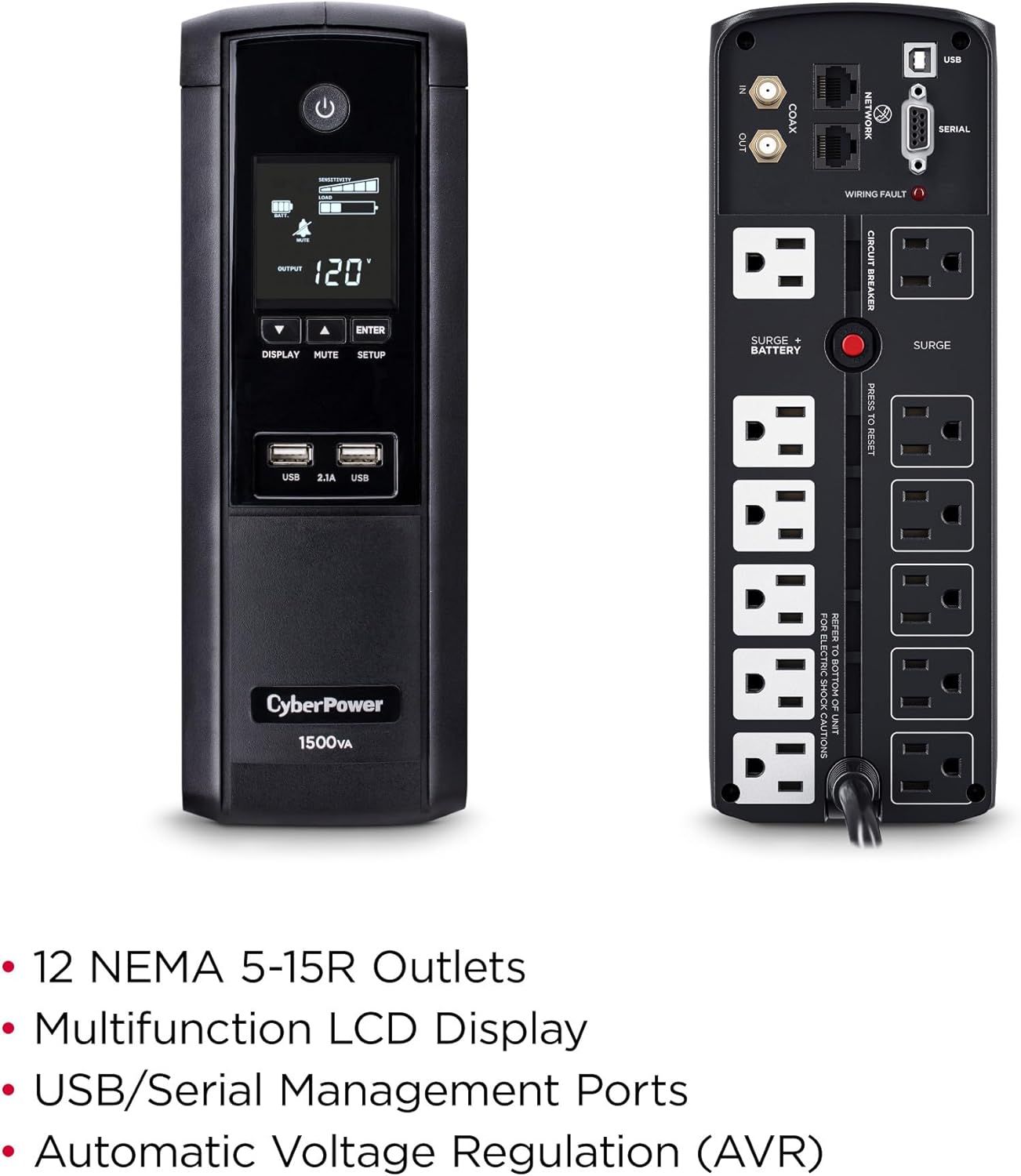
Figura 3: posterior view of the CyberPower BRG1500AVRLCD UPS, detailing the NEMA 5-15R outlets, network, cable, and serial ports.
The rear panel includes 12 NEMA 5-15R outlets: six battery backup & surge protected outlets and six surge protected outlets. It also features network (RJ45) and cable (Coax) surge protection ports, a serial port, and a USB port for management software connectivity. A circuit breaker reset button is also located on the rear panel.
5. Configuració
5.1 Càrrega inicial
Before initial use, plug the UPS into a grounded wall outlet and allow it to charge for at least 8 hours to ensure maximum battery runtime. The unit will automatically turn on when connected to mains power.
5.2 Equips de connexió
- Bateria de reserva i preses de corrent protegides contra sobretensions: Connecteu equips crítics com ara l'ordinador, el monitor i els discs durs externs a aquestes preses de corrent. Aquests dispositius rebran energia de la bateria del SAI durant una sortida.tage.
- Punts de venda protegits contra sobretensions: Connect non-critical equipment that still requires surge protection, such as printers or scanners, to these outlets. These devices will not receive battery backup power.
- USB Charge Ports: Use the front USB-A and USB-C ports to charge mobile phones, MP3 players, and cameras.
- Data Line Protection: Connect your network cable (RJ45) and coaxial cable (Coax) through the designated IN/OUT ports on the rear panel to protect against surges.
6. Instruccions de funcionament
6.1 Turning On/Off the UPS
- Encendre: Press and hold the Power button on the front panel for approximately 2 seconds. The LCD display will light up.
- Apagar: Press and hold the Power button for approximately 2 seconds. The LCD display will turn off.
6.2 Funcions de la pantalla LCD
The multifunction LCD panel displays immediate, detailed information on battery and power conditions. Use the 'Display' button to cycle through various screens:

Figura 4: Examples of information displayed on the Intelligent LCD panel, including input/output voltage, càrrega i estat de la bateria.
- Entrada Voltage: Mostra el volum actualtage from the utility power.
- Vol. De sortidatage: Mostra el voltage subministrada pel SAI als equips connectats.
- Capacitat de la bateria: Indicates the current charge level of the internal batteries.
- Capacitat de càrrega: Mostra el percentatgetage de la capacitat del SAI que utilitza l'equip connectat.
- Estimated Runtime: Provides an estimate of how long the UPS can supply power during an outage based on the current load.
- Registre d'esdeveniments: Registra esdeveniments d'energia com ara outages, surges i voltage fluctuacions.
6.3 Volum automàtictagReglament (AVR)
El SAI té funcions de Vol automàtictage Regulation (AVR), which automatically corrects minor power fluctuations (sags and overvoltages) without switching to battery power. This extends the life of the battery by reducing the number of times it needs to discharge and recharge.
6.4 PowerPanel Personal Edition Management Software
The UPS comes with FREE PowerPanel Personal Edition Management Software (Download). This software allows for advanced power management features, including scheduled shutdowns, remote monitoring, and customizable alerts. Refer to the software's documentation for installation and usage instructions.
7. Manteniment
7.1 Substitució de la bateria
The CyberPower BRG1500AVRLCD uses two 12V batteries. The batteries are designed to last approximately 3-5 years under normal operating conditions. When the batteries reach the end of their service life, they should be replaced by qualified personnel. For battery replacement, contact CyberPower Systems customer support or a certified technician.
7.2 Neteja
Regularly clean the exterior of the UPS with a dry cloth. Ensure ventilation openings are free from dust and debris to maintain proper airflow and prevent overheating.
8. Solució De Problemes
If the UPS is not functioning correctly, refer to the following common issues:
- El SAI no s'encén: Ensure the power cord is securely plugged into a grounded wall outlet and the UPS. Check the circuit breaker on the rear panel and reset if tripped.
- El SAI emet un so continu: This usually indicates the UPS is operating on battery power during an outage or a low battery condition. Save your work and shut down connected equipment if the outage és prolongat.