1. Introducció
This manual provides detailed instructions for the setup, operation, and maintenance of your DISH 123479171-AA Digital IR Remote Control. This remote is designed to control your DISH satellite receiver, television (TV), video cassette recorder (VCR), and auxiliary (AUX) devices. Please read this manual thoroughly before use to ensure proper functionality and to maximize your viewexperiència.
2. Producte acabatview
The DISH 123479171-AA remote control is an original DISH product, offering reliable infrared (IR) control for multiple entertainment devices. Its ergonomic design ensures comfortable handling and intuitive button placement for ease of use.
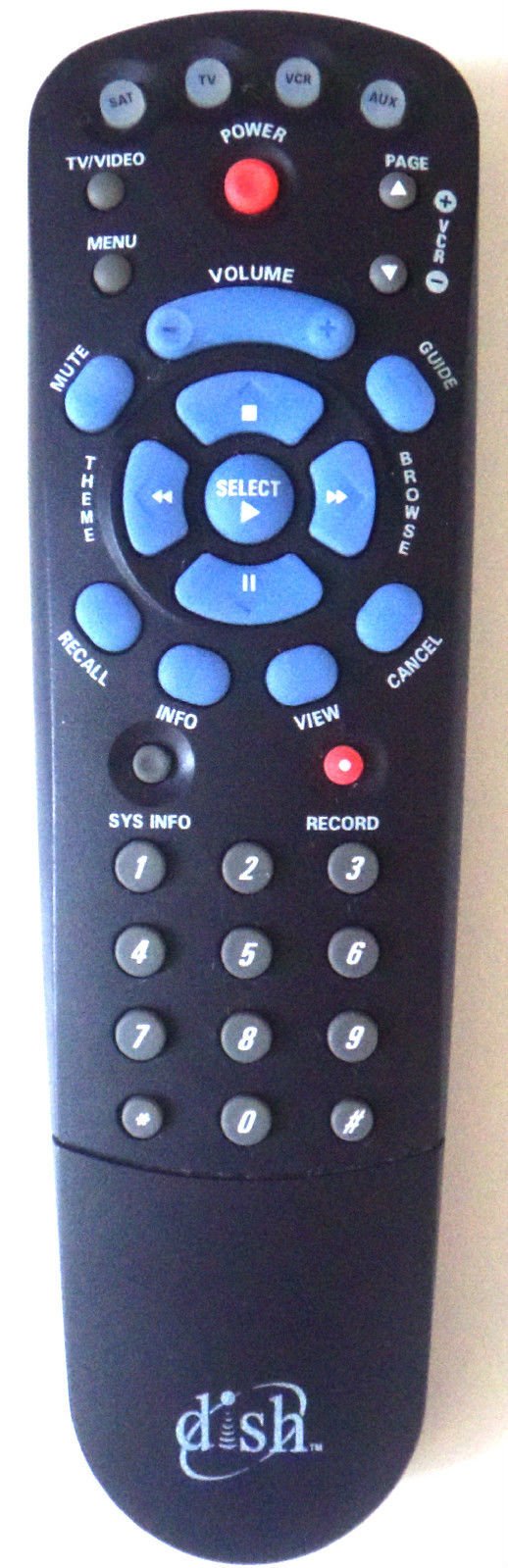
Figura 1: DISH 123479171-AA Digital IR Remote Control. This image shows the front view of the remote control, highlighting its array of buttons for various functions.
3. Configuració
3.1 Instal·lació de la bateria
- Localitzeu el compartiment de la bateria a la part posterior del comandament a distància.
- Feu lliscar la tapa del compartiment de la bateria cap avall i aixequeu-la.
- Insert two (2) fresh AA batteries, ensuring the positive (+) and negative (-) terminals align correctly with the markings inside the compartment.
- Torneu a col·locar la tapa del compartiment de la bateria fent-la lliscar fins que faci clic de manera segura.
3.2 Programming for TV, VCR, and AUX Devices
Your DISH remote is typically pre-programmed for DISH satellite receivers. To control other devices like your TV, VCR, or an auxiliary component, you may need to program the remote using specific codes. Refer to your DISH receiver's user manual or the DISH website for a comprehensive list of programming codes and detailed instructions for your specific device models.
- Passos generals de programació (poden variar):
- Engegueu el dispositiu que voleu programar (per exemple, el televisor).
- Press and hold the corresponding mode button on the remote (e.g., TV, VCR, AUX) until all mode buttons light up.
- Enter the 3-digit or 4-digit programming code for your device's brand.
- Point the remote at the device and press the POWER button. If the device turns off, the programming was successful.
- If the device does not turn off, try the next code for your brand or consult the DISH programming guide.
4. Instruccions de funcionament
The DISH 123479171-AA remote control features a standard layout for intuitive operation. Below are common button functions:
- POTÈNCIA: Turns the selected device (SAT, TV, VCR, AUX) on or off.
- SAT/TV/VCR/AUX: Selects the device mode the remote will control.
- GUIA: Displays the program guide for your DISH receiver.
- MENÚ: Accesses the main menu of the DISH receiver or selected device.
- SELECT/OK: Confirma una selecció o introdueix un element del menú.
- ARROW BUTTONS (UP/DOWN/LEFT/RIGHT): Navigates through menus and program guides.
- CHANNEL +/-: Changes channels on the DISH receiver or selected device.
- VOLUM +/-: Adjusts the volume of the selected device (typically TV).
- MUT: Silencia o activa l'àudio.
- INFORMACIÓ: Mostra informació del programa.
- ENRERE/SORTIDA: Torna a la pantalla anterior o surt d'un menú.
- REGISTRE: Initiates recording on the DISH receiver (if equipped) or VCR.
- PLAY/PAUSE/STOP/REW/FF: Controls playback functions for recorded content or VCR.
- TECLAT NUMÈRIC (0-9): Introdueix números de canal o seleccions de menú.
5. Manteniment
5.1 Neteja del comandament a distància
To clean your remote control, gently wipe its surface with a soft, dry, or slightly damp drap. No utilitzeu netejadors abrasius, dissolvents ni productes químics agressius, ja que poden danyar l'acabat del comandament a distància o els components interns.
5.2 Substitució de la bateria
Replace the batteries when the remote's performance degrades, or if the indicator light (if present) flashes to signal low battery power. Always replace both batteries at the same time with new AA batteries. Dispose of old batteries according to local regulations.
6. Solució De Problemes
If you encounter issues with your DISH 123479171-AA remote control, try the following troubleshooting steps:
- El comandament a distància no respon: Comproveu si les piles estan inserides correctament i tenen prou càrrega. Substituïu-les si cal.
- Remote not controlling a specific device: Ensure the correct mode button (SAT, TV, VCR, AUX) is selected. Re-verify programming for TV, VCR, or AUX devices if applicable.
- Control intermitent: Ensure there are no obstructions between the remote and the device's IR sensor. The remote uses infrared light, so direct line of sight is required.
- Buttons sticking: Clean the remote's surface as described in the Maintenance section.
- Remote still not working: Try resetting the remote by removing the batteries for a few minutes, then reinserting them. If issues persist, contact DISH customer support.
7. Especificacions
| Característica | Detall |
|---|---|
| Fabricant | PLAT |
| Número de model | 123479171-AA |
| Tecnologia de connectivitat | Infrarojos (IR) |
| Dispositius compatibles | DISH Satellite Receiver, TV, VCR, AUX |
| Tipus de controlador | Control de botons |
| Característica especial | Disseny ergonòmic |
| Font d'alimentació | 2 piles AA (no incloses) |
8. Garantia i Suport
For information regarding the warranty of your DISH 123479171-AA Digital IR Remote Control, please refer to the documentation included with your DISH satellite receiver or visit the official DISH Network website. For technical support, programming assistance, or to order replacement parts, please contact DISH customer service directly.
DISH Network Official Weblloc: www.dish.com
DISH Customer Support: Refer to your service agreement or the official weblloc web per a números de contacte i horaris d'atenció.


