Introducció
This manual provides detailed instructions for the proper use and maintenance of your Sharp EL-2607RIII Desktop Calculator. Please read this manual thoroughly before operating the calculator to ensure optimal performance and longevity.
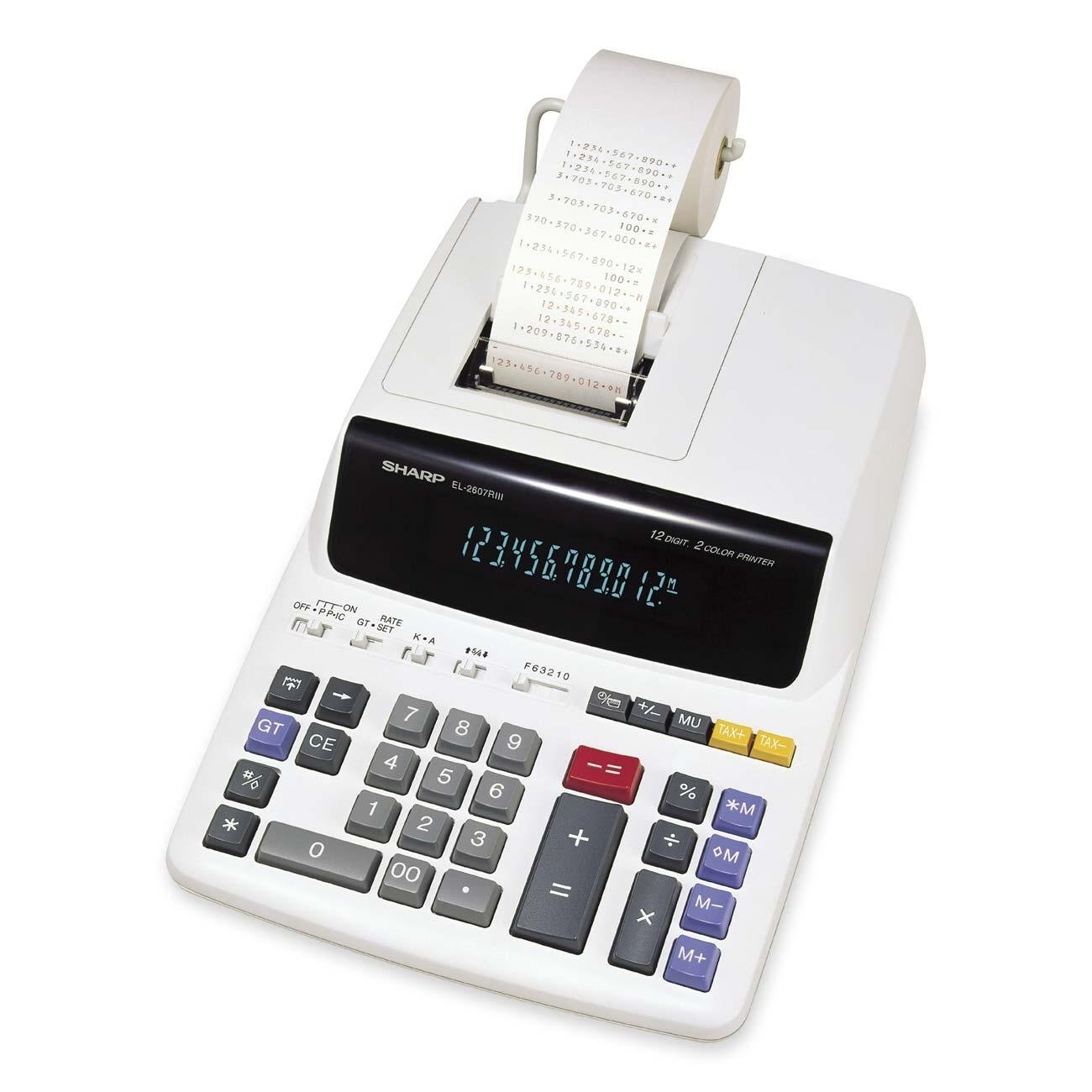
Figure 1: Sharp EL-2607RIII Desktop Calculator. This image displays the calculator's front, showing its 12-digit fluorescent display, numeric keypad, and function buttons.
Configuració
Encès
The Sharp EL-2607RIII Desktop Calculator is designed for AC power supply. To power on the device:
- Ensure the calculator is placed on a stable, flat surface.
- Connect the provided AC adapter cable into the power input port located on the back of the calculator.
- Connecteu l'adaptador de CA a una presa de corrent estàndard.
- The calculator should automatically power on, and the display will illuminate. If not, press the ON/C botó.
Instruccions de funcionament
Càlculs bàsics
Perform standard arithmetic operations using the numeric keypad and function buttons:
- Suma (+): Introduïu el primer número, premeu +, introdueix el segon número i prem =.
- Resta (-): Introduïu el primer número, premeu -, introdueix el segon número i prem =.
- Multiplicació (x): Introduïu el primer número, premeu x, introdueix el segon número i prem =.
- Divisió (÷): Introduïu el primer número, premeu ÷, introdueix el segon número i prem =.
- Esborrar entrada (CE): Clears the last entered number without affecting previous calculations.
- All Clear (ON/C): Esborra totes les entrades i càlculs, reinicialitzant la calculadora.
Funcions especials
The EL-2607RIII includes several advanced functions for business and financial calculations:
- Càlcul d'impostos: Allows for easy tax additions or subtractions. Refer to the calculator's dedicated tax buttons and their specific usage instructions.
- Mark-up, Cost/Sell/Margin Calculations: Utilized for determining profit margins and pricing strategies. Consult the specific buttons for these functions on the keypad.
- Percent Changes: Calcula el percentatgetage augmenta o disminueix.
- Automatic Add-on/Discounts: Apply automatic additions or discounts to prices.
- Grand Total Function (GT): Adds the grand total of several calculations, useful for summing multiple invoice items. Press GT to display the cumulative total.
- Funció de rellotge i calendari: Displays the current time and date. Refer to the specific button for activating and setting this function.
- Funcions de memòria:
- Memòria Plus (M+): Afegeix el valor mostrat a la memòria.
- Memòria Menys (M-): Resta el valor mostrat de la memòria.
- Recall Memory (RM): Mostra el valor que hi ha actualment a la memòria.
- Clear Memory (CM): Clears the memory, setting its value to zero.
Pantalla de visualització
The calculator features a 12-digit fluorescent display, providing clear visibility of numbers and symbols.
Manteniment
Neteja
Per mantenir l'aspecte i la funcionalitat de la calculadora:
- Disconnect the AC adapter before cleaning.
- Netegeu l'exterior amb un drap suau i sec.
- Per a la brutícia persistent, lleugerament dampal drap amb aigua o un netejador suau i no abrasiu.
- Do not use harsh chemicals, solvents, or abrasive materials, as these can damage the casing o pantalla.
Font d'alimentació
The calculator operates solely on AC power. Ensure the power cord is not damaged and is securely connected to both the calculator and the electrical outlet.
Resolució de problemes
Problemes comuns
- Calculator does not power on:
- Check if the AC adapter is securely plugged into both the calculator and a working electrical outlet.
- Comproveu que la presa de corrent funcioni provant-la amb un altre dispositiu.
- Premeu el botó ON/C botó.
- La pantalla és tènue o il·legible:
- Ensure the calculator is receiving stable AC power.
- The fluorescent display may have a limited lifespan. If issues persist, contact customer support.
- Resultats de càlcul incorrectes:
- Premeu ON/C to clear all previous operations and memory, then re-enter the calculation.
- Verify that the correct function mode (e.g., tax rate) is selected if applicable.
Especificacions
| Nom del model | EL-2607RIII |
| Mostra | 12-digit Fluorescent |
| Font d'alimentació | AC Supply Powered |
| Dimensions (A x A x P) | 0.3" x 8.7" x 12.9" (aprox. 0.76 cm x 22.1 cm x 32.77 cm) |
| Pes | 1.98 kg (aprox.) |
| Material | Plàstic |
| Funcions | Tax, Mark-up, Cost/Sell/Margin, Percent Change, Automatic Add-on/Discounts, Grand Total, Clock/Calendar, Memory (M+, M-, RM, CM) |
Garantia i Suport
Your Sharp EL-2607RIII Desktop Calculator is covered by a manufacturer's warranty. For specific warranty terms, duration, and conditions, please refer to the warranty card included with your product or visit the official Sharp Electronics website. For technical support, service, or inquiries, please contact Sharp customer service through their official channels.


