1. Introducció
The Celestron TrekGuide 48006-DS is a versatile 4-in-1 digital outdoor device designed for various outdoor activities. It integrates a digital compass, barometer, altimeter, and thermometer into a single, compact unit. This manual provides detailed instructions for setup, operation, and maintenance to ensure optimal performance and longevity of your device.

Figura 1.1: The Celestron TrekGuide 48006-DS device shown in its retail packaging, highlighting its 4-in-1 functionality as a digital compass, barometer, altimeter, and thermometer.
2. Contingut del paquet
Verifiqueu que tots els elements que s'enumeren a continuació siguin presents al vostre paquet:
- Celestron TrekGuide 48006-DS Digital Device
- Lanyard / Wrist Strap
- 2 x CR2032 Lithium-ion Batteries (pre-installed or separate)
- Aquest manual d'usuari
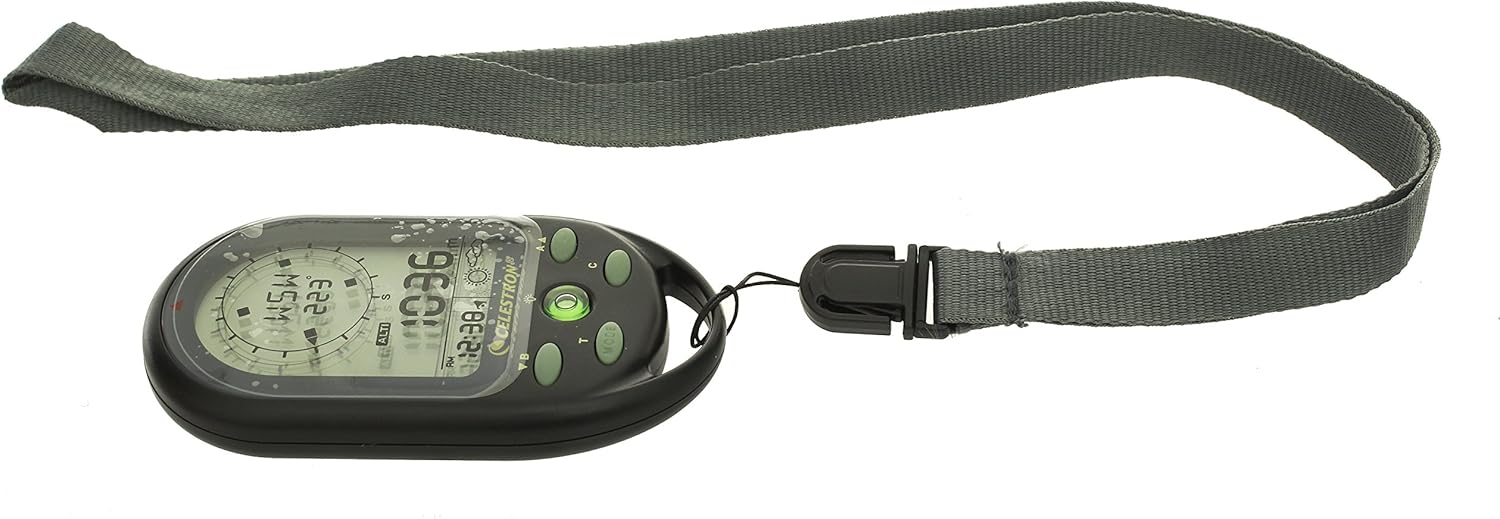
Figura 2.1: All components included with the Celestron TrekGuide: the main device, a gray lanyard, and two CR2032 batteries.
3. Dispositiu acabatview
Familiarize yourself with the various parts and controls of your TrekGuide device.

Figura 3.1: Davant view of the TrekGuide display, showing the digital compass, altitude reading, time, and weather forecast icon. Buttons for navigation and mode selection are visible below the screen.

Figura 3.2: posterior view of the TrekGuide device, displaying the "TrekGuide Digital Compass" logo, model number 48006, and regulatory markings. The battery compartment is located on the back.
3.1. Buttons and Display
- MODE Button (M): Cycles through different functions (Compass, Altimeter, Barometer, Thermometer, Time).
- SET Button (S): Used to enter settings mode for the currently displayed function.
- UP/DOWN Buttons (A/B): Adjust values or navigate menu options in settings mode.
- LIGHT Button (L): Activa la retroiluminació de la pantalla.
- Pantalla LCD: Shows readings, time, and settings.
4. Configuració
4.1. Instal·lació de la bateria
- Localitzeu el compartiment de la bateria a la part posterior del dispositiu (vegeu la Figura 3.2).
- Using a small Phillips head screwdriver, carefully remove the screws securing the battery cover.
- Insert two CR2032 Lithium-ion batteries, ensuring correct polarity (+/-).
- Replace the battery cover and secure it with the screws.
4.2. Engegada inicial i configuració bàsica
Upon first power-on or after battery replacement, you may need to set the time, date, and measurement units.
- Manteniu premut el botó MODE botó per encendre el dispositiu.
- Premeu el botó MODE button repeatedly until the Time display is shown.
- Manteniu premut el botó SET per entrar al mode de configuració de l'hora. El dígit de l'hora parpellejarà.
- Utilitza el Amunt/Avall botons per ajustar l'hora. Premeu SET to confirm and move to the next setting (minutes, 12/24 hour format, year, month, day).
- Repeat step 4 for all time and date settings.
- After setting the date, you may be prompted to set units (e.g., Celsius/Fahrenheit for temperature, meters/feet for altitude, hPa/inHg for pressure). Use Amunt/Avall per seleccionar i SET per confirmar.
- Premeu MODE per sortir de la configuració.
5. Instruccions de funcionament
The TrekGuide features multiple functions accessible via the MODE botó.
5.1. Brúixola digital
The digital compass provides directional bearings. For accurate readings, ensure the device is held level and away from strong magnetic fields.
- Premeu el botó MODE button until the compass display appears (showing cardinal directions and degrees).
- Calibració de la brúixola: For first use or if accuracy issues arise, calibrate the compass.
- In compass mode, press and hold the SET botó per entrar al mode de calibratge.
- Follow the on-screen instructions, typically involving rotating the device slowly in a figure-eight motion or 360-degree horizontal rotation.
- Once calibrated, the device will return to compass display.
- Hold the device horizontally and point the top edge in the desired direction. The display will show the cardinal direction (e.g., N, NE, E) and the bearing in degrees.
5.2. Altimeter
The altimeter measures current altitude based on atmospheric pressure. For best accuracy, calibrate it at a known altitude.
- Premeu el botó MODE button until the altimeter display appears (showing altitude in meters or feet).
- Altimeter Calibration:
- If you know your current altitude (e.g., from a map or sign), press and hold the SET button in altimeter mode.
- Utilitza el Amunt/Avall buttons to adjust the displayed altitude to the known value.
- Premeu SET per confirmar.
- The device will now display your current altitude. Note that altitude readings can fluctuate with changes in atmospheric pressure.
5.3. Baròmetre
The barometer measures atmospheric pressure and can provide a basic weather forecast.
- Premeu el botó MODE button until the barometer display appears (showing pressure in hPa or inHg).
- The device may also display a weather forecast icon (e.g., sun for clear, cloud for cloudy, rain for precipitation) based on recent pressure trends. This is an estimation and should not replace official weather forecasts.
5.4. Termòmetre
The thermometer measures ambient temperature.
- Premeu el botó MODE button until the thermometer display appears (showing temperature in Celsius or Fahrenheit).
- For accurate readings, remove the device from your body and allow it to acclimate to the ambient air temperature for several minutes.
5.5. Clock, Calendar, and Alarm
The TrekGuide also functions as a clock with date display and an alarm feature.
- Time/Date Display: Premeu el botó MODE button until the time and date are shown.
- Configuració d'alarma: En mode horari, premeu el botó SET button until the alarm setting appears. Use Amunt/Avall to adjust the alarm time and SET to confirm. You can usually toggle the alarm on/off in this mode.
5.6. Funcionament de la retroiluminació
Premeu el botó LLUM button to illuminate the display for better visibility in low-light conditions. The backlight will typically remain on for a few seconds before automatically turning off to conserve battery power.
6. Manteniment
6.1. Neteja
Netegeu el dispositiu amb un suau, damp drap. No utilitzeu productes de neteja abrasius ni dissolvents, ja que poden danyar el casing or display. Ensure the device is dry before storage.
6.2. Substitució de la bateria
When the display becomes dim or the device functions erratically, it is time to replace the batteries. Refer to Section 4.1 for battery installation instructions. Always use two new CR2032 Lithium-ion batteries. Dispose of old batteries responsibly according to local regulations.
6.3. Emmagatzematge
Store the TrekGuide in a cool, dry place away from direct sunlight and extreme temperatures. If storing for an extended period, it is recommended to remove the batteries to prevent leakage.
7. Solució De Problemes
| Problema | Causa possible | Solució |
|---|---|---|
| El dispositiu no s'encén. | Piles gastades o instal·lades incorrectament. | Check battery polarity. Replace batteries with new CR2032 cells. |
| Inaccurate compass readings. | Needs calibration; strong magnetic interference. | Perform compass calibration (Section 5.1). Move away from electronic devices or metal objects. |
| Inaccurate altimeter readings. | Needs calibration; changes in atmospheric pressure. | Calibrate altimeter at a known altitude (Section 5.2). Note that pressure changes affect readings. |
| La pantalla està tènue o parpelleja. | Potència de bateria baixa. | Substituïu les piles. |
| El dispositiu no respon. | Error temporal de programari. | Remove batteries for 30 seconds, then reinsert. This performs a soft reset. |
8. Especificacions
- Model: Celestron TrekGuide 48006-DS
- Funcions: Digital Compass, Barometer, Altimeter, Thermometer, Clock, Calendar, Alarm
- Visualització: LCD amb llum de fons
- Resistència a l'aigua: Yes (Splash-proof, not submersible)
- Font d'alimentació: 2 x CR2032 Lithium-ion Batteries
- Dimensions: Aproximadament 104.5 x 26.3 x 50 mm (4.1 x 1.0 x 2.0 polzades)
- Pes: Aproximadament 130 grams (0.29 lliures)
- Temperatura de funcionament: (Not specified, typical for electronics)
- Interval d'altitud: (Not specified, typical for similar devices)
- Interval de pressió: (Not specified, typical for similar devices)
- Interval de temperatura: (Not specified, typical for similar devices)
Note: Specific ranges for altitude, pressure, and temperature are not provided in the product data. Refer to the device's on-screen display or packaging for precise details if available.
9. Garantia i Suport
For warranty information and technical support, please refer to the official Celestron weblloc web o poseu-vos en contacte amb el seu departament d'atenció al client. Conserveu el rebut de compra com a comprovant de compra per a qualsevol reclamació de garantia.
Celestron Official Weblloc: www.celestron.com


