1. Introducció
El THOMSON CT390 és un radiodespertador compacte i versàtil dissenyat per proporcionar funcions de mesura del temps, entreteniment per ràdio i alarma. Compta amb una pantalla LCD intuïtiva amb controls tàctils, sintonització de ràdio FM/MW, alarmes duals amb funció de cap de setmana i opcions de connectivitat, com ara USB i AUX per a la reproducció d'àudio extern. Aquest manual proporciona instruccions detallades per configurar i utilitzar la unitat CT390.
2. Informació de seguretat
- Assegureu-vos que l'adaptador de corrent estigui connectat a una presa de corrent compatible.
- No exposeu la unitat a l'aigua, la humitat ni a temperatures extremes.
- Eviteu col·locar la unitat a prop de fonts de calor o sota la llum solar directa.
- Netegeu la unitat amb un drap suau i sec. No utilitzeu netejadors líquids ni materials abrasius.
- No intenteu desmuntar ni reparar la unitat vosaltres mateixos. Encarregueu tot el manteniment a personal qualificat.
3. Contingut del paquet
Si us plau, comproveu que tots els elements siguin presents al paquet:
- Unitat de rellotge despertador amb ràdio THOMSON CT390
- Adaptador d'alimentació
- Sensor de temperatura extern (per a la visualització de la temperatura exterior)
- Manual d'usuari (aquest document)
4. Producte acabatview
4.1 Panell frontal i pantalla
El panell frontal té una gran pantalla LCD i controls tàctils per a diverses funcions.
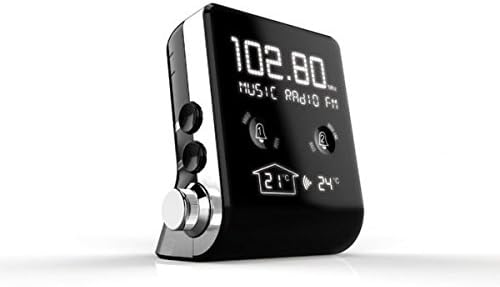
Imatge 1: Davant view del THOMSON CT390, que mostra la pantalla LCD amb radiofreqüència (per exemple, 102.80 MHz), el text "MUSIC RADIO FM", dues icones de campana d'alarma i lectures de temperatura interior (21 °C) i exterior (24 °C).

Imatge 2: Davant view del THOMSON CT390, que mostra la pantalla LCD amb l'hora actual (per exemple, 0:20) i la data (per exemple, DG 01 GENER 2012). Això view també mostra les icones d'alarma i les lectures de temperatura a la part inferior.
4.2 Controls/ports laterals i posteriors
Els panells lateral i posterior allotgen botons físics, un botó giratori i ports de connexió.

Imatge 3: Lateral i posterior view del THOMSON CT390. Els controls visibles inclouen els botons «SYNC TIME», «DIMMER», «SET», «MODE», un botó giratori «TUNING/ADJUST», un port USB i una presa d'entrada AUX.
4.3 Sensor de temperatura extern
La unitat inclou un sensor extern per mostrar la temperatura exterior.
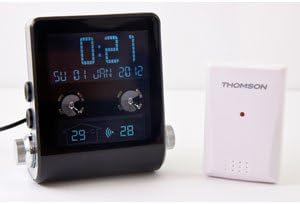
Imatge 4: La unitat THOMSON CT390 es mostra al costat del seu sensor de temperatura extern blanc compacte, que transmet sense fil les dades de temperatura exterior a la unitat principal.
5. Configuració
5.1 Connexió d'alimentació
- Connecteu l'adaptador d'alimentació a la presa d'entrada de CC de la part posterior del CT390.
- Connecteu l'adaptador de corrent a una presa de corrent estàndard. La unitat s'engegarà i la pantalla s'il·luminarà.
5.2 Configuració inicial de la data i l'hora
El CT390 admet l'ajust automàtic de l'hora mitjançant RDS (Sistema de Dades de Ràdio) quan està sintonitzat a una emissora FM que emet informació horària. També és possible la configuració manual.
- Configuració automàtica (via RDS): Sintonitza una emissora de ràdio FM. Si l'emissora emet hora RDS, el rellotge es sincronitzarà automàticament.
- Configuració manual:
- Premeu i manteniu premut el botó «SET» (vegeu la imatge 3) per entrar al mode de configuració de l'hora.
- Feu servir el botó «SINTONITZACIÓ/AJUST» per ajustar l'hora i, a continuació, premeu «SET» per confirmar.
- Repetiu-ho per a minuts, any, mes i dia.
- Premeu 'SET' de nou per sortir del mode de configuració.
5.3 Emparellament del sensor de temperatura extern
El sensor extern s'hauria d'aparellar automàticament amb la unitat principal en engegar-lo. Assegureu-vos que el sensor estigui col·locat en un lloc exterior adequat, protegit de la pluja directa i la llum solar, per obtenir lectures precises.
6. Instruccions de funcionament
6.1 Visualització de l'hora i la data
La pantalla LCD mostra contínuament l'hora i la data actuals. També es mostren les temperatures interiors i exteriors.
6.2 Funcionament de la ràdio
- Encès/apagat: Premeu el botó «MODE» per canviar entre la ràdio i altres modes.
- Selecció de la banda: En el mode de ràdio, premeu «MODE» per alternar entre les bandes FM i MW.
- tuning: Feu servir el botó «SINTONITZACIÓ/AJUST» per sintonitzar manualment la freqüència desitjada.
- Escaneig automàtic: Premeu i manteniu premut el botó 'SINTONITZACIÓ/AJUST' per cercar automàticament la següent emissora disponible.
- Ajust de volum: Feu servir el control de volum dedicat (si n'hi ha, ja que en cas contrari el botó «TUNING/ADJUST» podria funcionar també com a volum en certs modes).
6.3 Configuració d'alarma
El CT390 disposa de dues alarmes independents (Alarma 1 i Alarma 2) i una funció de cap de setmana.
- Configuració d'una alarma:
- Premeu la icona tàctil Alarma 1 o Alarma 2 a la pantalla frontal per activar-la/desactivar-la.
- Premeu i manteniu premuda la icona d'alarma corresponent per entrar al mode de configuració de l'alarma.
- Feu servir el botó «SINTONITZACIÓ/AJUST» per ajustar l'hora de l'alarma (hora i minut) i, a continuació, premeu la icona de l'alarma per confirmar cada pas.
- Seleccioneu la font de l'alarma: Ràdio, Brunzidor o USB (si hi ha un dispositiu USB connectat).
- Confirmeu la configuració de l'alarma per sortir.
- Funció de cap de setmana: Activeu la funció de cap de setmana per desactivar les alarmes els dissabtes i diumenges. Aquesta opció normalment es configura durant el procés de configuració de l'alarma.
- Funció de posposar: Quan soni una alarma, premeu el botó "SNOOZE" (sovint un botó gran a la part superior o una zona tàctil específica) per silenciar temporalment l'alarma durant uns minuts.
- Aturar una alarma: Per desactivar una alarma que sona, premeu qualsevol botó que no sigui "SNOOZE". L'alarma es reiniciarà per al dia següent.
6.4 Configuració de la pantalla
Ajusta la brillantor de la pantalla per obtenir una òptima viewing.
- Atenuador: Premeu el botó «DIMMER» (vegeu la imatge 3) per canviar entre els diferents nivells de brillantor de la pantalla LCD.
Reproducció USB i AUX 6.5
Connecteu dispositius d'àudio externs per reproduir-los a través de l'altaveu del CT390.
- Reproducció USB: Inseriu una unitat flash USB amb MP3 files al port USB. La unitat hauria de canviar automàticament al mode USB o caldria seleccionar-lo mitjançant el botó «MODE».
- Entrada AUX: Connecteu un dispositiu d'àudio extern (per exemple, un telèfon intel·ligent, un reproductor MP3) a la presa d'entrada AUX amb un cable d'àudio de 3.5 mm. Seleccioneu el mode AUX amb el botó "MODE".
7. Manteniment
Per garantir la longevitat i el rendiment òptim del vostre THOMSON CT390:
- Netegeu la unitat amb un drap suau, sec i sense borrissol.
- No utilitzeu netejadors abrasius, ceres o dissolvents, ja que poden danyar l'acabat.
- Mantingueu la unitat lliure de pols i deixalles.
8. Solució De Problemes
Si teniu problemes amb el vostre CT390, consulteu els següents problemes i solucions habituals:
| Problema | Causa possible | Solució |
|---|---|---|
| El temps és imprecís o es desvia. | No hi ha senyal RDS; error de configuració manual; desviació interna del rellotge. | Sintonitza una emissora FM amb RDS. Reinicia l'hora manualment. Assegura't que la unitat no pateixi interrupcions freqüents del subministrament elèctric. |
| L'alarma no sona. | Alarma no activada; volum massa baix; funció de cap de setmana activa. | Assegureu-vos que es mostri la icona de l'alarma. Augmenteu el volum. Comproveu la configuració de la funció de cap de setmana. |
| Mala recepció de ràdio. | Senyal feble; antena no estesa; interferències. | Esteneu completament l'antena de cable FM. Reposicioneu la unitat. Eviteu col·locar-la a prop de dispositius electrònics que puguin causar interferències. |
| La pantalla és massa tènue o massa brillant. | Ajust de l'atenuador. | Premeu el botó 'DIMMER' per ajustar la brillantor. |
| No es mostra la temperatura exterior. | Sensor extern no emparellat o fora de l'abast; bateria del sensor baixa (si escau). | Assegureu-vos que el sensor extern estigui dins de l'abast de la unitat principal. Comproveu si hi ha algun compartiment de piles al sensor. |
9. Especificacions
- Marca: Thomson
- Número de model: CT390
- Color: Negre
- Material: Plàstic
- Tipus de visualització: LCD digital
- Bandes de ràdio: FM, MW
- Característiques especials: Calendari, funció d'alarma, altaveus integrats, visualització de temperatura interior/exterior, port USB, entrada AUX
- Font d'alimentació: CA (alimentació de la xarxa elèctrica)
- Pes de l'article: Aproximadament 760 g
- Dimensions del paquet: 20.4 x 16.8 x 12.4 cm
10. Garantia i Suport
Per obtenir informació sobre la garantia i l'assistència al client, consulteu la documentació proporcionada en el moment de la compra o poseu-vos en contacte amb el vostre centre de servei local de Thomson. Conserveu el comprovant de compra per a reclamacions de garantia.