Introducció
This manual provides comprehensive instructions for the setup, operation, maintenance, and troubleshooting of your RCA 32 Inch LED HDTV. Please read this manual thoroughly before using your television to ensure proper and safe operation. The RCA 32" LED 60Hz HDTV features energy-efficient LED technology for a bright, clear picture and HD 720p resolution for an immersive entertainment experience. It supports a wide range of input technologies including HDMI, VGA, YPBPR, AV Audio/Video, PC Audio, Headphone, and RF, offering versatile connectivity options. Its 60Hz refresh rate ensures smooth, blur-free images.
1. Guia de configuració
1.1 Desembalatge
- Carefully remove the television and all accessories from the packaging.
- Retain the original packaging materials for future transport or service needs.
- Verify that all components are present: TV unit, remote control, power cord, and stand components.
1.2 Col·locació del suport
To attach the included stand to your RCA 32 Inch LED HDTV, follow these steps:
- Col·loqueu la pantalla del televisor amb la pantalla cap avall sobre una superfície suau i neta per evitar ratllades.
- Alineeu les bases del suport amb les ranures corresponents de la part inferior del televisor.
- Secure the stands using the provided screws. Ensure they are firmly tightened.

Figura 1.1: A baix view of the TV illustrating the stand attachment points.

Figura 1.2: Costat inclinat view del programa de televisióasing the slim profile i el suport adjunt.
1.3 Muntatge a la paret (opcional)
This television is compatible with VESA standard wall mounts. Refer to your wall mount's instructions for installation. Ensure proper ventilation when wall-mounting.

Figura 1.3: posterior view of the TV, highlighting the VESA mounting points and various input/output ports.
1.4 Connexió de dispositius externs
Your RCA HDTV offers multiple connectivity options for various devices:
- HDMI: Connect Blu-ray players, game consoles, cable/satellite boxes. The TV features 3 HDMI ports.
- VGA: Connecteu un ordinador per utilitzar-lo com a monitor.
- YPBPR (vídeo per components): Connect older video devices.
- AV Audio/Video (Composite): Connect standard definition devices.
- Àudio de PC: Entrada d'àudio per a connexió VGA.
- Auriculars: Per a una escolta privada.
- RF (Antenna/Cable): Connecteu una antena per a emissions per aire o una connexió de televisió per cable.

Figura 1.4: lateral view of the TV, detailing the accessible input and output ports.
1.5 Connexió d'alimentació
After connecting all desired devices, plug the power cord into the TV's power input, then into a standard electrical outlet.
2. Instruccions de funcionament
2.1 Encès/Apagat
Premeu el botó PODER button on the remote control or on the TV's control panel to turn the TV on or off.

Figura 2.1: Frontal view of the RCA 32 Inch LED HDTV.
2.2 Selecció de la font d'entrada
Premeu el botó ENTRADA or FONT button on the remote control to cycle through available input sources (HDMI1, HDMI2, HDMI3, VGA, AV, YPBPR, TV).
2.3 Menu Navigation (OSD)
Utilitza el MENÚ button to access the On-Screen Display (OSD) menu. Use the arrow keys (▲/▼/◄/►) to navigate and the OK or ENTRAR botó per confirmar les seleccions.
2.4 Configuració de la imatge
Within the OSD menu, navigate to 'Picture' to adjust settings such as:
- Mode d'imatge: Standard, Dynamic, Movie, User.
- Brillantor: Adjust the overall lightness or darkness of the image.
- Contrast: Ajusta la diferència entre les zones clares i fosques.
- Color: Adjust the intensity of colors.
- Tint: Adjust the green-magenta balance (NTSC only).
- Nitidez: Adjust the clarity of image edges.
2.5 Configuració de so
Within the OSD menu, navigate to 'Sound' to adjust settings such as:
- Mode de so: Estàndard, Música, Pel·lícula, Usuari.
- Gravs/Aguts: Adjust low and high frequency audio.
- Balanç: Adjust the volume balance between left and right speakers.
- Volum automàtic: Enable to reduce sudden volume changes.
2.6 Configuració d'idioma
The OSD language can be set to English, Spanish, or French. Navigate to 'Setup' or 'System' in the OSD menu to change the language.
3. Manteniment
3.1 Neteja de la pantalla
Per netejar la pantalla, netegeu-la suaument amb un drap suau i sense borrissol. Per a marques difícils, dampen the cloth slightly with water or a specialized screen cleaner. Never spray cleaner directly onto the screen.
3.2 Neteja de l'armari
Wipe the TV cabinet with a soft, dry cloth. Avoid using abrasive cleaners, waxes, or solvents as they can damage the finish.
3.3 Atenció general
- Eviteu exposar el televisor a la llum solar directa o a temperatures extremes.
- No bloquegeu les obertures de ventilació de la part posterior del televisor.
- Desendolleu el televisor de la presa de corrent durant tempestes o quan el deixeu sense vigilància durant llargs períodes.
4. Guia de resolució de problemes
Abans de contactar amb l'atenció al client, consulteu els següents problemes i solucions habituals:
| Problema | Causa possible | Solució |
|---|---|---|
| Sense poder | Power cord not securely connected; Power outlet not active. | Ensure power cord is firmly plugged into TV and outlet. Test outlet with another device. |
| No hi ha imatge, però hi ha so | Font d'entrada incorrecta seleccionada; el dispositiu extern no està encès o connectat correctament. | Press the INPUT/SOURCE button to select the correct input. Check connections of external devices. |
| No hi ha so, però hi ha imatge | Volume muted or too low; Incorrect audio output settings; External device audio issue. | Unmute volume or increase level. Check TV's audio settings. Verify audio output from external device. |
| El control remot no funciona | Batteries are dead or incorrectly inserted; Obstruction between remote and TV; Remote sensor blocked. | Replace batteries, ensuring correct polarity. Remove any obstructions. Ensure remote is pointed at the TV's sensor. Note: Some users report the remote layout is not intuitive and may not pair with universal cable remotes. This is a design characteristic. |
| Picture and Sound Out of Sync | Source device issue; TV processing delay. | Try restarting the TV and the connected source device. Check if the issue persists across different inputs. This can sometimes occur after the TV is turned off and on again. |
| Ghost Images or Lines on Screen | Panel deterioration; Signal interference. | Check cable connections for interference. If the issue persists and worsens over time, it may indicate a hardware issue. |
5. Especificacions
| Característica | Detall |
|---|---|
| Número de model | RT3205/RLDED3258A |
| Mida de la pantalla | 32 polzades (82 cm en diagonal) |
| Tecnologia de visualització | LED |
| Resolució | 720p |
| Freqüència d'actualització | 60 Hz |
| Relació d'aspecte | 16:9 |
| Tecnologia de connectivitat | HDMI (x3), VGA, YPBPR, AV Audio/Video, PC Audio, Headphone, RF |
| Dimensions del producte (P x A x A) | 3.1" x 28.9" x 17.4" (7.9 cm x 73.4 cm x 44.2 cm) |
| Pes de l'article | 7.6 lliures (3.45 kg) |
| Wattage | 42 watts |
| Components inclosos | TV, Remote Control, Power Cord, Stand |
| Llenguatge OSD | Anglès, espanyol, francès |
Eficiència energètica
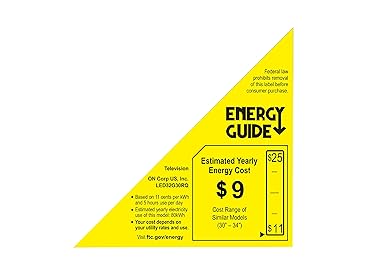
Figure 5.1: Estimated Yearly Energy Cost for the RCA 32 Inch LED HDTV.
6. Informació de la garantia
For specific warranty details, please refer to the warranty card included with your product or contact RCA customer support. Typically, RCA products come with a limited warranty covering manufacturing defects for a specified period from the date of purchase.
7. Atenció al client
If you require further assistance or encounter issues not covered in this manual, please contact RCA customer support. Visit the official RCA weblloc web per obtenir informació de contacte, preguntes freqüents i recursos addicionals.


