Producte acabatview
The LeapFrog Creativity Camera App with Protective Case is designed to transform your compatible iPhone or iPod touch into an interactive learning camera for children aged 3 to 6 years. This innovative product combines the functionality of your device's camera with engaging educational activities and games, all while providing robust protection for your device.
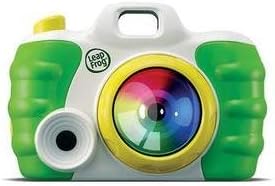
Image: The LeapFrog Creativity Camera Protective Case, featuring a green and white design with a large colorful lens on the front.
Guia de configuració
1. Què hi ha a la caixa
- LeapFrog Creativity Camera Protective Case (Green)
- Instructions for downloading the Creativity Camera App
Nota: An iPhone 4/4s/5 or iPod touch 4G device is required and sold separately. This product does not work with LeapPad or Leapster Explorer systems.
2. Compatibilitat del dispositiu
Ensure your device is one of the following models:
- iPhone 4
- iPhone 4s
- iPhone 5
- iPod touch 4th Generation
3. Descàrrega i instal·lació d'aplicacions
- Ensure your compatible iPhone or iPod touch is connected to the internet.
- Obre l'App Store al teu dispositiu.
- Cerca "LeapFrog Creativity Camera App".
- Download and install the application. Follow any on-screen prompts.
4. Inserting Your Device into the Case
- Carefully open the protective case.
- Align your iPhone or iPod touch with the designated slot inside the case, ensuring the camera lens and buttons align with the case's openings.
- Gently press the device into place until it is securely seated. The case is designed to provide a snug fit for protection.
- Close the case securely.
Instruccions de funcionament
Once your device is securely in the case and the app is installed, launch the LeapFrog Creativity Camera App to begin playing.
1. Fer fotos
- Within the app, navigate to the camera mode.
- Point the device's camera at your subject.
- Press the on-screen shutter button or the designated button on the case (if applicable) to capture a photo.
2. Editing Photos
The app allows children to creatively edit their photos:
- Select a photo from your gallery within the app.
- Explore various tools to add silly effects, frames, stamps, and other creative elements.
- Save your edited photos to the app's album.
3. Photo Missions
Engage in guided photo missions that encourage exploration and creativity:
- Follow the app's prompts to find and photograph specific objects or scenes.
- Complete missions to unlock new features or rewards within the app.
4. Augmented Reality Game
Experience an exciting augmented reality game:
- Select the augmented reality game mode within the app.
- Point the device's camera at a flat surface.
- Interact with virtual characters and objects that appear on your screen, overlaid onto the real world.
Manteniment
Cleaning the Protective Case
- To clean the case, gently wipe it with a soft, damp tela.
- Do not use abrasive cleaners or solvents, as these may damage the case's finish.
- Ensure the case is completely dry before reinserting your device.
Cura del dispositiu
- Always ensure your iPhone or iPod touch is securely seated within the protective case during use.
- Avoid dropping the case with the device inside, as severe impacts may still cause damage.
- Remove the device from the case periodically to clean both the device and the inside of the case, preventing dust buildup.
Resolució de problemes
App Not Launching or Crashing
- Assegureu-vos que el sistema operatiu del vostre dispositiu estigui actualitzat.
- Try force-closing the app and reopening it.
- Si el problema persisteix, suprimeix l'aplicació i torna-la a instal·lar des de l'App Store.
- Check if your device model is compatible (iPhone 4/4s/5, iPod touch 4G).
Device Does Not Fit in Case
- Verify that your device is one of the compatible models listed in the Setup Guide.
- Ensure there are no foreign objects or debris inside the case preventing a proper fit.
- Confirm the device is oriented correctly before attempting to close the case.
App Features Not Working Correctly
- Ensure the app has necessary permissions (e.g., camera access) enabled in your device's settings.
- Reinicia l'aplicació o el dispositiu.
- Comprova si hi ha actualitzacions de l'aplicació a l'App Store.
Especificacions
| Característica | Detall |
|---|---|
| Marca | LeapFrog |
| Nom del model | Creativity Camera App |
| ASIN | B00LZ6W54C |
| Color | Verd |
| Descripció del rang d'edat | Nen (3-6 anys) |
| Dispositius compatibles | iPhone 4/4s/5, iPod touch 4G |
| Característiques especials | Augmented Reality Game, Photo Missions, In-Camera Editing |
| Mitjans integrats | Protective Case & App |
| Piles incloses | No |
| Fabricant | LeapFrog Enterprises |
Garantia i Suport
For information regarding product warranty, technical support, or any other inquiries, please visit the official LeapFrog website or contact their customer service department. Specific warranty terms and conditions may vary and are typically provided with the product packaging or available on the manufacturer's weblloc.
You can often find support resources, FAQs, and contact information on the LeapFrog Brand Store on Amazon or directly on the LeapFrog corporate weblloc.


