1. Producte acabatview
The D-Link DGS-1510-28X is a Smart Managed Switch designed for Small to Medium Enterprise (SME/SMB) networks. It features 24 Gigabit Ethernet ports and 4 10-Gigabit SFP+ ports, providing high-speed connectivity and uplink capabilities. This switch integrates advanced management and security functions, offering a balance between a fully managed switch's capabilities and ease of use. It supports physical stacking, virtual stacking, Layer 2 and Layer 3 Lite features, and various security protocols to ensure network reliability and performance.

Figura 1: Frontal view of the D-Link DGS-1510-28X switch.
2. Pautes de seguretat
- Assegureu-vos de tenir una connexió a terra adequada del dispositiu per evitar riscos elèctrics.
- Do not expose the switch to water or excessive humidity.
- Operate the device within the specified temperature and humidity ranges (23°F to 122°F).
- Use only the power cord provided with the device or a compatible replacement.
- Eviteu bloquejar les obertures de ventilació per evitar el sobreescalfament.
- Desconnecteu l'alimentació abans de netejar o realitzar tasques de manteniment.
3. Contingut del paquet
Comproveu que el vostre paquet contingui els elements següents:
- D-Link DGS-1510-28X Switch
- Kit de muntatge en bastidor
- Cable d'alimentació
- Guia d'instal·lació ràpida (QIG)
4. Maquinari acabatview
4.1 Tauler frontal

Figura 2: Front inclinat view of the DGS-1510-28X switch, showing all ports and indicators.
- 24 ports 10/100/1000BASE-T: Standard Gigabit Ethernet ports for connecting network devices.
- 4 x 10-Gigabit SFP+ Ports: High-speed fiber optic ports for uplinks or stacking.
- Port de la consola: RJ-45 port for command-line interface (CLI) access.
- Indicadors LED: Power, Link/Activity, Speed for each port, and Stack ID indicators.
4.2 Panell posterior

Figura 3: posterior view of the DGS-1510-28X switch, showing the power input and grounding screw.
- Entrada d'alimentació de CA: Connector per al cable d'alimentació.
- Cargol de presa de terra: For connecting an earth ground cable.
- Ranura de bloqueig Kensington: Per a la seguretat física.
4.3 Dimensions
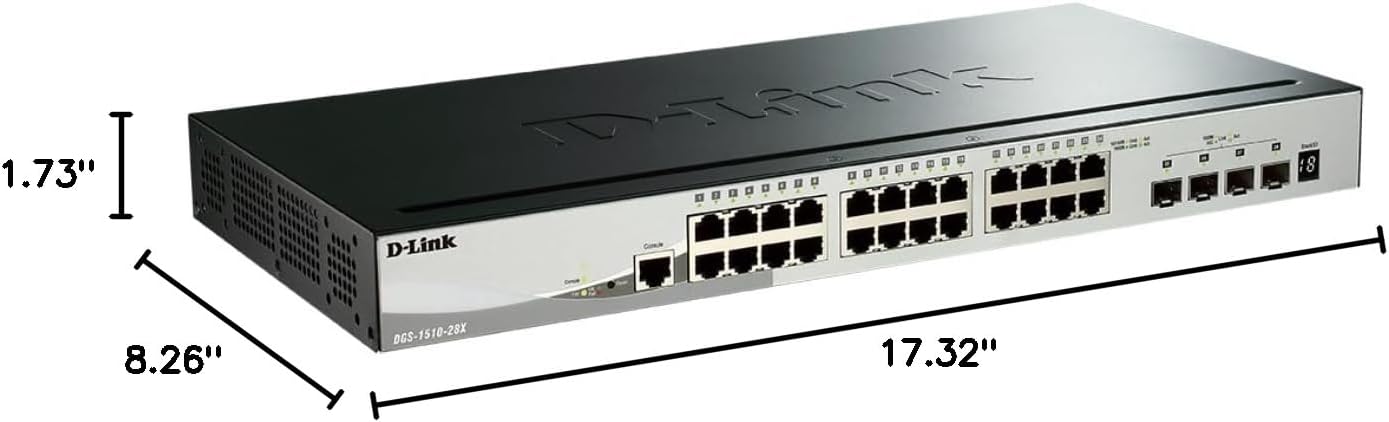
Figure 4: Dimensions of the DGS-1510-28X switch: 17.32"L x 8.26"W x 1.73"H.
5. Instal·lació i configuració
5.1 Muntatge en bastidor
The DGS-1510-28X can be installed in a standard 19-inch equipment rack. Use the provided rackmount kit to secure the switch. Attach the mounting brackets to the sides of the switch using the included screws, then secure the switch into the rack.
5.2 Connexió d'alimentació
- Connect the provided AC power cord to the power input on the rear panel of the switch.
- Connecteu l'altre extrem del cable d'alimentació a una presa de corrent adequada.
- Assegureu-vos que el LED d'alimentació del panell frontal s'il·lumina, indicant que l'interruptor rep alimentació.
5.3 Connexions de xarxa
- Connect your network devices (computers, servers, printers, NAS, IP cameras, wireless APs, VoIP phones) to the 10/100/1000BASE-T ports using standard Ethernet cables.
- For high-speed uplinks or connections to other network segments, insert compatible SFP+ transceivers into the 10-Gigabit SFP+ ports and connect appropriate fiber optic cables.
6. Funcionament i configuració
6.1 Accés a la interfície de gestió
The DGS-1510-28X can be managed via a web-based graphical user interface (GUI) or a Command Line Interface (CLI).
- WebGestió basada en: Connect a computer to any Gigabit Ethernet port on the switch. Configure your computer's IP address to be in the same subnet as the switch's default IP address (refer to the Quick Installation Guide for default IP). Open a web navegador i introduïu l'adreça IP del commutador per accedir a la pàgina d'inici de sessió.
- Interfície de línia d'ordres (CLI): Connect a console cable from your computer's serial port to the switch's console port. Use a terminal emulation program (e.g., PuTTY) with appropriate serial settings (e.g., 115200 baud rate, 8 data bits, no parity, 1 stop bit, no flow control) to access the CLI.

Figura 5: Example of the intuitive webinterfície de gestió basada en
6.2 Key Features Configuration
- VLAN: Configure Virtual Local Area Networks to segment network traffic and enhance security and performance. The switch supports various VLAN types, including port-based, tag-based, and protocol-based VLANs.
- Apilat: The DGS-1510-28X supports physical stacking of up to 6 units using the 10GbE SFP+ ports, creating a single logical unit for simplified management. Virtual stacking via D-Link's Single IP Management (SIM) allows management of up to 32 units.
- 10GbE SFP+ Ports: Utilize these ports for high-bandwidth connections to servers, storage devices, or other core network equipment.
- Mode de vigilància: This feature streamlines IP surveillance network deployment. When enabled in the web UI, it automatically detects ONVIF-compliant devices and segments them into a dedicated Auto Surveillance VLAN, optimizing video traffic.
- Característiques de seguretat: The switch includes a comprehensive security suite:
- Llista de control d'accés (ACL): Filters network traffic based on MAC or IP addresses.
- ARP Spoofing Prevention: Protects against attacks that can redirect network traffic.
- Vinculació de port IP-MAC: Binds specific IP and MAC addresses to switch ports for enhanced security.
- D-Link Safeguard Engine: Protects the switch's CPU from traffic flooding caused by malicious attacks.
- DoS Attack Prevention: Mitigates various Denial of Service attacks.
- Layer 3 Lite & Static Routing: Supports IPv4/IPv6 routing and IP segmentation to improve network performance and manage traffic across different subnets.

Figure 6: Illustration of 10G SFP+ stacking capabilities.

Figure 7: Screenshot of the Surveillance Mode interface, showing device detection and network topology.
7. Manteniment
- Actualitzacions de firmware: Comproveu regularment el suport de D-Link website for the latest firmware versions. Updating firmware can provide new features, performance improvements, and security patches. Follow the instructions provided with the firmware update package.
- Neteja: Use a soft, dry cloth to clean the exterior of the switch. Do not use liquid or aerosol cleaners. Ensure ventilation openings are free from dust and debris.
- Còpia de seguretat de la configuració: Periodically back up your switch configuration to an external device to facilitate quick recovery in case of a reset or failure.
8. Solució De Problemes
- Sense energia: Ensure the power cord is securely connected to both the switch and a working power outlet. Verify the power LED is illuminated.
- Sense connectivitat de xarxa: Check the Link/Activity LEDs for the connected ports. Ensure Ethernet cables are properly seated and undamaged. Verify IP address settings on connected devices and the switch.
- Rendiment lent: Check for network loops (Spanning Tree Protocol should be enabled). Monitor port utilization and ensure connected devices are operating at their expected speeds. Consider upgrading cable types if necessary (e.g., for 10GbE connections).
- No es pot accedir Web IU: Verify your computer's IP address is in the same subnet as the switch. Clear your browser's cache or try a different browser. Ensure no firewall is blocking access.
- Console Access Issues: Confirm serial port settings (baud rate, data bits, parity, stop bits, flow control) match the switch's requirements. Ensure the console cable is correctly connected.
9. Especificacions tècniques
| Característica | Especificació |
|---|---|
| Número de model | DGS-1510-28X |
| Dimensions del producte (LxWxH) | 17.32" x 8.26" x 1.73" |
| Pes de l'article | 4.2 lliures |
| Voltage | 240 Volts |
| Material de la caixa | Metall |
| Interval de temperatura de funcionament | De 23 °F a 122 °F |
| Tipus d'interfície | RJ45, SFP+ |
| Velocitat de transferència de dades | 128 gigabits per segon (capacitat de commutació) |
| Nombre de Ports | 28 (24 Gigabit, 4 10GbE SFP+) |
| Plataforma de maquinari | PC |
| UPC | 790069406058 |
| Color | Negre |
| Dispositius compatibles | Desktop, Printer, Router |
10. Garantia i suport tècnic
The D-Link DGS-1510-28X Smart Managed Switch is backed by D-Link's Lifetime Protection, ensuring long-term confidence in the quality and reliability of your network infrastructure. For technical assistance, product documentation, or warranty information, please visit the official D-Link support website or contact your local D-Link representative.
For further information and support, visit: D-Link Official Weblloc


