Introducció
This manual provides essential instructions for the safe and efficient operation of your Yamaha HTR-2067 5.1 Channel AV Receiver. Please read this manual thoroughly before using the unit to ensure proper setup and performance. Keep this manual in a safe place for future reference.
Informació de seguretat
- Font d'alimentació: Connecteu la unitat només a una presa de corrent altern del vol.tage especificat al panell posterior.
- Ventilació: Assegureu-vos que hi hagi una ventilació adequada. No bloquegeu les obertures de ventilació.
- Aigua i humitat: No exposeu la unitat a la pluja ni a la humitat. No col·loqueu objectes plens de líquids a sobre de la unitat.
- Objectes estrangers: Do not insert foreign objects into the unit's openings.
- Manteniment: No intenteu fer el manteniment d'aquesta unitat vosaltres mateixos. Envieu totes les tasques de manteniment a personal de servei qualificat.
- Impedància de l'altaveu: Ensure connected speakers have an impedance of 6 ohms or higher. Refer to the "CAUTION: SEE INSTRUCTION MANUAL FOR CORRECT SETTING" label near the speaker terminals.
Configuració
Panell posterior acabatview
The following image illustrates the rear panel of the Yamaha HTR-2067 receiver, highlighting various connection points for audio, video, and speakers.
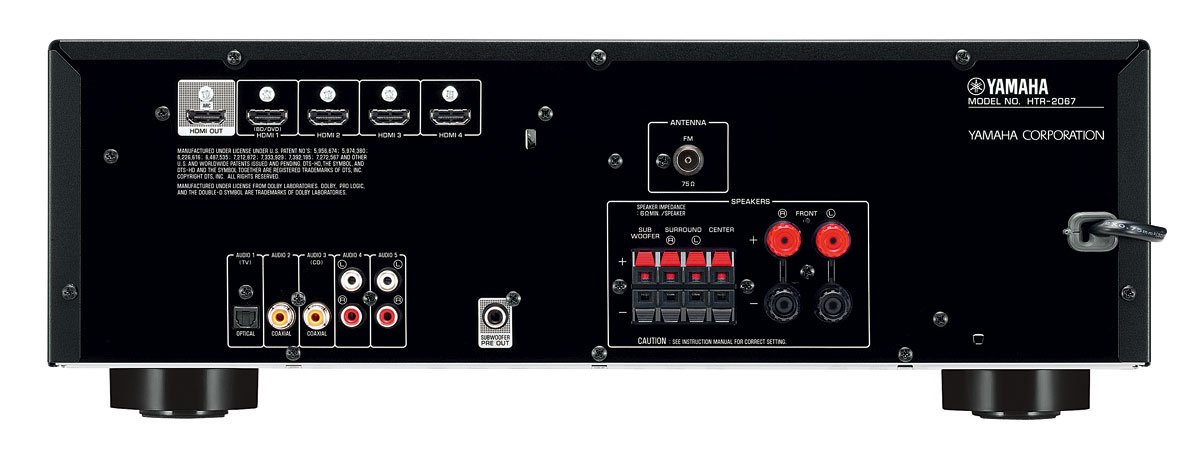
Figure 1: Rear Panel of Yamaha HTR-2067 AV Receiver
1. Desembalatge
Carefully remove the receiver and all accessories from the packaging. Retain the packaging materials for future transport or storage.
2. Connexió dels altaveus
Connect your speakers to the corresponding terminals on the rear panel. Ensure correct polarity (+ to + and - to -) for each speaker. The HTR-2067 supports a 5.1 channel setup.
- Altaveus frontals (E/D): Connect to the "FRONT" terminals.
- Ponent del centre: Connecteu-vos al terminal "CENTER".
- Altaveus envoltants (E/D): Connecteu-vos als terminals "SURROUND".
- subwoofer: Connect a powered subwoofer to the "SUBWOOFER PRE OUT" RCA jack.
Refer to the speaker impedance warning on the rear panel, which states "SPEAKER IMPEDANCE 6Ω MIN / SPEAKER".
3. Connexió de dispositius d'àudio/vídeo
Use the appropriate cables to connect your source devices (e.g., Blu-ray player, game console, TV) to the receiver.
- Connexions HDMI:
- HDMI OUT (ARC): Connect to your TV's HDMI input (preferably one supporting ARC for audio return).
- HDMI 1 (BD/DVD), HDMI 2, HDMI 3, HDMI 4: Connect your video source devices here.
- Connexions d'àudio digital:
- OPTICAL (AUDIO 1 (TV)): For optical digital audio from a TV or other device.
- COAXIAL (AUDIO 2): For coaxial digital audio from a CD player or other device.
- Connexions d'àudio analògic:
- AUDIO 3 (CD), AUDIO 4, AUDIO 5: For analog audio devices using RCA cables.
4. Connexió d'antenes
For FM radio reception, connect the supplied FM antenna to the "ANTENNA FM 75Ω" terminal on the rear panel.
5. Connexió d'alimentació
After all other connections are made, plug the power cord into an AC wall outlet.
Instruccions de funcionament
1. Encendre/apagar
Premeu el botó PODER botó del panell frontal o del comandament a distància per encendre o apagar el receptor.
2. Selecció d'entrada
Select the desired input source using the input selector buttons on the front panel or the remote control. For exampli, premeu BD / DVD for a Blu-ray player connected to HDMI 1.
El ESCENA buttons (BD/DVD, TV, CD, Radio) provide one-touch power-on and input selection, along with pre-set sound programs.
3. Ajust de volum
Adjust the master volume using the large knob on the front panel or the VOLUM +/- botons del comandament a distància.
4. Sound Modes (CINEMA DSP)
The HTR-2067 features CINEMA DSP with 17 DSP programs. Use the PROGRAMA buttons on the remote control to cycle through different sound fields and enhance your listening experience.
5. Mode ECO
Activate the ECO mode to reduce power consumption by approximately 20%. This setting can be toggled via the remote control or system menu.
Manteniment
- Neteja: Wipe the unit with a soft, dry cloth. Do not use chemical cleaners or abrasive materials.
- Ventilació: Comproveu periòdicament que les obertures de ventilació no estiguin obstruïdes per pols o deixalles.
- Cable d'alimentació: Inspeccioneu el cable d'alimentació regularment per detectar qualsevol dany.
Resolució de problemes
| Problema | Causa possible | Solució |
|---|---|---|
| Sense poder | Cable d'alimentació desconnectat; unitat en mode d'espera. | Ensure power cord is securely plugged in; press POWER button. |
| Sense so | Incorrect input selected; speakers not connected; volume too low; mute activated. | Seleccioneu l'entrada correcta; comproveu les connexions dels altaveus; augmenteu el volum; desactiveu el silenci. |
| Cap vídeo | Incorrect input selected; HDMI cable loose or faulty; TV input incorrect. | Select correct input; check HDMI connections; ensure TV is on correct input. |
| Mala recepció de ràdio | Antena no connectada o mal posicionada. | Connect FM antenna; adjust antenna position for better reception. |
Si el problema persisteix, consulteu un tècnic de servei qualificat.
Especificacions
| Característica | Detall |
|---|---|
| Marca | Yamaha |
| Model | HTR-2067 |
| Canals | So envoltant de 5.1 canals |
| 4K Pass-through | Yes (4K 24/30p) |
| DSP Programs | CINEMA DSP (17 programs) |
| Mode ECO | Yes (approx. 20% less power consumption) |
| Connectivitat | HDMI, Optical, Coaxial, Analog RCA, FM Antenna |
| Impedància de l'altaveu | Mínim 6 ohms |
| Pes de l'article | 8.72 kg |
| Dimensions (aprox.) | 55.7 x 41.4 x 22.4 cm (Dimensions del paquet) |
Garantia i Suport
For warranty information and customer support, please refer to the warranty card included with your product or visit the official Yamaha weblloc web. Conserveu el rebut de compra com a comprovant de compra.
For technical assistance or service inquiries, contact your authorized Yamaha dealer or service center.


