1. Introducció
This manual provides essential instructions for the safe operation and maintenance of your QFX PBX-410204BTD PA Speaker. Please read this manual thoroughly before using the device and retain it for future reference.
1.1. Producte acabatview
The QFX PBX-410204BTD is a versatile battery-powered PA speaker system featuring dual 10-inch woofers and dual 1-inch tweeters. It includes multiple audio input options such as Bluetooth, USB, SD card, FM radio, and DVD playback. Additional features include a disco light and karaoke functionality, making it suitable for various entertainment and public address applications. The unit operates on a 12V 12AH rechargeable battery and supports AC 100-240V input.
1.2. Instruccions de seguretat
- Font d'alimentació: Assegureu-vos que la font d'alimentació coincideixi amb el voltage requirements (AC 100-240V or DC 12V).
- Ventilació: No bloquegeu les obertures de ventilació. Mantingueu un espai suficient al voltant de la unitat per a un flux d'aire adequat.
- Aigua i humitat: No exposeu la unitat a la pluja, la humitat o els líquids.
- Fonts de calor: Mantingueu la unitat allunyada de fonts de calor com ara radiadors, registres de calor, estufes o altres aparells que produeixin calor.
- Neteja: Disconnect the power before cleaning. Use a dry cloth.
- Manteniment: No intenteu atendre aquest producte vosaltres mateixos. Consulteu tots els serveis a personal de servei qualificat.
- Bateria: The unit contains a rechargeable battery. Follow proper disposal guidelines for batteries. Do not expose to excessive heat.
2. Contingut del paquet
Si us plau, comproveu el paquet per veure si hi ha els elements següents:
- QFX PBX-410204BTD PA Speaker Unit
- Adaptador/cable de corrent
- Comandament a distància (si està inclòs)
- Micròfon (si està inclòs)
- Manual d'usuari (aquest document)
3. Controls i característiques
Familiarize yourself with the various controls and connection ports on your PA speaker.
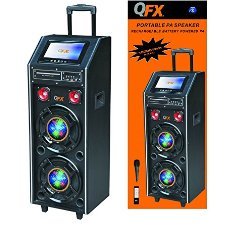
Figura 1: Frontal view of the QFX PBX-410204BTD PA Speaker. This image displays the speaker's front panel, including the dual 10-inch woofers, the central control panel with various buttons and knobs, and the integrated disco light.
3.1. Tauler de control acabatview
- Interruptor d'alimentació: Encén/apaga la unitat.
- Control de volum: Ajusta el volum mestre.
- Entrada de micròfon: Connects a wired microphone.
- Echo/Mic Volume: Adjusts microphone volume and echo effect.
- Port USB: Per a la reproducció des d'una unitat flaix USB.
- Ranura per a targeta SD: Per a la reproducció amb targeta SD.
- Botó de mode: Switches between input modes (Bluetooth, USB, SD, FM, DVD).
- Botó Reproduir/Pausa: Controla la reproducció de suports.
- Botons de pista anterior/següent: Navigates media tracks or FM stations.
- Antena FM: Per a una millor recepció de ràdio FM.
- Disco Light Switch: Turns the disco light ON/OFF.
- Reproductor de DVD: Integrated DVD disc slot and controls.
- Entrada de CA: Connects the power adapter for charging and AC operation.
- DC 12V Input/Output: For external 12V power source or output.
4. Configuració
4.1. Càrrega inicial
Before first use, fully charge the internal battery. Connect the power adapter to the AC input on the speaker and plug it into a standard wall outlet. The charging indicator will illuminate. Charging typically takes several hours. The indicator will change or turn off once fully charged.
4.2. Col·locació
Place the speaker on a stable, flat surface. Ensure there is adequate space around the unit for ventilation. Avoid placing it near direct sunlight, heat sources, or areas with high humidity.
5. Instruccions de funcionament
5.1. Encendre/apagar
To power on the unit, toggle the Power Switch to the "ON" position. To power off, toggle it to "OFF".
5.2. Connexió Bluetooth
- Turn on the speaker and press the "Mode" button until "Bluetooth" mode is selected.
- Enable Bluetooth on your mobile device or audio player.
- Cerca "QFX PBX-410204BTD" (or similar name) in your device's Bluetooth settings.
- Select the speaker to pair. A confirmation tone will sound upon successful connection.
- Ara pots reproduir àudio des del teu dispositiu a través de l'altaveu.
5.3. Reproducció des de targeta USB/SD
- Inseriu una unitat flash USB o una targeta SD a la ranura corresponent.
- Press the "Mode" button to select "USB" or "SD" mode. The unit will automatically begin playing compatible audio files.
- Feu servir els botons Reprodueix/Pausa, Anterior i Següent per controlar la reproducció.
5.4. Ràdio FM
- Press the "Mode" button to select "FM" mode.
- Esteneu l'antena FM per a una millor recepció.
- Press and hold the Play/Pause button to auto-scan and save available FM stations.
- Use the Previous/Next buttons to navigate through saved stations.
5.5. Reproducció de DVD
- Insert a DVD disc into the DVD slot.
- Press the "Mode" button to select "DVD" mode.
- Use the integrated DVD controls or the remote control to manage playback.
5.6. Funció de karaoke
- Connect a microphone to the Microphone Input jack.
- Adjust the Microphone Volume and Echo controls to your preference.
- Play music from any source (Bluetooth, USB, SD, DVD) and sing along.
5.7. Llum de discoteca
Toggle the Disco Light Switch to activate or deactivate the integrated disco light feature.
6. Manteniment
6.1. Neteja
Wipe the exterior of the unit with a soft, dry cloth. Do not use abrasive cleaners, waxes, or solvents. Ensure the unit is powered off and unplugged before cleaning.
6.2. Cura de la bateria
To prolong battery life, fully charge the unit before storing it for extended periods. Recharge the battery at least once every 3 months if not in regular use. Avoid completely draining the battery frequently.
6.3. Emmagatzematge
Guardeu l'altaveu en un lloc fresc i sec, allunyat de la llum solar directa i de temperatures extremes.
7. Solució De Problemes
| Problema | Causa possible | Solució |
|---|---|---|
| Sense poder | Unit not plugged in; Power switch off; Battery drained. | Check power connection; Turn power switch ON; Charge the battery. |
| Sense so | Volume too low; Incorrect input mode; Device not paired (Bluetooth). | Increase volume; Select correct input mode; Re-pair Bluetooth device. |
| Bluetooth no connectat | L'altaveu no està en mode Bluetooth; El dispositiu és massa lluny; Interferències. | Assegureu-vos que l'altaveu estigui en mode Bluetooth; acosteu el dispositiu; eviteu els obstacles. |
| L'USB/SD no es reprodueix | Incorrecte file format; targeta USB/SD corrupta; mode incorrecte. | Assegureu-vos files are compatible (e.g., MP3); Try another USB/SD card; Select correct mode. |
| Mala recepció de la ràdio FM | Antena no estesa; Senyal feble. | Fully extend the FM antenna; Try repositioning the unit. |
8. Especificacions
- Model: PBX-410204BTD
- Tipus d'altaveu: Altaveu PA amb bateria
- Mida del woofer: 2 x 10 polzades
- Talla de la mida: 2 x 1 polzada
- Connectivitat: Bluetooth, USB, SD, FM Radio, DVD
- Característiques especials: Disco Light, Karaoke
- Bateria: Recarregable de 12V 12AH
- Entrada de CA: 100-240V
- DC Input/Output: 12 V
- Potència de sortidatage: 346 watts
- Dimensions del paquet: 100.33 x 43.18 x 43.18 cm (39.5 x 17 x 17 polzades)
- Pes de l'article: 29.94 kg (66 lliures)
9. Garantia i Suport
For warranty information and technical support, please refer to the warranty card included with your product or contact QFX customer service directly. Keep your purchase receipt as proof of purchase.
Nota: Els termes de garantia específics poden variar segons la regió i el distribuïdor.


