1. Introducció
The D-Link DWR-116 Wireless N300 Multi-WAN Router is designed to provide flexible and reliable internet connectivity. It allows you to share a mobile broadband connection (via a 4G LTE or 3G USB adapter) or a traditional wired internet connection (via a DSL/Cable modem) across a high-speed wireless network. This router supports N300 wireless standards, offering speeds up to 300 Mbps, and includes advanced security features like WPA/WPA2 encryption and dual-active firewalls.
Les característiques clau inclouen:
- Support for 4G LTE/EV-DO/CDMA/HSPA+/HSUPA/HSDPA/UMTS wireless networks via USB adapter.
- Input Type RJ-45 (Ethernet Cable) for ISPs such as MTNL, BSNL, Airtel, Hathway, ACT Fibernet.
- Portable mobile wireless capability.
- Auto WAN Failover for uninterrupted connection.
- Dual-active firewalls (SPI and NAT) and WPA/WPA2 wireless encryption for secure network sharing.
- Maximum physical rate up to 300Mbps in 802.11n 1x1 mode.
2. Contingut del paquet
Si us plau, verifiqueu que el vostre paquet contingui els elements següents:
- D-Link DWR-116 Wireless N300 Multi-WAN Router
- Adaptador d'alimentació
- Cable Ethernet
- Guia d'instal·lació ràpida (si s'inclou)
Si falta algun element o hi ha algun dany, poseu-vos en contacte amb el vostre distribuïdor local de D-Link.
3. Maquinari acabatview
Panell frontal
The front panel of the DWR-116 router features LED indicators that provide status information about the device's operation.

Figura 1: Davant view of the D-Link DWR-116 router, showing the LED indicators for power, internet, Wi-Fi, and WAN/LAN status.
Panell posterior
El panell posterior conté tots els ports necessaris per connectar el router a la xarxa i a la font d'alimentació.
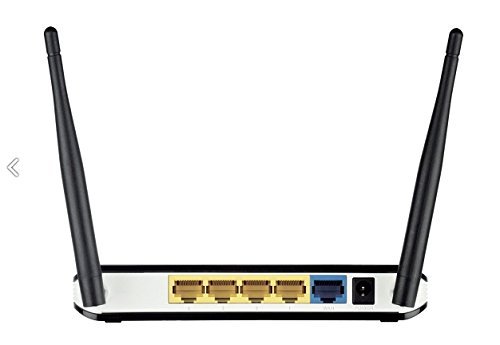
Figura 2: posterior view of the D-Link DWR-116 router, displaying the WAN port (blue), LAN ports (yellow), USB port, and power input.
lateral View
Un costat view illustrates the overall design and antenna placement.

Figura 3: lateral view of the D-Link DWR-116 router, highlighting its compact design and two external antennas.
4. Instruccions de configuració
4.1 Connexió inicial del maquinari
- Posicionament del router: Place the DWR-116 in a central location to maximize wireless coverage. Avoid placing it near obstructions, metal objects, or devices that emit radio frequency noise (e.g., microwave ovens).
- Connectar l'alimentació: Plug the provided power adapter into the router's power input port and then into a wall outlet. The Power LED on the front panel should illuminate.
- Connecta't a la font d'Internet:
- For Mobile Broadband (3G/4G LTE): Insert your compatible 3G/4G USB adapter into the USB port on the rear of the DWR-116 router.
- For Wired Internet (DSL/Cable Modem): Connect an Ethernet cable from your DSL/Cable modem's LAN port to the blue WAN port on the DWR-116 router.
- Connect Local Devices (Optional): For wired connections, connect Ethernet cables from your computers or other network devices to the yellow LAN ports on the DWR-116 router.
4.2 Configuració mitjançant Web Interfície
- Connecteu-vos al router:
- Amb cable: Assegureu-vos que l'ordinador estigui connectat a un dels ports LAN del router.
- Sense fil: Connect to the router's default Wi-Fi network. The default Wi-Fi name (SSID) and password are usually printed on a label on the bottom of the router.
- Accés Web Interfície: Obre a web browser (e.g., Chrome, Firefox) and type the router's default IP address (commonly
192.168.0.1or192.168.1.1) into the address bar, then press Enter. - Inici de sessió: Introduïu el nom d'usuari i la contrasenya predeterminats. Normalment són
adminper a tots dos o que es troba a l'etiqueta del router. - Executa l'assistent de configuració: Follow the on-screen instructions of the setup wizard to configure your internet connection (3G/4G or WAN), Wi-Fi network name (SSID), and password. It is highly recommended to change the default administrator password for security.
- Actualitzar el firmware: After initial setup, navigate to the firmware update section in the router's web interface and check for the latest firmware version. Updating the firmware can improve performance and security.
5. Funcionament del router
5.1 Connexió a la xarxa sense fil
To connect a wireless device (laptop, smartphone, tablet) to your DWR-116 router:
- On your device, enable Wi-Fi and scan for available networks.
- Seleccioneu el nom de la xarxa Wi-Fi (SSID) del vostre encaminador de la llista.
- Enter the Wi-Fi password (WPA/WPA2 key) you configured during setup.
- El dispositiu ara hauria d'estar connectat a Internet.
5.2 Ús de WPS (configuració protegida Wi-Fi)
WPS allows for easy and secure connection of new devices without manually entering the Wi-Fi password.
- On your wireless device, initiate the WPS connection process (often found in Wi-Fi settings).
- Within two minutes, press the WPS button on your DWR-116 router (refer to the hardware overview per a la ubicació).
- The devices will automatically establish a secure connection.
5.3 WAN Failover Functionality
The DWR-116 features an auto-failover mechanism to ensure continuous internet connectivity.
- If you have both a wired WAN connection (DSL/Cable modem) and a 3G/4G USB adapter connected, the router can be configured to use one as the primary connection and the other as a backup.
- In case the primary WAN link is lost, the router will automatically switch to the backup 3G/4G network.
- Aquesta funció es pot configurar al router web interface under WAN settings.
6. Manteniment
- Actualitzacions de firmware: Comproveu regularment el suport de D-Link website for firmware updates for your DWR-116 router. Firmware updates can provide new features, improve performance, and enhance security.
- Col·locació del router: Ensure the router is placed in an open area, away from walls, large metal objects, and other electronic devices that may cause interference. Optimal placement improves Wi-Fi signal strength and coverage.
- Neteja: Keep the router clean and free from dust. Use a soft, dry cloth to wipe the exterior. Do not use liquid cleaners.
- Reiniciant: If you experience network issues, a simple restart of the router (unplugging the power for 10 seconds and plugging it back in) can often resolve temporary problems.
- Gestió de contrasenyes: Periodically change your Wi-Fi password and router administration password to maintain network security.
7. Solució De Problemes
This section addresses common issues you might encounter with your DWR-116 router.
- Sense connexió a Internet:
- Check all cable connections (power, WAN, LAN, USB adapter).
- Verify that your internet service (3G/4G or wired) is active and working.
- Restart your modem (if applicable) and then your router.
- Ensure the correct WAN settings are configured in the router's web interfície.
- Poor Wi-Fi Signal or Speed:
- Relocate the router to a more central position, away from obstructions and interference sources.
- Assegureu-vos que les antenes del router estiguin col·locades verticalment per obtenir un senyal òptim.
- Comproveu si hi ha actualitzacions de firmware.
- Reduir el nombre de dispositius connectats o d'activitats que requereixen molta amplada de banda.
- Devices Not Reconnecting to Wi-Fi (Android specific issue mentioned in reviews):
- Reinicieu l'encaminador.
- Assegureu-vos que el firmware del router estigui actualitzat.
- On the Android device, forget the network and reconnect.
- PPOE Connection Issues (e.g., after power interruption, password reset):
- Ensure the router's firmware is updated, as this was a reported bug.
- Re-enter PPOE credentials in the router's web interface if they reset.
- Contact your ISP to verify PPOE settings.
- No es pot accedir al router Web Interfície:
- Verify your computer is connected to the router (wired or wireless).
- Assegureu-vos que esteu utilitzant l'adreça IP correcta (per exemple,
192.168.0.1). - Esborra la memòria cau del navegador o prova un altre navegador.
- If you changed the router's IP address, use the new one.
8. Especificacions
| Característica | Detall |
|---|---|
| Marca | D-Link |
| Número de model | DWR-116 |
| Tipus de connectivitat | 3G, 4G, Wi-Fi |
| Tipus sense fil | 802.11n |
| Comunicació sense fils estàndard | 802.11n |
| Classe de banda de freqüència | Doble banda |
| Max Physical Rate | Up to 300Mbps (in 802.11n 1x1 mode) |
| Ports WAN | 1 x 10/100 Ethernet WAN port |
| Ports LAN | 4 x 10/100 Ethernet LAN ports |
| Port USB | 1 x USB port for 3G/4G USB adapter |
| Seguretat | WPA/WPA2 wireless encryption, Dual-active firewalls (SPI and NAT) |
| Característica especial | Servidor d'impressió USB |
| Pes de l'article | 128 g |
| Dimensions del paquet | 27.2 x 21 x 7 cm |
9. Garantia i Suport
9.1 Informació de la garantia
This product comes with a manufacturing warranty as per the principles of D-Link. Please refer to the warranty card included with your product or visit the official D-Link website for detailed warranty terms and conditions. Some reviews indicate a 3-year warranty.
9.2 Suport tècnic
For technical assistance, product registration, or to download the latest firmware and documentation, please visit the official D-Link support website. Contact information for D-Link support can typically be found on their weblloc o a l'embalatge del producte.
When contacting support, please have your product model number (DWR-116) and serial number ready.


