1. Introducció
This manual provides comprehensive instructions for the setup, operation, maintenance, and troubleshooting of your Genius Traveler 9005BT 4-D Bluetooth Mouse. Please read this manual thoroughly before using the device to ensure proper functionality and longevity.
Característiques principals:
- Precision 1200 dpi BlueEye engine for versatile surface tracking.
- Bluetooth 4-button wireless optical mouse.
- Ergonomic design suitable for both left and right-handed users.
- Turbo Scroll function for rapid document and web navegació de la pàgina.
- BlueEye technology allows operation on various surfaces including dusted glass, marble, carpet, and sofa upholstery.
- Compatible with multiple operating systems: Android 3.0+, Windows 7/XP/Vista, and Mac OS X 10.4 or later.
2. Contingut del paquet
Verifiqueu que tots els elements que s'enumeren a continuació siguin presents al paquet del producte:
- Genius Traveler 9005BT Mouse
- CD driver for mouse 4-D Scroll function
- Two AA Alkaline batteries
- Manual d'usuari en diversos idiomes
3. Configuració
3.1. Instal·lació de la bateria
- Localitzeu la tapa del compartiment de la bateria a la part inferior del ratolí.
- Feu lliscar o aixequeu suaument la tapa per obrir el compartiment.
- Insert the two AA Alkaline batteries, ensuring correct polarity (+ and -) as indicated inside the compartment.
- Torneu a col·locar la tapa del compartiment de la bateria fins que sentiu un clic i quedi ben fixada al seu lloc.
3.2. Emparellament Bluetooth
To connect your Traveler 9005BT mouse to your device:
- Ensure the mouse is powered on. There is typically a power switch on the underside of the mouse.
- Activate Bluetooth on your computer, laptop, or Android device.
- On your device, navigate to the Bluetooth settings and initiate a search for new devices.
- The Genius Traveler 9005BT should appear in the list of available devices. Select it to begin the pairing process.
- Follow any on-screen prompts to complete the pairing. A successful connection will be indicated by a confirmation message on your device.
The mouse supports Bluetooth EDR 2.0 technology, providing a reliable working distance of up to 10 meters. It is compatible with Android 3.0+, Windows 7/XP/Vista, and Mac OS X 10.4 or later.
3.3. Driver Installation (for 4-D Scroll Function)
For optimal use of the 4-D Scroll function, install the provided driver:
- Insert the included CD driver into your computer's optical drive.
- Seguiu les instruccions que apareixen a la pantalla per instal·lar el programari necessari.
- Restart your computer if prompted to ensure the driver is fully installed and recognized.
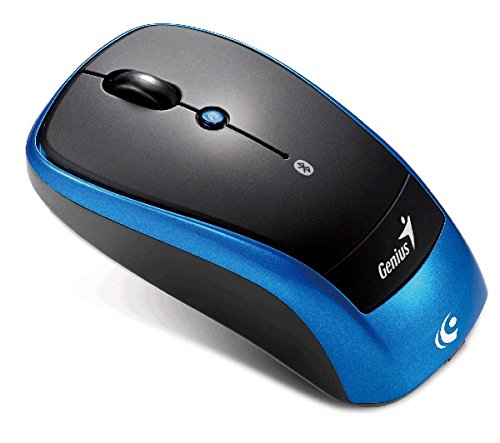
Una sobrecàrrega view of the Genius Traveler 9005BT 4-D Bluetooth Mouse, showcasing its ergonomic design with a black top surface and blue sides. It features a scroll wheel, left and right click buttons, and a small button for 4-D scroll functionality.
4. Funcionament del ratolí
4.1. Funcions bàsiques
- Clic esquerre: Press the left button for primary selection and activation.
- Clic dret: Press the right button to access contextual menus.
- Roda de desplaçament: Roll the wheel up or down to scroll vertically through documents and web pàgines.
4.2. 4-D Scroll Function
The Traveler 9005BT features a dedicated 4-D scroll function key. Once the driver is installed, this function allows for more natural and convenient scrolling by simply moving your mouse in the direction you wish to scroll (up, down, left, or right) while holding down the 4-D scroll button.
4.3. Turbo Scroll
Engage the Turbo Scroll feature for hyper-fast navigation through lengthy documents, spreadsheets, and web pages. This function allows you to accelerate scrolling speed, significantly improving efficiency when reviewing extensive content.
4.4. BlueEye Technology
The integrated BlueEye technology enables the mouse to operate on a wide variety of surfaces that traditional optical mice may struggle with. This includes challenging textures such as dusted glass, marble, carpet, and sofa upholstery, providing flexibility in your workspace.
5. Manteniment
5.1. Neteja
Per mantenir un rendiment i un aspecte òptims:
- Ensure the mouse is powered off before cleaning.
- Feu servir un drap suau, sec i sense borrissol per netejar les superfícies exteriors.
- Per a la brutícia persistent, lleugerament dampNetegeu el drap amb aigua o un netejador suau i no abrasiu. Eviteu la humitat excessiva.
- Do not use harsh chemicals, solvents, or abrasive materials, as these can damage the mouse's finish or internal components.
- Periodically clean the optical sensor area on the underside of the mouse with a cotton swab to prevent tracking issues.
5.2. Substitució de la bateria
When the mouse's performance degrades or it stops responding, it may be time to replace the batteries. Follow the battery installation steps outlined in Section 3.1.
6. Solució De Problemes
If you encounter issues with your Genius Traveler 9005BT mouse, refer to the following common solutions:
- El ratolí no respon:
- Assegureu-vos que el ratolí estigui encès.
- Comproveu i substituïu les piles si cal.
- Verify that Bluetooth is enabled on your device and the mouse is paired correctly. Try re-pairing if needed.
- Move the mouse closer to your device to rule out range issues.
- Moviment erràtic del cursor:
- Netegeu el sensor òptic de la part inferior del ratolí.
- Ensure you are using the mouse on a suitable surface. While BlueEye technology is versatile, extreme surfaces or highly reflective ones can still cause issues.
- Check for any obstructions around the optical sensor.
- 4-D Scroll Function Not Working:
- Confirm that the 4-D scroll driver has been installed correctly from the provided CD.
- Reinicieu l'ordinador després de la instal·lació del controlador.
- Bluetooth Disconnections:
- Assegureu-vos que no hi hagi altres dispositius que causin interferències de Bluetooth.
- Actualitza els controladors Bluetooth del teu dispositiu.
- Torneu a emparellar el ratolí amb el dispositiu.
If these steps do not resolve the issue, consult the multi-language user manual included in your package or contact Genius customer support.
7. Especificacions
| Característica | Detall |
|---|---|
| Marca | Geni |
| Número de model | Traveler 9005BT |
| Tecnologia de detecció de moviment | Optical (BlueEye) |
| DPI | 1200 ppp |
| Connectivitat | Bluetooth EDR 2.0 |
| Nombre de botons | 4 |
| Orientació de la mà | Ambidextre |
| Font d'alimentació | 2 piles alcalines AA (no incloses) |
| Sistemes operatius compatibles | Windows® 7, Vista, XP / Android 3.0+ / Mac OS X 10.4+ |
| Plataforma de maquinari | Ordinador portàtil, ordinador personal |
8. Garantia i Suport
For warranty information, please refer to the documentation provided with your purchase or contact your retailer. Genius products typically come with a limited warranty. For technical support or further assistance, please consult the multi-language user manual included in your package or visit the official Genius weblloc per obtenir informació de contacte.


