1. Introducció
This manual provides comprehensive instructions for the Monoprice MS-WN513N2 Wireless N300 4-Port Broadband Router. This device is designed to provide a high-speed wireless network connection for your home or small office, offering reliable internet access and advanced security features. Please read this manual thoroughly before operating the device.
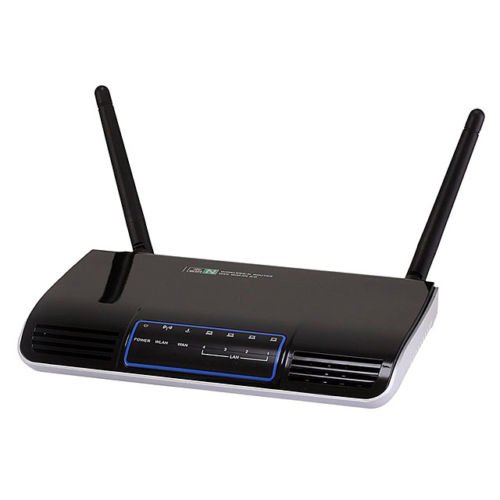
Imatge 1.1: Frontal view of the Monoprice MS-WN513N2 Wireless N300 Router. The router is black with indicator lights on the front panel.
2. Característiques
The Monoprice MS-WN513N2 router offers a range of features to enhance your network experience:
- Wireless N300 Performance: Complies with 802.11b/g/n standards, offering wireless transmission speeds up to 300 Mbps.
- 4-Port Broadband Router: Includes four (4) LAN ports for wired connections.
- Seguretat avançada: Supports 64-bit/128-bit WEP, WPA/WPA2, and WPA-PSK/WPA2-PSK authentication.
- Suport IPv6: Compatible with Internet Protocol Version 6.
- Qualitat de servei (QoS): Bandwidth control for prioritizing network traffic.
- WPS (Configuració protegida per Wi-Fi): Simplifies wireless security configuration.
- Múltiples modes de funcionament: Can be configured as a Gateway, Wireless Bridge, or Wireless ISP (WISP).
- DNS dinàmic (DDNS): Supports dynamic domain name system configuration.
- UPnP Support: Universal Plug and Play for easy device discovery.
- Tallafoc: Integrated firewall for network protection.
- Automatic MDI/MDIX: Automatic cable detection for Ethernet ports.
3. Contingut del paquet
Si us plau, verifiqueu que tots els elements siguin presents al vostre paquet:
- Monoprice MS-WN513N2 Wireless N300 Router
- Adaptador d'alimentació (DC 5V)
- Cable Ethernet
- Guia d'instal·lació ràpida (si s'inclou)
4. Sobrecàrrega físicaview
4.1 Indicadors del panell frontal
El panell frontal inclou indicadors LED que proporcionen informació d'estat:
- LED d'alimentació: Indica si el router està encès.
- LED WAN: Indica l'estat de la connexió a Internet.
- LED LAN (1-4): Indiqueu l'activitat als ports LAN amb cable respectius.
- LED WLAN: Indica activitat de xarxa sense fil.
4.2 Ports i botons del panell posterior
The rear panel contains all physical connection points:
- Port d'alimentació DC 5V: Es connecta a l'adaptador de corrent inclòs.
- Port WAN: Es connecta a la xarxa del mòdem o del proveïdor de serveis d'Internet.
- Ports LAN (1-4): Connect to wired devices such as computers, gaming consoles, or switches.
- Botó WPS: Inicia la configuració protegida de Wi-Fi per a una connexió sense fil fàcil.
- Restableix el forat: Used to restore the router to factory default settings. Insert a paperclip and hold for 5-10 seconds.
- Ports d'antena: Two (2) ports for connecting the external antennas.
5. Configuració
5.1 Connexió de maquinari
- Connecteu les antenes: Screw the two external antennas onto the antenna ports on the rear panel.
- Connecta el mòdem: Connect one end of an Ethernet cable to your modem's LAN port and the other end to the WAN port del router.
- Connectar l'alimentació: Connecteu l'adaptador de corrent al router Port d'alimentació DC 5V and plug the adapter into a power outlet.
- Encès: Wait for the router to power on. The Power LED should illuminate. Allow a few minutes for the router to boot up and establish a connection.
- Connect Computer (Optional): For initial configuration, it is recommended to connect a computer directly to one of the router's LAN ports mitjançant un cable Ethernet.
5.2 Configuració inicial (Web Interfície)
- Encaminador d'accés: Obre a web browser on a connected computer. In the address bar, type the router's default IP address (commonly
192.168.1.1or192.168.0.1) and press Enter. Refer to the label on the bottom of your router for the exact IP address and default login credentials. - Inici de sessió: Introduïu el nom d'usuari i la contrasenya predeterminats (per exemple,
adminper a tots dos). - Executa l'assistent de configuració: El del router web interface will typically present a Quick Setup Wizard. Follow the on-screen prompts to configure your internet connection type (e.g., PPPoE, Dynamic IP, Static IP) and basic wireless settings (SSID, password).
- Canvia les credencials predeterminades: For security, it is highly recommended to change the default login username and password for the router's web interfície.
6. Funcionament
6.1 Configuració de la xarxa sense fil
To configure your wireless network:
- Navegueu fins a Configuració sense fil secció a la web interfície.
- SSID: Change the default Wireless Network Name (SSID) to a unique name.
- Mode de seguretat: Seleccioneu WPA2-PSK as the recommended security mode.
- Contrasenya: Set a strong, unique password (at least 8 characters, including letters, numbers, and symbols).
- Canal: The router can automatically select the best 2.4 GHz channel. You can also manually select a fixed channel (e.g., 1, 6, or 11) to avoid interference.
- Deseu els vostres canvis.
6.2 Configuració de seguretat
The router provides various security features:
- Tallafoc: The built-in firewall helps protect your network from external threats. Ensure it is enabled.
- Filtre MAC: You can restrict network access to specific devices based on their MAC addresses.
- Control parental: Some routers offer features to block specific websites or limit internet access times for certain devices.
- WPS: Use the WPS button for quick, secure connections with WPS-compatible devices.
6.3 Funcions avançades
Explore the advanced settings in the web interface for more control:
- Qualitat de servei (QoS): Prioritize bandwidth for applications like gaming or video streaming.
- Transmissió de ports: Configure specific ports to allow external access to devices on your local network (e.g., for gaming servers).
- DNS dinàmic (DDNS): If you have a dynamic public IP address, DDNS allows you to access your network using a consistent domain name.
- IPv6: Configure IPv6 settings if your ISP supports it.
- Mode de funcionament: Change the router's mode to Wireless Bridge or WISP if needed for specific network setups.
7. Manteniment
7.1 actualitzacions de microprogramari
Periodically check the Monoprice website for firmware updates. Firmware updates can improve performance, add new features, and fix security vulnerabilities. Follow the instructions provided with the firmware update carefully to avoid damaging the device.
7.2 Restabliment de l'encaminador
If you forget your login password or experience persistent issues, you can restore the router to its factory default settings:
- Amb el router engegat, localitzeu el Restableix el forat al panell posterior.
- Use a paperclip or a thin, pointed object to press and hold the reset button inside the hole for approximately 5-10 seconds.
- Release the button when the router's LEDs flash or restart.
- The router will reboot with factory default settings. You will need to reconfigure it using the web interfície.
8. Solució De Problemes
Aquí teniu solucions a problemes comuns:
- Sense accés a Internet:
- Check if the WAN LED is lit. If not, ensure the Ethernet cable from the modem is securely connected to the router's WAN port.
- Reinicieu el mòdem i l'encaminador.
- Verifiqueu la configuració de la connexió a Internet al router web interfície.
- No es pot accedir Web Interfície:
- Assegureu-vos que l'ordinador estigui connectat al router mitjançant Ethernet o Wi-Fi.
- Verify the router's IP address. Try
192.168.1.1or192.168.0.1. - Esborra la memòria cau del navegador o prova un altre navegador.
- If you forgot the password, perform a factory reset.
- Velocitat sense fil lenta:
- Ensure your devices support 802.11n for optimal speeds.
- Check for interference from other 2.4 GHz devices (cordless phones, microwaves). Try changing the wireless channel.
- Assegureu-vos que el router estigui situat en un lloc central i que no estigui obstruït.
- Update your device's wireless adapter drivers.
- Caigudes de connexió sense fil:
- Check for signal strength and interference.
- Assegureu-vos que el firmware del router estigui actualitzat.
- Verify that the wireless security settings are correctly configured.
9. Especificacions
| Característica | Especificació |
|---|---|
| Model | MS-WN513N2 |
| Estàndards sense fil | IEEE 802.11n (Draft 2.0), IEEE 802.11g, IEEE 802.11b |
| Wireless Signal Rates (802.11n) | Up to 300 Mbps (270, 243, 216, 162, 135, 130, 108, 81, 65, 54, 40.5, 27, 13.5 Mbps) |
| Wireless Signal Rates (802.11g) | 54, 48, 36, 24, 18, 12, 9, 6 Mbps |
| Wireless Signal Rates (802.11b) | 11, 5.5, 2, 1 Mbps |
| Interval de freqüència | 2.4 - 2.4835 GHz |
| Potència de transmissió sense fils | Fins a 20 dBm |
| Tecnologia de modulació | DBPSK, DQPSK, CCK, OFDM, 16-QAM, 64-QAM |
| Ports | 4x LAN Ports, 1x WAN Port, 2x Antenna Ports, 1x DC 5V Power Port |
| Botons | WPS Button, Reset Hole |
| Seguretat | WEP de 64/128 bits, WPA/WPA2, WPA-PSK/WPA2-PSK |
| Font d'alimentació | DC 5V |
| Protocols compatibles | IPv6, PPPoE |
10. Garantia i Suport
Per obtenir informació sobre la garantia i assistència tècnica, consulteu la pàgina oficial de Monoprice. weblloc web o contacteu directament amb el servei d'atenció al client de Monoprice. Conserveu el rebut de compra per a reclamacions de garantia.
Monopreu Weblloc: www.monoprice.com


