tech21 204996

Tech 21 SansAmp Manual d'instruccions del Para Driver DI (v2)

Marca: tech21 | Model: 204996

Introducció

The Tech 21 SansAmp Para Driver DI (v2) is a versatile floor-based direct box and preamp designed to provide detailed tone shaping for various signal sources. It is particularly effective with acoustic, electric, and bass guitars, as well as upright bass, whether connected directly to a mixing console or an instrument amplifier. The SansAmp circuitry imparts a natural warmth and presence, emulating the sound of a miked tube pre-amp, while effectively eliminating harsh, unnatural harmonics often associated with piezo pickups. The Drive control allows for adding subtle to pronounced edge to your sound.

Característiques clau

Controls i connexions

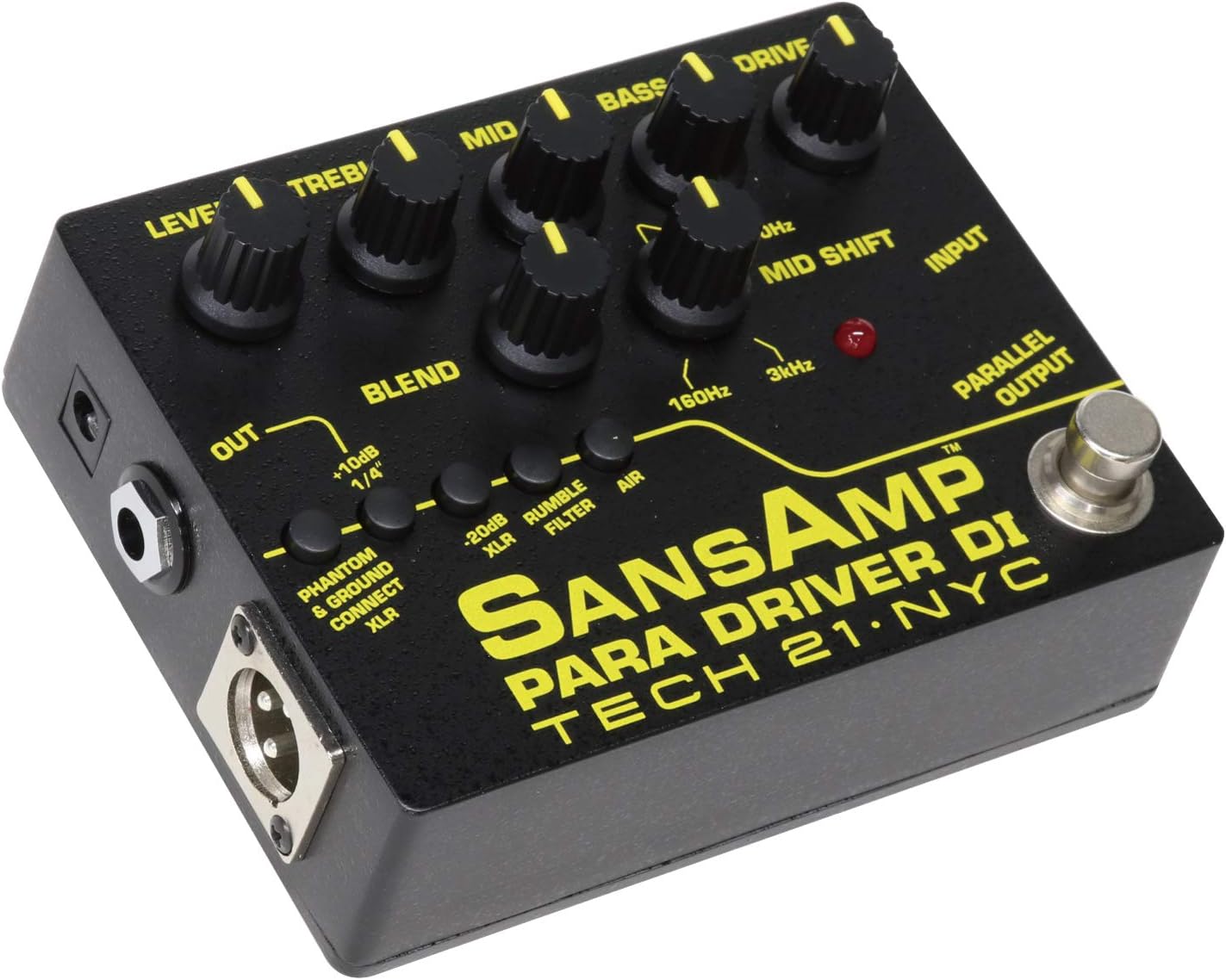
De dalt a baix view of the Tech 21 SansAmp Para Driver DI (v2) pedal, showing all control knobs and buttons.

Figura 1: superior view of the SansAmp Para Driver DI (v2) showing control layout.

Perilles de control:

  • NIVELL: Ajusta el nivell de sortida general del pedal.
  • AGUTS: Controls the high-frequency equalization.
  • MITJÀ: Controls the mid-frequency equalization.
  • BAIX: Controls the low-frequency equalization.
  • CONDUIR: Adjusts the amount of SansAmp tub amplifier emulation and overdrive.
  • BARREJA: Mixes the direct instrument signal with the SansAmp tub amplifier emulation.
  • MID SHIFT (160Hz - 3kHz): Selects the specific mid-frequency point to be affected by the MID control.

Botons:

  • PHANTOM & GROUND CONNECT XLR: Engages phantom power for the XLR output and connects/disconnects the ground.
  • -20dB XLR: Attenuates the XLR output by 20dB for hotter signals.
  • RUMBLE FILTER: Activates a high-pass filter to remove unwanted low-end rumble.
  • AIRE: Boosts high frequencies for added clarity and sparkle.
lateral view of the Tech 21 SansAmp Para Driver DI (v2) pedal, showing the input and parallel output jacks.

Figura 2: lateral view showing Input and Parallel Output.

lateral view of the Tech 21 SansAmp Para Driver DI (v2) pedal, showing the XLR output and 1/4 inch output jacks.

Figura 3: lateral view showing XLR Output and 1/4" Output.

Connexions:

Guia de configuració

  1. Connexió d'alimentació: Connect a 9V DC power supply (not included) to the power input jack, or utilize phantom power from a mixer via the XLR output by engaging the "PHANTOM & GROUND CONNECT XLR" button.
  2. Connexió de l'instrument: Connecteu el vostre instrument (guitarra, baix, etc.) a la ENTRADA jack utilitzant un cable d'instrument estàndard de 1/4 de polzada.
  3. Connexió de sortida:
    • For direct connection to a mixer or audio interface, use an XLR cable from the SORTIDA XLR to your mixer's input.
    • For connection to an instrument amplifier or other pedals, use a 1/4-inch cable from the OUT (1/4") jack.
    • To send an unaffected signal to another device (e.g., a tuner or a separate amplifier), use the SORTIDA PARAL·LEL.
  4. Configuració inicial: Before powering on, set all control knobs (LEVEL, TREBLE, MID, BASS, DRIVE, BLEND) to their 12 o'clock (noon) position. Ensure all push-buttons are disengaged for a neutral starting point.

Instruccions de funcionament

The SansAmp Para Driver DI (v2) offers extensive tonal flexibility. Experiment with the controls to find your desired sound.

Formació del to:

Output Level Management:

Manteniment

Resolució de problemes

ProblemaCausa possibleSolució
Sense sortida de soNo power; incorrect cable connections; volume knobs set to zero.Check power supply/phantom power; ensure all cables are securely connected; increase LEVEL knob.
Distorted/Clipping SoundInput signal too hot; DRIVE knob set too high; output level too high.Reduce instrument output; lower DRIVE knob; engage -20dB XLR pad if using XLR output.
Excessive Low-End RumbleUnwanted sub-sonic frequencies.Engage the RUMBLE FILTER button.
Lack of Clarity/SparkleInsufficient high-frequency presence.Engage the AIR button.

Especificacions

Informació de la garantia

For detailed warranty information, please refer to the official tech21 website or contact their customer support directly. Retain your proof of purchase for warranty claims.

Atenció al client

Should you require further assistance, technical support, or have questions regarding your SansAmp Para Driver DI (v2), please visit the official tech21 website for contact details and support resources. You can also refer to the tech21 Store on Amazon per obtenir informació addicional sobre el producte.

Documents relacionats - 204996

Preview Productes de tercers d'Apple per a educació infantil, primària i secundària: llista de preus de llicències de programari i maquinari
Llista oficial de preus i guia de llicències de programari per a productes de maquinari i programari de tercers oferts per Apple Inc. per a institucions d'educació infantil, primària i secundària i superior, amb data del 13 de novembre de 2012. Inclou un catàleg complet d'accessoris, programari i solucions d'infraestructura informàtica.
Preview Guia del propietari de les plantilles calefactades Sharper Image: característiques, funcionament i seguretat
Guia completa per a les plantilles calefactables Sharper Image (núm. d'article 204996), que inclou el contingut del paquet, les característiques del producte, les instruccions de càrrega i funcionament, la taula de talles, les especificacions elèctriques, l'emmagatzematge, els avisos de seguretat, la garantia i el compliment de la normativa FCC.
Preview Descripció i especificacions dels efectes M-Vave MK-300
Explora els efectes complets i ampdescripcions del model d'electrofor per a l'M-Vave MK-300. Aquesta guia detalla els paràmetres per a Wah, FX, Gate, EQ, Modulació, Delay, Reverb i enumera nombrosos efectes clàssics i moderns ampsimulacions de lificadors i armaris.
Preview Llista de preus de productes de tercers d'Apple per a educació infantil, primària i secundària, 19 de març de 2013
Llista oficial de preus d'Apple Inc. per a productes de maquinari i programari de tercers disponibles per a institucions d'educació infantil, primària i secundària i superior. Inclou un catàleg complet d'accessoris, llicències de programari i articles relacionats amb números de peça, descripcions i preus, actualitzat el 19 de març de 2013.
Preview AudioTechnology Magazine Número Setè: Gravació, Masterització i Equipament d'Estudiviews
Exploreu el número setè de la revista AudioTechnology, que inclou articles en profunditat sobre tècniques d'enregistrament, coneixements de masterització i una revisió completa.viewd'equips d'àudio professionals i notícies del sector.
Preview Guia de regals tecnològics de Nadal de T-Mobile 2021: descobreix els millors regals
Explora la Guia de regals tecnològics per a les festes del 2021 de T-Mobile, que inclou els últims telèfons intel·ligents, accessoris, dispositius d'àudio i rellotges intel·ligents de les millors marques com Apple, Samsung i Google, perfectes per a tots els de la teva llista.