1. Introducció
The Celestron TetraView LCD Digital Microscope is a powerful, full-featured biological microscope designed for classrooms, labs, and hobbyists. It offers advanced features for detailed observation and documentation of microscopic specimens.
Característiques principals:
- Pantalla LCD d'4.3 polzades: Mounted on a 180° rotating head for shared viewing without eyepieces.
- Càmera digital de 5 MP: Captures high-resolution still images and 30 fps video directly to an SD card.
- Ampliació: Optical magnification from 40x to 400x, with digital zoom up to 1600x.
- Adjustable Mechanical Stage: Allows precise slide positioning for optimal viewing.
- Dual Illumination: Adjustable bottom LED for translucent specimens and top LED for opaque objects.
- Connectivitat: SD card slot, USB 2.0, and AV output for external display.
- Opcions d'energia: Operates on AC adapter or 4 AA batteries for portability.
2. Configuració
2.1 Desembalatge i components
Traieu amb cura tots els components de l'embalatge. Assegureu-vos que hi hagi els elements següents:
- Celestron TetraView Microscopi digital LCD
- Targeta SD de 8 GB
- USB 2.0 Cable (data transfer)
- 7 diapositives preparades
- 4-plug, multi-country AC adapter
- Funda antipols
- Maleta de transport
- Touch Pen (Stylus)
- Cable AV
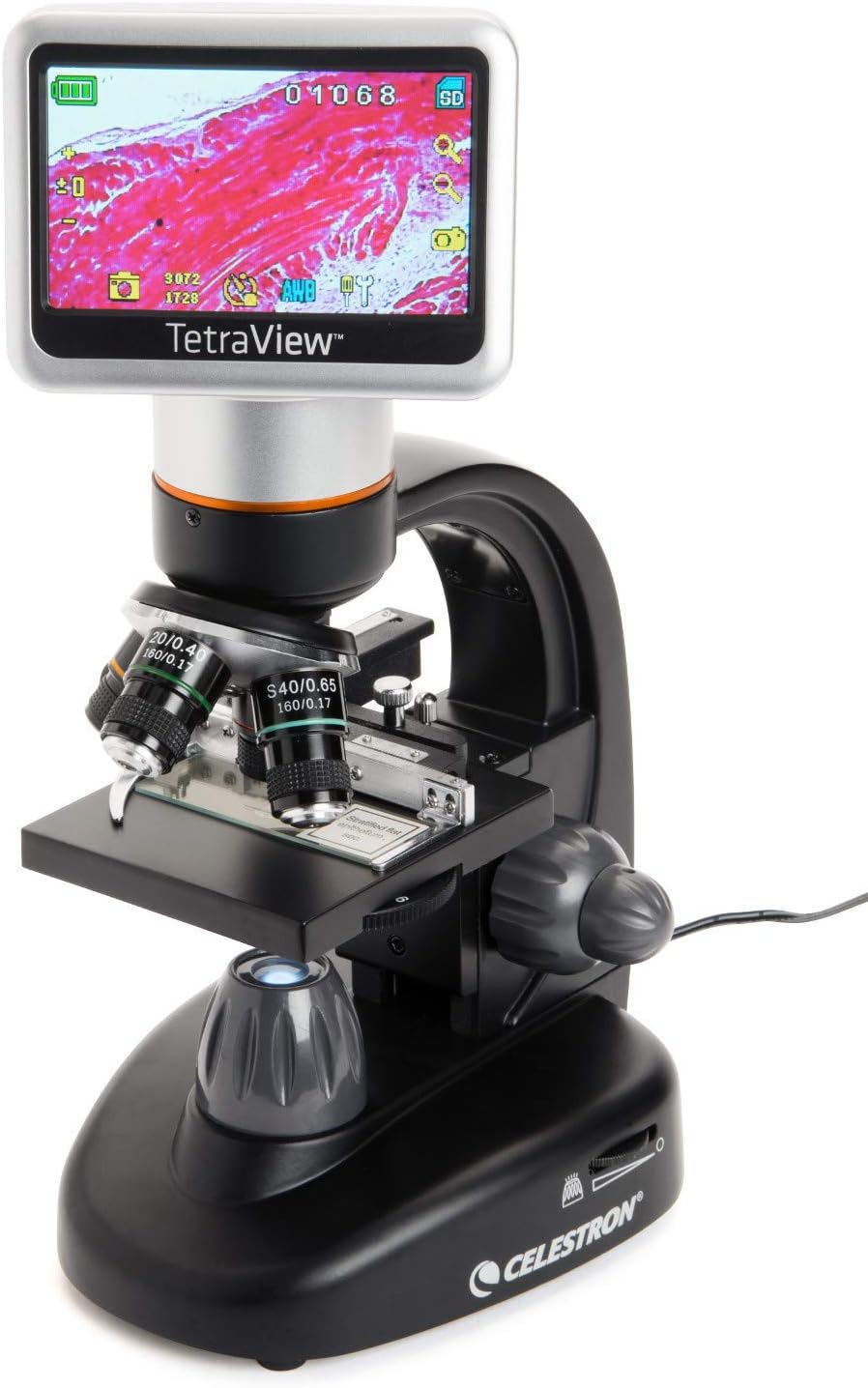
Figura 2.1: Mésview of the Celestron TetraView LCD Digital Microscope.
2.2 Powering the Microscope
El TetraView microscope can be powered in two ways:
- Adaptador de CA: Connect the included multi-country AC adapter to the microscope's power input and a suitable wall outlet.
- Piles AA: For portable use, insert 4 AA batteries (not included) into the battery compartment located at the base of the microscope.
2.3 Inserció de la targeta SD
Locate the SD card slot on the side of the LCD screen unit. Insert the included 8GB SD card until it clicks into place. This card is essential for saving images and videos.

Figure 2.3: SD card slot and other connectivity ports.
3. Operating the Microscope
3.1 LCD Screen and Controls
The 4.3-inch full-color LCD screen provides a clear view of your specimens. It can rotate 180 degrees, allowing multiple users to view simultaneously. The touchscreen interface, used with the included stylus, provides access to various settings and functions.

Figure 3.1: The rotatable LCD screen for collaborative viewing.
3.2 Magnification and Objective Lenses
The microscope features a rotating objective turret with 4x, 10x, 20x, and 40x lenses. Combined with the 10x digital eyepiece, this provides optical magnifications of 40x, 100x, 200x, and 400x. The LCD screen's 4x digital zoom allows for a total magnification of up to 1600x.

Figure 3.2: Objective lenses on the rotating turret.
3.3 Specimen Placement and Focusing
Place your prepared slide on the adjustable mechanical stage. Use the coarse and fine focus knobs to bring the specimen into sharp focus. The mechanical stage allows for precise movement of the slide across the field of view.

Figure 3.3: Mechanical stage for precise slide positioning.

Figure 3.4: Coarse and fine focus knobs.
3.4 Illumination and Filter Wheel
The microscope features an adjustable bottom LED illuminator for viewing translucent specimens. A built-in 6-position filter wheel below the stage includes color and aperture filters to enhance contrast and control lighting for clearer specimen viewing.
3.5 Captura d'imatges i vídeos
Utilize the 5MP digital camera to capture high-resolution still images and smooth 30 fps video. These can be saved directly to the included SD card. The LCD screen interface provides controls for capturing and reviewing your observations.
3.6 TV Output
Connect the microscope to a TV or monitor using the included AV cable for large-scale viewing of your specimens, ideal for presentations or group study.
Video 3.6: Official product video demonstrating the Celestron TetraView LCD Digital Microscope's features and operation.
4. Manteniment
4.1 Neteja
To clean the microscope's exterior, use a soft, damp cloth. For optical surfaces (lenses, screen), use a lens cleaning solution and a microfiber cloth specifically designed for optics. Avoid abrasive materials or harsh chemicals.
4.2 Emmagatzematge
When not in use, cover the microscope with the included dust cover to protect it from dust and debris. Store it in the rugged canvas carrying case for transport or long-term storage to prevent damage.
5. Solució De Problemes
5.1 Sense poder
- Ensure the AC adapter is securely connected to both the microscope and a working power outlet.
- If using batteries, check that they are correctly inserted and not depleted. Replace if necessary.
5.2 Imatge borrosa
- Adjust the coarse and fine focus knobs slowly.
- Ensure the objective lens is clean and free of smudges.
- Verify the specimen slide is correctly placed on the mechanical stage.
5.3 Screen Not Displaying Image
- Comproveu la connexió d'alimentació.
- Ensure the microscope is turned on.
- Adjust illumination settings.
6. Especificacions
| Característica | Detall |
|---|---|
| Dimensions del producte | 5.5 x 13 x 7 polzades |
| Pes de l'article | 4.18 lliures |
| Número de model de l'article | 44347 |
| Bateries | Necessites 4 piles AA (no incloses) |
| Tipus de font de llum | LED |
| Material | PE (polietilè) |
| Color | Negre |
| Ampliació màxima | 1600x (Optical up to 400x, Digital up to 1600x) |
| Voltage | 240 Volts (AC adapter) |
| Descripció de la lent objectiva | (4) Achromatic objectives on turret (4x, 10x, 20x, 40x) |
| Sensor de càmera | 5MP |
| Mida de pantalla LCD | 4.3 polzades |
7. Garantia i Suport
7.1 Informació de la garantia
Your Celestron TetraView LCD Digital Microscope includes a 2-Year US Warranty. Please retain your proof of purchase for warranty claims.
7.2 Atenció al client
For unlimited support, contact Celestron's team of US-based experts. You can also refer to the official user manual for more detailed instructions and support:


