Introducció
The Casio G-Shock GA-400-1B is a robust and functional timepiece designed for durability and intuitive operation. Featuring a large rotary switch, it offers easy access to various functions, making it suitable for active lifestyles. This model is built with G-SHOCK's renowned shock and magnetic resistance, complemented by 200-meter water resistance, ensuring reliable performance in demanding environments.

Figura 1: Frontal view of the Casio G-Shock GA-400-1B watch.
Característiques clau
- Resistència a l'aigua de 200M: Ideal for swimming, surfing, and extreme sports, ensuring protection in water-related activities.
- Bold & Functional Design: Features a large rotary switch for intuitive operation, allowing easy adjustments to time zones, stopwatch, and timer settings.
- Tough & Durable: Built with shock resistance, magnetic resistance, and a rugged resin case & band to handle extreme conditions.
- World Time Feature: Easily switch between 31 time zones (48 cities + UTC) with one-touch access to your home city and world time zones.
- Auto LED Backlight with Afterglow: Amber LED illumination ensures easy readability in low-light conditions.
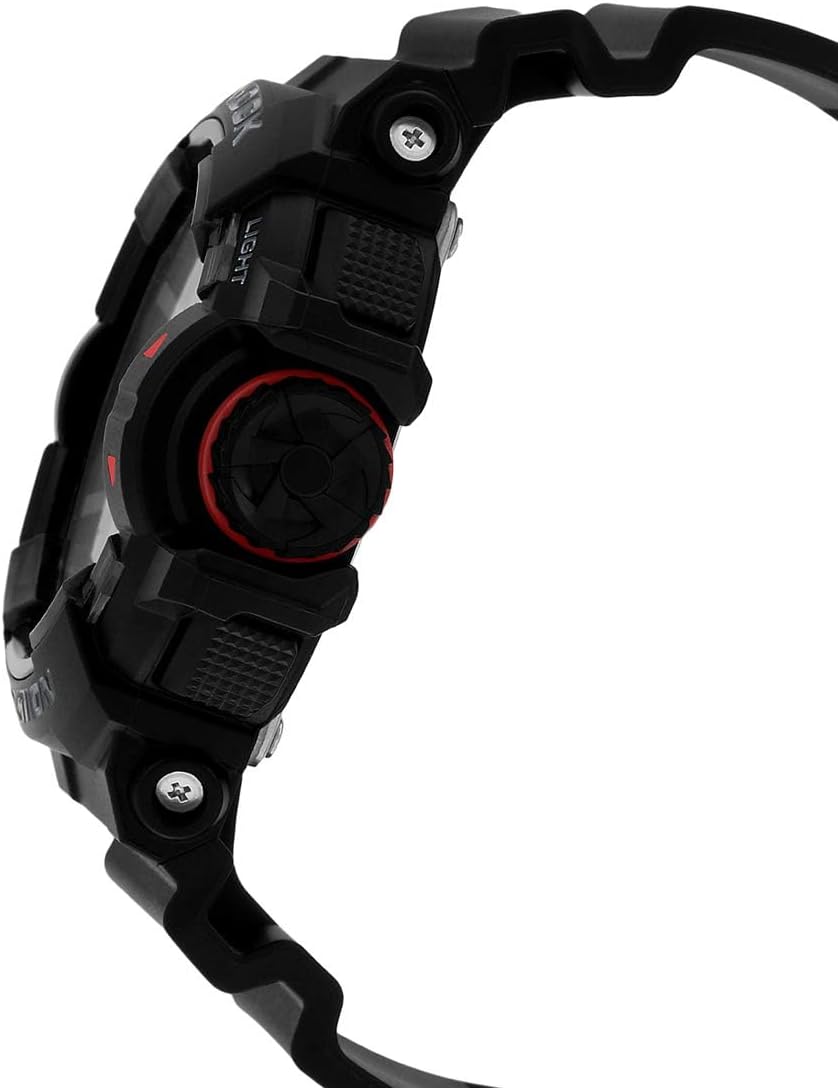
Figura 2: lateral view espectacleasing the large rotary switch for intuitive control.
Configuració
Configuració de l'hora inicial
- En el mode d'indicació de l'hora, manteniu premut AJUSTAR button (top left) until the city code starts to flash, indicating the setting screen.
- Utilitza el INTERRUPTOR GIRATORI (right side) to select your desired Home City code.
- Premeu el botó MODE button (bottom left) to cycle through the settings: DST (Daylight Saving Time), 12/24-hour format, Seconds, Hour, Minute, Year, Month, Day.
- Utilitza el INTERRUPTOR GIRATORI o el INICI/PARA (a dalt a la dreta) i RESET (bottom right) buttons to change the flashing value.
- Once all settings are configured, press the AJUSTAR button to exit the setting screen. The analog hands will automatically adjust to the set digital time.
S'han acabat les funcions del botóview
| Botó/Component | Funció |
|---|---|
| AJUSTAR (A dalt a l'esquerra) | Enters/Exits setting modes. |
| MODE (Bottom Left) | Cycles through watch modes (Timekeeping, World Time, Stopwatch, Countdown Timer, Alarm). |
| LLUM (Top Right) | Activa la retroiluminació LED. |
| INICI/PARA (Middle Right) | Starts/stops stopwatch or timer. Also used for value adjustment in setting modes. |
| RESET (Bottom Right) | Resets stopwatch or timer. Also used for value adjustment in setting modes. |
| INTERRUPTOR GIRATORI (Costat dret) | Navigates and adjusts values in various modes and settings. |

Figura 3: Detallada view of the watch's control buttons and rotary switch.
Funcionament del rellotge
Modes de navegació
Premeu el botó MODE button (bottom left) to cycle through the different operational modes:
- Timekeeping Mode (TME)
- Mode hora mundial (WT)
- Mode de cronòmetre (STW)
- Countdown Timer Mode (TMR)
- Mode d'alarma (ALM)
Funció d'hora mundial
- Des del mode de mesura del temps, premeu MODE to enter World Time Mode.
- Gira el INTERRUPTOR GIRATORI to scroll through different city codes and view their current times.
- To swap your Home City with the currently displayed World Time City, hold down the INICI/PARA button (top right) for about three seconds.
Funció de cronòmetre
- Des del mode de mesura del temps, premeu MODE until you reach Stopwatch Mode (STW).
- Premeu INICI/PARA (a dalt a la dreta) per iniciar el cronòmetre.
- Premeu INICI/PARA de nou per aturar-ho.
- Premeu RESET (a baix a la dreta) per reiniciar el cronòmetre a zero.
- Per a temps parcials, premeu RESET mentre el cronòmetre està en marxa per mostrar el temps parcial. Premeu RESET de nou per tornar a la mesura del temps transcorregut.
Funció de temporitzador de compte enrere
- Des del mode de mesura del temps, premeu MODE until you reach Countdown Timer Mode (TMR).
- Manteniu premuda la AJUSTAR fins que l'hora d'inici del compte enrere actual parpellegi.
- Utilitza el INTERRUPTOR GIRATORI to set the desired countdown time (up to 24 hours).
- Premeu AJUSTAR per sortir de la pantalla de configuració.
- Premeu INICI/PARA per començar el compte enrere.
- Premeu INICI/PARA de nou per fer una pausa, i RESET per reiniciar.
Funció d'alarma
- Des del mode de mesura del temps, premeu MODE until you reach Alarm Mode (ALM).
- Utilitza el INTERRUPTOR GIRATORI to scroll through different alarms (AL1-AL5, SNZ, SIG).
- Per configurar una alarma, manteniu premuda la tecla AJUSTAR button while the desired alarm is displayed.
- Utilitza el INTERRUPTOR GIRATORI per configurar l'hora de l'alarma. Premeu MODE per canviar entre la configuració d'hores i minuts.
- Premeu AJUSTAR per sortir de la pantalla de configuració.
- Premeu INICI/PARA per activar/desactivar l'alarma.
Llum de fons LED
Premeu el botó LLUM button (top right) to illuminate the watch face. The Auto LED Backlight feature can be enabled or disabled in the Timekeeping Mode settings, allowing the light to activate automatically when the watch is tilted towards your face.
Vídeo 1: Acabatview of the Casio G-Shock GA-400-1B, demonstrating its multi-dimensional analog and digital display and overall design.
Manteniment
Resistència a l'aigua
The GA-400-1B is water resistant to 200 meters (20 BAR). This means it is suitable for recreational scuba diving, but not for saturation diving. Do not operate any buttons or the rotary switch while the watch is wet or submerged in water to prevent water ingress.
Neteja
Netegeu el rellotge amb un drap suau i sec per eliminar la brutícia i la humitat. Per a la brutícia resistent, utilitzeu un drap suau.ampEsbandiu amb aigua i un detergent neutre suau i, a continuació, eixugueu. Eviteu utilitzar agents volàtils com ara dissolvent o benzina, ja que poden danyar els components de resina.
Canvi de bateria
The watch is powered by one AA battery. When the display becomes dim or functions become erratic, it indicates low battery power. Battery replacement should be performed by a qualified technician or an authorized Casio service center to ensure proper sealing and water resistance integrity.

Figura 4: posterior view del rellotge, mostrant el fons de la caixa.
Resolució de problemes
- Watch display is blank or dim: The battery may be low. Refer to the "Battery Replacement" section.
- Les agulles analògiques no coincideixen amb l'hora digital: This can occur after strong impact or magnetic exposure. Perform a hand home position correction. Refer to the full manual for detailed steps, typically involving holding the ADJUST button and using the rotary switch to align hands.
- Els botons no responen: Ensure the watch is not in a locked mode (if applicable, though GA-400 does not have a specific lock). A low battery can also cause this. If issues persist, a full reset may be required (consult Casio support).
- Incorrect time after travel: Check your Home City setting and Daylight Saving Time (DST) setting in Timekeeping Mode.
Especificacions
| Característica | Detall |
|---|---|
| Número de model | GA-400-1B |
| Dimensions (L x A x A) | 3.86 x 4.41 x 3.94 polzades |
| Pes | 2.5 unces |
| Resistència a l'aigua | 200M (20 BAR) |
| Resistència al xoc | Sí |
| Resistència magnètica | Sí |
| Llum | Auto LED Backlight (Amber) with Afterglow |
| Hora del món | 31 fusos horaris (48 ciutats + UTC) |
| Cronòmetre | 1/100 de segon, capacitat de mesura: 23:59'59.99'' |
| Temporitzador de compte enrere | Measuring unit: 1 second, countdown range: 1 minute to 24 hours |
| Alarmes | 5 daily alarms (with 1 snooze alarm), hourly senyal horari |
| Tipus de bateria | 1 bateria AA (inclosa) |
| Material de la caixa/bisel | Resina |
| Material de la banda | Resina |
| Fabricant | Casio |
| País d'origen | Xina |

Figure 5: Watch size comparison with a standard credit card.
Garantia i Suport
Casio G-Shock watches typically come with a manufacturer's warranty covering defects in materials and workmanship. The specific terms and duration of the warranty may vary by region. Please refer to the warranty card included with your purchase or visit the official Casio weblloc per obtenir informació detallada sobre la garantia.
For technical support, service, or to locate an authorized service center, please visit the official Casio support weblloc web o poseu-vos en contacte amb el seu departament d'atenció al client. Conserveu el comprovant de compra per a reclamacions de garantia.
Casio oficial Weblloc: www.casio.com


