Campus SP-FY24

CAMPUS Poppy Music Portable Bluetooth Speaker

Manual d'usuari

Model: SP-FY24

Producte acabatview

El CAMPUS Poppy Music is a compact and portable Bluetooth 3.0 speaker designed for on-the-go music enjoyment. It features a unique pop-art design with interchangeable silicone covers, allowing you to customize its appearance. Equipped with a built-in microphone, it also supports hands-free calling.

CAMPUS Poppy Music Speaker in blue

Image: The CAMPUS Poppy Music speaker, showcasing its compact design and blue silicone cover.

Guia de configuració

1. Contingut del paquet

Abans de començar, assegureu-vos que tots els elements estiguin presents al paquet:

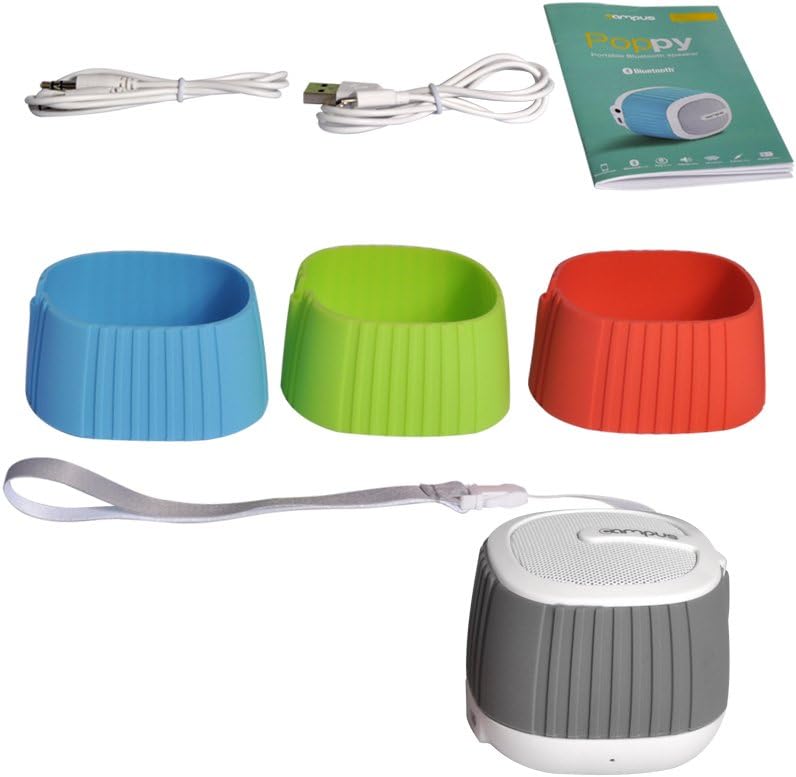
Contents of CAMPUS Poppy Music speaker package

Image: The complete package contents, including the speaker, multiple silicone covers, charging cable, audio cable, and user manual.

  • CAMPUS Poppy Music Portable Bluetooth Speaker
  • Interchangeable Silicone Covers (Red, Blue, Green, Gray)
  • Cable de càrrega micro-USB
  • Cable d'àudio de 3.5 mm (AUX)
  • Manual d'usuari

2. Càrrega inicial

For optimal performance, fully charge the speaker before first use.

  1. Connect the supplied Micro-USB cable to the charging port (DC 5V) on the speaker.
  2. Connecteu l'altre extrem del cable USB a un adaptador de corrent USB (no inclòs) o al port USB d'un ordinador.
  3. The LED indicator will illuminate during charging.
  4. Charging typically takes 2 to 3 hours. The LED indicator will change or turn off once fully charged.

3. Changing Silicone Covers

Customize your speaker's look by easily swapping the silicone covers.

Speaker with silicone covers being changed

Imatge: Un desmuntat view of the speaker, showing how the silicone cover can be removed and replaced.

  1. Gently peel off the current silicone cover from the speaker body.
  2. Select your desired color cover.
  3. Align the new cover with the speaker and carefully stretch it over the body until it fits snugly.
Four CAMPUS Poppy Music speakers with different colored silicone covers

Image: Four CAMPUS Poppy Music speakers, each with a different colored silicone cover (red, blue, green, gray), demonstrating the customization options.

Instruccions de funcionament

1. Encendre/apagar

  • Per encendre: Locate the power button (often integrated with play/pause or a dedicated switch) and press and hold it until you hear an audible prompt or the LED indicator lights up.
  • Per apagar: Press and hold the power button again until the speaker powers down.

2. Emparellament Bluetooth

Connect your speaker wirelessly to your device.

  1. Ensure the speaker is powered on and in pairing mode (the LED indicator may flash rapidly).
  2. Al telèfon intel·ligent, la tauleta o un altre dispositiu compatible amb Bluetooth, aneu a la configuració de Bluetooth.
  3. Cerca available devices. The speaker should appear as "Poppy Music" or similar.
  4. Select the speaker from the list to pair. You will hear a confirmation sound once successfully connected.
  5. L'altaveu es tornarà a connectar automàticament al darrer dispositiu emparellat quan s'engegui, si el Bluetooth del dispositiu està actiu i dins del seu abast.

3. Reproducció i controls d'àudio

Control your music and calls using the speaker's integrated controls.

  • Reproduir/pausa: Press the Play/Pause button (often a central button) to start or pause music playback.
  • Control de volum: Use the volume up (+) and volume down (-) buttons to adjust the audio level.
  • Seguiment anterior / següent: Press and hold or short press (depending on model) the volume buttons or dedicated track buttons to skip tracks.
  • Trucades mans lliures:
    • Respon a la trucada: Premeu el botó Reproduir/Pausa una vegada per respondre a una trucada entrant.
    • Finalitzar la trucada: Premeu el botó Reprodueix/Pausa una vegada durant una trucada per finalitzar-la.
    • Rebutja la trucada: Mantén premut el botó Reproduir/Pausa per rebutjar una trucada entrant.

4. AUX Input (Wired Connection)

For devices without Bluetooth, use the 3.5mm audio cable.

  1. Connecteu un extrem del cable d'àudio de 3.5 mm al port d'entrada AUX de l'altaveu.
  2. Connect the other end to the headphone jack of your audio device (e.g., MP3 player, computer).
  3. L'altaveu canviarà automàticament al mode AUX.

Manteniment

Resolució de problemes

ProblemaCausa possibleSolució
L'altaveu no s'encén.La bateria està baixa o esgotada.Carregueu l'altaveu durant 2-3 hores.
No es pot emparellar per Bluetooth.
  • L'altaveu no està en mode d'emparellament.
  • El Bluetooth està desactivat al dispositiu.
  • L'altaveu ja està connectat a un altre dispositiu.
  • Too far from the device.
  • Ensure speaker is powered on and LED is flashing (pairing mode).
  • Activa el Bluetooth al teu dispositiu.
  • Disconnect from other devices or turn off their Bluetooth.
  • Move speaker closer to your device (within 10 meters).
Sense so.
  • El volum és massa baix.
  • Incorrect input mode (Bluetooth/AUX).
  • El dispositiu no reprodueix àudio.
  • Increase volume on both speaker and connected device.
  • Ensure correct mode is active (Bluetooth connected or AUX cable inserted).
  • Check if audio is playing on your source device.
Mala qualitat de so.
  • Interference or distance.
  • Bateria baixa.
  • Move speaker closer to the device, away from obstacles or other wireless devices.
  • Carregueu l'altaveu.

Especificacions

MarcaCampus
Nom del modelPoppy Music
Número de modelSP-FY24
Tecnologia de connectivitatBluetooth 3.0, AUX (3.5mm)
Potència de sortida màxima dels altaveus3 watts RMS
Durada de la bateriaDe 5 a 8 hores
Temps de càrrega2 to 3 hours (via Micro-USB, 5V)
Dispositius compatiblesSmartphones, Tablets, Bluetooth-enabled devices
Dimensions (paquet)15.4 x 9.2 x 8.2 cm
Pes (paquet)240.4 g
Tipus de controladorTouchpad (Pekplatta)

Garantia i Suport

This product is covered by standard consumer warranty laws in your region. Please retain your proof of purchase for any warranty claims.

For technical support or further assistance, please refer to the contact information provided by your retailer or visit the official Campus weblloc.

Note: Software updates are not guaranteed for this product.

Documents relacionats - SP-FY24

Preview Recanvis de la sèrie PizzaMaster 700/800/900view i Llista
Peces completes més enllàview i llista dels forns PizzaMaster de les sèries 700, 800 i 900. Trobeu números de peça, descripcions i diagrames dels components essencials del forn.
Preview Guia d'instal·lació de la coberta enrotllable suau MaxMate
Guia d'instal·lació completa per a la coberta enrotllable suau MaxMate, que inclou les eines necessàries, la llista d'elements, els passos de muntatge, el posicionament, el tancament, l'enrotllament amunt/avall, el control de tensió, les instruccions especials del suport i la resolució de problemes.
Preview Lents ZEISS Supreme Prime i Supreme Prime Radiance: Taules de profunditat de camp
Taules completes de profunditat de camp per a les lents ZEISS Supreme Prime i Supreme Prime Radiance, que detallen el rendiment en diversos diafragmes T i formats de sensor per a directors de fotografia i artistes visuals.
Preview Adhesius Bostik ISOGRIP®: Informe d'avaluació ICC-ES ESR-1140 per a panells sandvitx
Informe d'avaluació ICC-ES complet (ESR-1140) per als adhesius ISOGRIP® de Bostik. Detalla les especificacions del producte, les aplicacions en panells sandvitx estructurals, les directrius d'instal·lació i el compliment dels codis de construcció IBC, IRC i Califòrnia.
Preview Umelome Spin Dryer User Manual and Instructions
Read the Umelome Spin Dryer user manual for safety instructions, product overview, commissioning, operation, cleaning, and technical data. Learn how to properly use and maintain your spin dryer.
Preview Guia d'instal·lació i ús de la dutxa termostàtica i manual NewTeam 1000 Plus
Guia completa d'instal·lació i ús per a les dutxes termostàtiques i manuals NewTeam 1000 Plus, que cobreix la planificació, el muntatge, la posada en marxa, les instruccions d'ús, la resolució de problemes i les peces de recanvi.