1. Introducció
The Bogen 1126-BG-UTI1 is a single-zone paging controller designed to integrate a paging system with a telephone system. It provides a reliable interface for making announcements over a public address system from a telephone. This manual provides detailed instructions for the proper installation, operation, and maintenance of your Bogen paging controller.
2. Informació important de seguretat
Si us plau, llegiu i comprengui totes les instruccions de seguretat abans de fer servir aquest dispositiu. Conservi aquest manual per a futures consultes.
- Font d'alimentació: Connecteu la unitat només a la font d'alimentació especificada del voltage.
- Humitat: No exposeu la unitat a la pluja o la humitat.
- Ventilació: Assegureu-vos una ventilació adequada. No bloquegeu les obertures de ventilació.
- Manteniment: Demaneu totes les tasques de manteniment a personal de servei qualificat. No intenteu fer el manteniment d'aquest producte vosaltres mateixos.
- Neteja: Netegeu només amb un drap sec.
3. Contingut del paquet
Verifiqueu que tots els elements siguin presents al paquet:
- Bogen 1126-BG-UTI1 Single Zone Paging Controller Unit
- Adaptador d'alimentació
- Manual d'usuari (aquest document)
- Maquinari de muntatge (si escau)
4. Producte acabatview
The Bogen 1126-BG-UTI1 features various ports and indicators for seamless integration and operation. Familiarize yourself with the unit's components before installation.
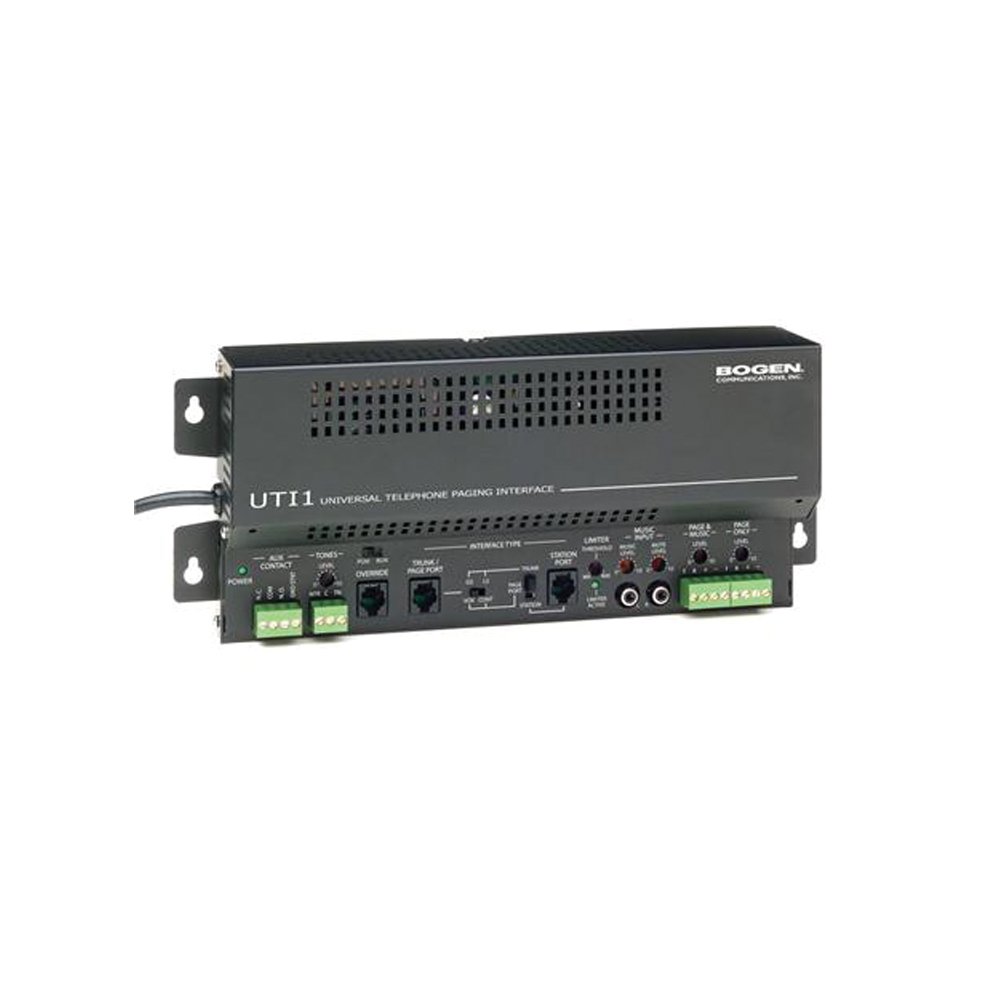
Figura 1: Davant view of the Bogen Single Zone Paging Controller. This image displays the main unit, highlighting its compact design and essential connection points for audio input and output, as well as power. The various ports and indicators are visible, crucial for understanding the device's functionality and connectivity.
4.1 Tauler frontal
- LED d'alimentació: Indica l'estat d'alimentació.
- Control de nivell d'entrada: Adjusts the audio input sensitivity.
- Control de nivell de sortida: Ajusta el volum de sortida d'àudio.
4.2 Panell posterior
- Telephone Line Input: RJ-11 jack for connecting to the telephone system.
- Sortida d'àudio: RCA or screw terminal connections for connecting to an ampmés viu.
- Entrada d'alimentació: Jack for connecting the power adapter.
- MOH Output: Music On Hold output (if applicable).
5. Configuració i instal·lació
Follow these steps to properly install your paging controller:
- Muntatge: Choose a suitable location for the controller, away from excessive heat or moisture. Secure the unit using appropriate mounting hardware if desired.
- Connect to Telephone System: Connect an RJ-11 cable from your telephone system's paging port or a suitable analog extension to the "Telephone Line Input" on the controller. Consult your telephone system's manual for specific paging port details.
- Connecta't a Ampmés viu: Connect the "Audio Output" of the paging controller to an available input on your paging amplifier. Ensure correct polarity if using screw terminals.
- Connectar l'alimentació: Plug the provided power adapter into the "Power Input" jack on the controller, then plug the adapter into a standard electrical outlet. The Power LED should illuminate.
- Initial Level Adjustment: Start with the Input Level and Output Level controls set to their minimum positions.
6. Instruccions de funcionament
Once installed, the Bogen 1126-BG-UTI1 is ready for operation.
6.1 Making a Page
- From a telephone connected to the system, dial the designated paging access code or extension.
- Wait for the confirmation tone or voice prompt from the paging controller.
- Speak clearly into the telephone handset to make your announcement.
- Hang up the telephone when finished.
6.2 Adjusting Audio Levels
- Nivell d'entrada: Slowly increase the "Input Level Control" until the paging audio is clear and distortion-free. If the audio is too loud or distorted, decrease this level.
- Nivell de sortida: Adjust the "Output Level Control" to achieve the desired volume through the paging speakers. This should be done in conjunction with the ampcontrol de volum del lifier.
7. Manteniment
The Bogen 1126-BG-UTI1 is designed for reliable operation with minimal maintenance.
- Neteja: Periodically wipe the unit with a soft, dry cloth. Do not use liquid cleaners or aerosols.
- Ventilació: Ensure that ventilation openings remain clear of dust and debris.
- Connexions: Occasionally check all cable connections to ensure they are secure.
8. Solució De Problemes
Si teniu problemes, consulteu la guia de resolució de problemes següent:
| Problema | Causa possible | Solució |
|---|---|---|
| Sense indicador lluminós d'alimentació. | Power adapter not connected or faulty; no power at outlet. | Check power adapter connection. Verify outlet has power. Test with another adapter if available. |
| No paging audio. | Incorrect telephone system connection; amplifier off or muted; audio levels too low. | Verify telephone line and audio output connections. Ensure amplifier is on and not muted. Adjust Input and Output Level controls. |
| Paging audio is distorted. | Input or output levels set too high. | Reduce Input Level and/or Output Level controls. |
| Cannot access paging from telephone. | Incorrect paging access code; telephone system not configured correctly. | Confirm the correct paging access code with your telephone system administrator. Verify telephone system programming. |
If the problem persists after attempting these solutions, contact Bogen technical support.
9. Especificacions
| Característica | Detall |
|---|---|
| Número de model | 1126-BG-UTI1 |
| Marca | Bogen |
| Dimensions del paquet | 15 x 9 x 7 polzades |
| Pes de l'article | 6.7 lliures |
| ASIN | B00P1AOL2C |
| Fabricant | Bogen |
| Paging Zones | Zona única |
| Compatibilitat | Telephone systems with analog paging port or extension |
10. Garantia i Suport
Bogen products are designed for durability and performance. For specific warranty information, please refer to the warranty card included with your product or visit the official Bogen website. Technical support is available to assist with any questions or issues you may encounter.
- Assistència en línia: Visita www.bogen.com/support for FAQs, documentation, and contact information.
- Informació de contacte: Refer to the Bogen website for current telephone numbers and email addresses for technical assistance.


