1. Introducció
This manual provides detailed instructions for the safe and efficient operation of your QFX SBX-410202BT Bluetooth Tower Home Theater Speaker System. Please read this manual thoroughly before using the product and retain it for future reference. This system is designed to deliver high-quality audio for your home entertainment needs, featuring Bluetooth connectivity and a built-in ampmés viu.
2. Instruccions de seguretat importants
- Font d'alimentació: Ensure the speaker system is connected to a power source that matches the voltage specified on the unit. Use only the provided power cord.
- Ventilació: No bloquegeu cap obertura de ventilació. Instal·leu-la d'acord amb les instruccions del fabricant. Manteniu un espai suficient al voltant de la unitat per a un flux d'aire adequat.
- Aigua i humitat: Do not expose this appliance to rain or moisture. Do not place objects filled with liquids, such as vases, on the apparatus. This product is not waterproof.
- Calor: No instal·leu a prop de cap font de calor com ara radiadors, registres de calor, estufes o altres aparells (inclosos amplificadors) que produeixen calor.
- Neteja: Unplug this apparatus before cleaning. Clean only with a dry cloth.
- Manteniment: Demaneu tot el servei a personal de servei qualificat. El manteniment és necessari quan l'aparell s'ha fet malbé d'alguna manera, com ara el cable d'alimentació o l'endoll està danyat, s'ha vessat líquid o han caigut objectes a l'aparell, l'aparell ha estat exposat a la pluja o la humitat, no funciona amb normalitat. , o s'ha deixat caure.
- Col·locació: Place the speaker system on a stable, flat surface to prevent it from falling.
3. Contingut del paquet
Verifiqueu que tots els elements que s'enumeren a continuació siguin presents al vostre paquet:
- QFX SBX-410202BT Tower Speaker System (Main Unit)
- Control remot
- Cable d'alimentació
- Audio Cable (RCA to 3.5mm)
- Manual d'usuari (aquest document)
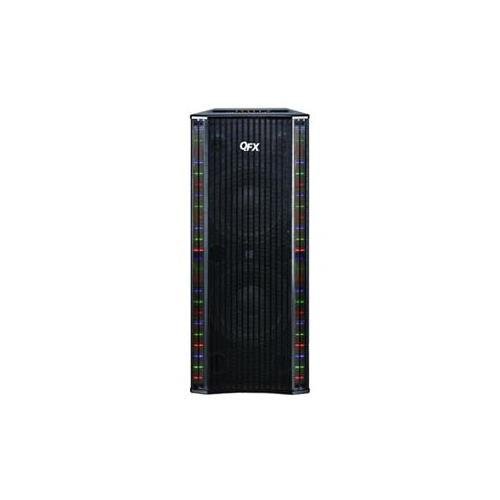
Image: The QFX SBX-410202BT Bluetooth Tower Home Theater Speaker System, showing its tall, black design with speaker grilles and control panel. This image represents the main unit of the product.
4. Instruccions de configuració
4.1 Desembalatge i col·locació
- Traieu amb cura tots els components de l'embalatge.
- Place the tower speaker system on a flat, stable, and level surface. Ensure there is adequate space around the unit for ventilation.
- Eviteu col·locar la unitat a prop de la llum solar directa, fonts de calor o zones amb molta humitat.
4.2 Connexió d'alimentació
- Insert the power cord into the AC IN port on the back of the speaker system.
- Plug the other end of the power cord into a standard wall outlet (AC 120V/60Hz).
- Ensure the power switch on the back of the unit is in the OFF position before plugging it in.
4.3 Connexions d'àudio
The SBX-410202BT offers multiple ways to connect audio sources:
4.3.1 Connexió Bluetooth
- Turn on the speaker system using the power switch.
- Press the "MODE" button on the control panel or remote control until "Bluetooth" mode is selected. The Bluetooth indicator light will flash.
- Al dispositiu amb Bluetooth (telèfon intel·ligent, tauleta, etc.), activeu el Bluetooth i cerqueu els dispositius disponibles.
- Select "QFX SBX-410202BT" from the list of devices.
- Once paired, the Bluetooth indicator light will stop flashing and remain solid. You can now play audio from your device.
4.3.2 AUX/RCA Connection
- Connect one end of the provided RCA to 3.5mm audio cable to the AUX IN ports (red and white) on the back of the speaker system.
- Connect the 3.5mm end of the cable to the headphone jack or audio output of your external audio device (e.g., TV, MP3 player).
- Press the "MODE" button on the control panel or remote control until "AUX" mode is selected.
4.3.3 Reproducció des de targeta USB/SD
- Insert a USB flash drive or SD card (with MP3 audio files) al port corresponent del tauler de control.
- The system will automatically switch to USB/SD mode and begin playing audio files. If not, press the "MODE" button to select USB or SD.
5. Instruccions de funcionament
5.1 Funcions del tauler de control
The main control panel is located on the top or front of the tower speaker. Key functions include:
- POTÈNCIA: Encén/apaga la unitat.
- Mode: Switches between input sources (Bluetooth, AUX, USB, SD).
- VOLUM +/-: Ajusta el nivell de volum principal.
- REPRODUCCIÓ/PAUSA: Plays or pauses audio playback (for Bluetooth, USB, SD modes).
- ANTERIOR/SEGUENT: Skips to the previous or next track (for Bluetooth, USB, SD modes).
- BAIX/AGUS: Adjusts bass and treble levels (may be separate knobs or buttons).
5.2 Funcions de control remot
El comandament a distància inclòs proporciona un accés còmode a totes les funcions des de la distància. Assegureu-vos que les piles estiguin correctament inserides.
- All functions available on the control panel are also accessible via the remote.
- Additional functions may include direct input selection buttons (e.g., BT, AUX, USB, SD), EQ presets, and mute.
5.3 Microphone Input (if applicable)
If your model includes a microphone input, connect a standard 1/4-inch microphone cable to the MIC IN jack. Adjust the microphone volume using the dedicated MIC VOL knob (if present) or the master volume.
6. Manteniment
6.1 Neteja
- Always unplug the speaker system from the power outlet before cleaning.
- Use a soft, dry cloth to wipe the exterior surfaces of the unit.
- Do not use liquid cleaners, aerosol sprays, or abrasive chemicals, as these may damage the finish or internal components.
- Use a soft brush or vacuum cleaner with a brush attachment to gently clean speaker grilles if dust accumulates.
6.2 Emmagatzematge
Si emmagatzema la unitat durant un període prolongat:
- Unplug the power cord and disconnect all audio cables.
- Guardeu la unitat en un lloc fresc i sec, allunyat de la llum solar directa i de temperatures extremes.
- It is recommended to keep the original packaging for storage and transport.
7. Guia de resolució de problemes
| Problema | Causa possible | Solució |
|---|---|---|
| Sense poder | Power cord not connected; Power switch off; Wall outlet not working. | Ensure power cord is securely plugged in; Turn power switch ON; Test wall outlet with another device. |
| Sense so | Volume too low; Incorrect input mode selected; Audio cables not connected properly; Bluetooth not paired. | Increase volume; Press MODE button to select correct input; Check audio cable connections; Re-pair Bluetooth device. |
| Bluetooth no connectat | Speaker not in Bluetooth mode; Device too far; Interference; Device already paired to another speaker. | Ensure speaker is in Bluetooth mode; Move device closer; Turn off other Bluetooth devices; Disconnect from other speakers. |
| El comandament a distància no funciona | Piles gastades o incorrectament inserides; Obstrucció entre el comandament a distància i la unitat. | Replace batteries; Ensure correct polarity; Remove obstructions; Point remote directly at the unit's sensor. |
| So distorsionat | Volume too high; Source audio quality poor; Speaker placed too close to a wall. | Reduce volume; Try a different audio source; Adjust speaker placement. |
8. Especificacions
- Model: SBX-410202BT
- Marca: QFX
- Tipus: Tower Home Theater Speaker System
- Connectivitat: Bluetooth, AUX (RCA), USB, SD
- Font d'alimentació: Cable elèctric (CA 120V/60Hz)
- Pes de l'article: Aproximadament 49 lliures (22.2 kg)
- Tipus de muntatge: Terra de peu
- Característica especial: Integrat Amplifier, Built-in Microphone (if applicable)
- UPC: 804892190241