Introducció
This manual provides comprehensive instructions for the setup, operation, and maintenance of your RCA RCR160SBM1 Directv TV Remote Control. This remote is designed to work with specific models, including DSM635RH and DRD435RH, as well as CMT1496, CMT2097, CMT2195, CMT2196, CMT2198, DSM535RH, and DSM586RH. Please read this manual thoroughly to ensure proper use and to maximize the functionality of your remote control.
Configuració
1. Instal·lació de la bateria
- Localitzeu el compartiment de la bateria a la part posterior del comandament a distància.
- Feu lliscar la tapa del compartiment de la bateria cap avall o en la direcció indicada per una fletxa per obrir-la.
- Introduïu dues piles AAA (no incloses), assegurant-vos que els terminals positiu (+) i negatiu (-) s'alineïn amb les marques de l'interior del compartiment.
- Torneu a col·locar la tapa del compartiment de la bateria fent-la lliscar fins que faci clic de manera segura.
2. Initial Setup / Programming (if required)
This remote is designed to work with specific DIRECTV models. In most cases, it should function immediately with compatible DIRECTV receivers. If the remote does not respond, or if you wish to control other devices (like a TV or DVD player), programming may be required. Refer to your DIRECTV receiver's user manual for specific remote programming instructions, or visit the official RCA support website for universal remote programming codes and methods.
- For DIRECTV Receivers: Ensure your receiver is powered on. Point the remote at the receiver and press any button. If it responds, no further programming is needed for the receiver.
- For Other Devices (TV, DVD, VCR): Programming typically involves entering a specific code for your device's brand. Consult the RCA support website or the original remote's manual for code lists and programming steps.
Instruccions de funcionament
This section details the functions of the buttons on your RCA RCR160SBM1 remote control.
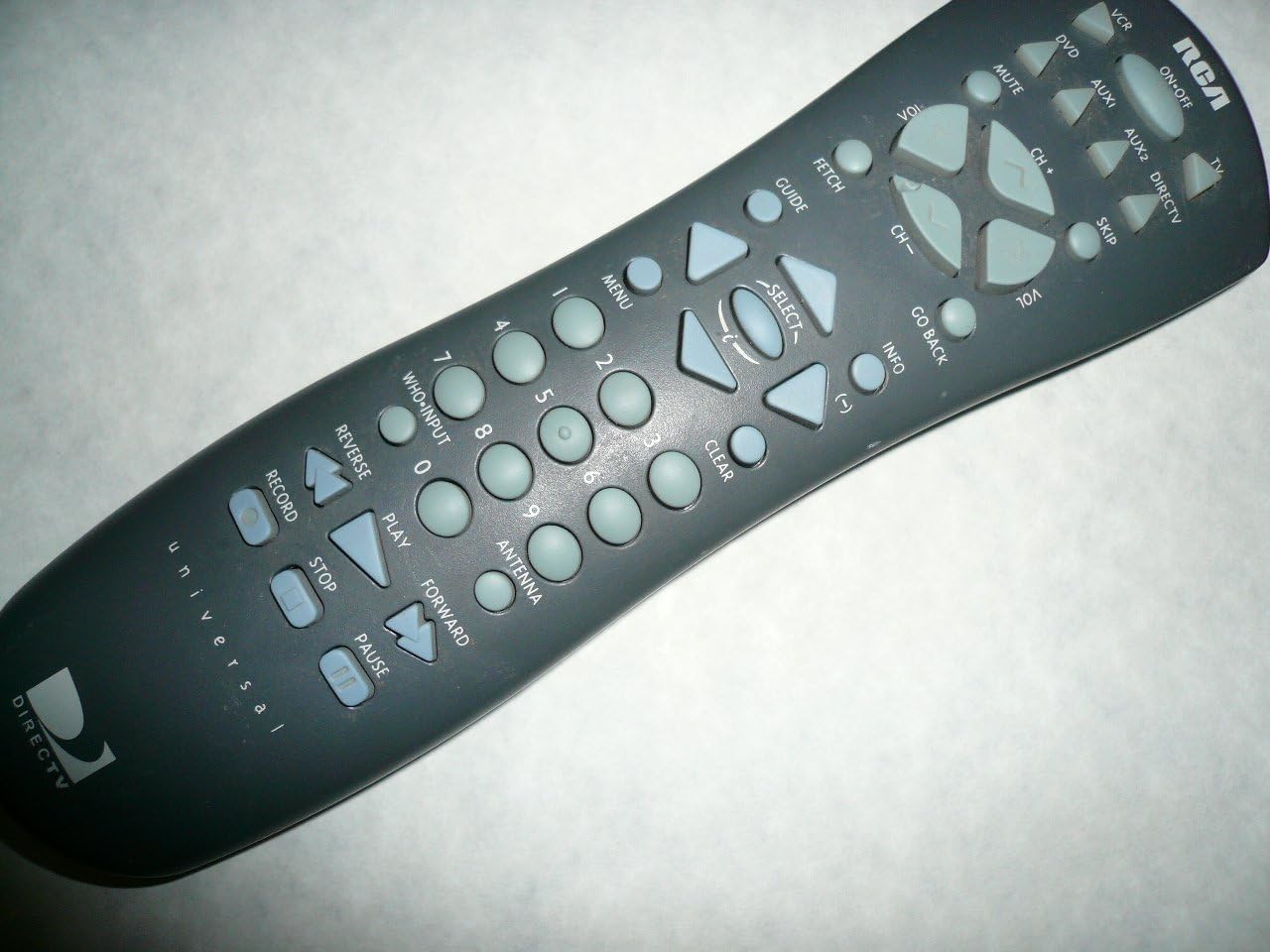
Imatge: De dalt a baix view of the RCA RCR160SBM1 Directv TV Remote Control. The remote is dark gray with light gray buttons. The top right features the RCA logo and device selection buttons. The center has navigation and channel/volume controls. The lower section includes number pad, playback controls, and Directv branding.
Funcions del botó
- Device Selection Buttons (Top Right):
- VCR: Selects VCR mode.
- DVD: Selects DVD player mode.
- AUX1 / AUX2: Selects auxiliary device modes.
- DIRECTV: Selects DIRECTV receiver mode.
- TV: Selects Television mode.
- Power & Mute:
- ON-OFF: Powers the selected device on or off.
- MUT: Silencia o activa l'àudio.
- Navigation & Channel/Volume:
- VOL +/-: Ajusta el volum amunt o avall.
- CH +/-: Canvia el canal cap amunt o cap avall.
- Botons de fletxa (amunt, avall, esquerra, dreta): Navigates menus and guides.
- SELECCIONAR: Confirms a selection in menus.
- Menu & Information:
- MENÚ: Opens the main menu of the selected device.
- GUIA: Mostra la guia del programa.
- INFORMACIÓ: Mostra informació sobre el programa actual o l'element seleccionat.
- TORNA: Torna a la pantalla o menú anterior.
- FETCH: (Specific function, may vary by device) Often used to recall previous channel or information.
- OMET: Skips forward in content or through channels.
- Teclat numèric (0-9):
- Used to directly enter channel numbers or other numerical inputs.
- Controls de reproducció:
- REGISTRE: Inicia l'enregistrament del programa actual.
- STOP: Atura la reproducció o la gravació.
- JUGAR: Starts playback of content.
- PAUSA: Posa en pausa la reproducció.
- REVERSA: Rewinds content.
- AVANT: Fast forwards content.
- Altres botons:
- WHO-INPUT: (Specific function, may vary by device) Often used to switch video inputs or display input information.
- ANTENA: (Specific function, may vary by device) May switch between antenna and cable/satellite inputs.
- ESBORAR: Clears entered numbers or dismisses on-screen messages.
Manteniment
Neteja del comandament a distància
To maintain the appearance and functionality of your remote control, clean it regularly:
- Use a soft, dry cloth to wipe the surface of the remote.
- Per a la brutícia persistent, lleugerament dampen the cloth with water or a mild, non-abrasive cleaner. Do not spray cleaner directly onto the remote.
- Avoid using harsh chemicals, solvents, or abrasive cleaning pads, as these can damage the remote's finish or internal components.
Canvi de bateria
Replace batteries when the remote's performance degrades or it stops responding. Refer to the "Battery Installation" section under Setup for detailed steps. Always use new batteries of the specified type (AAA) and dispose of old batteries responsibly according to local regulations.
Resolució de problemes
If you encounter issues with your remote control, try the following solutions:
| Problema | Possible causa/solució |
|---|---|
| El comandament a distància no respon. |
|
| Remote has limited range or intermittent response. |
|
| Certain buttons do not work. |
|
| Remote does not control my specific DIRECTV receiver/TV. |
|
Especificacions
| Característica | Detall |
|---|---|
| Número de model | RCR160SBM1 |
| Marca | RCA |
| Dispositius compatibles | Television, VCR, DVD, DIRECTV receivers (e.g., DSM635RH, DRD435RH, CMT1496, CMT2097, CMT2195, CMT2196, CMT2198, DSM535RH, DSM586RH) |
| Tecnologia de connectivitat | Infrarojos (IR) |
| Tipus de controlador | Control de botons |
| Característica especial | Disseny ergonòmic |
| Font d'alimentació | Batteries (typically AAA, not included) |
| Pes de l'article | 4 unces |
| Dimensions del paquet | 10 x 2 x 1 polzades |
| Fabricant | Recanvis RCA |
| Data de primera disponibilitat | 4 de novembre de 2014 |
Informació de la garantia
RCA products typically come with a limited warranty covering defects in materials and workmanship. The duration and terms of the warranty may vary. Please retain your proof of purchase for warranty claims. For detailed warranty information specific to your RCA RCR160SBM1 remote control, please refer to the documentation included with your purchase or visit the official RCA support weblloc.
Atenció al client
For further assistance, technical support, or to inquire about replacement parts, please contact RCA customer support:
- Assistència en línia: Visita la pàgina oficial de la RCA weblloc per a preguntes freqüents, guies de resolució de problemes i informació de contacte. www.rca.com/support (Nota: Això és un marcador de posició) URL, please refer to actual RCA support site)
- Suport telefònic: Check the RCA weblloc web o embalatge del producte per a números de telèfon d'atenció al client.
When contacting support, please have your product model number (RCR160SBM1) and purchase details ready.


